GETTING STARTED
Set up the PlayStation game console according to its Instruction Manual. Ensure the power is off before inserting or removing a disk. Insert the Celebrity Deathmatch disc and close the Disc Cover. Insert the game Controller and turn on the PlayStation game console. Follow the on-screen instructions to start the game. Saving Your Game
To save your game, you will need a MEMORY CARD (Celebrity Deathmatch only supports MEMORY CARD slot 1). It is advised that you do not insert or remove peripherals or MEMORY CARDS once the power is on.
Make sure there are enough free blocks on your MEMORY CARD before commencing play.
Console Top View
Console Front View
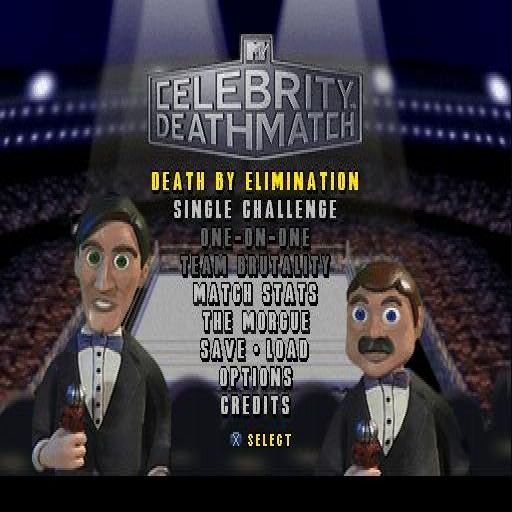
MAIN MENU
Death by Elimination
This mode allows you to play against the AI in a one-on-one match. Pick your celebrity from the 8 available in the Player 1 window and get ready to fight to the death.
By eliminating opponents, you will unlock 3 hidden celebrities, which you can use throughout each mode. When selecting a celebrity, check the Stamina and Strength meters to match a celebrity to your personal fighting style. Each opponent, ring style, and match time limit is randomly picked in this mode.
Single Player
This mode allows you to play against the AI in a match where you pick your opponent, ring style, and match time limit.
One-On-One
This is the classic Multiplayer mode of player-vs-player. It can only be entered by having a controller in Slot 2 of your console. Both players must select a celebrity and ring style in this mode.
Team Brutality
This Multiplayer mode allows you to select 3 celebrities per team. It can only be entered by having a controller in Slot 2 of your console. Player 1 will select a 3-celebrity team and a ring style; Player 2 will select a 3-celebrity team and the match time limit.
Match Stats
This feature allows you to view the number of wins, losses, and/or draws of all celebrities for both single player and multiplayer modes. If you do not save your game, all data here will be lost.
The Morgue
This keeps track of all celebrities you defeated, and which celebrity you used to defeat them with, while playing Death by Elimination. If you do not save your game, all data here will be lost.
Save
Save your current game or overwrite an existing game at any time.
Load
Load a saved game at any point from the main menu.
Credits
This allows you to view the Celebrity Deathmatch team credits.
Options Menu
To highlight the Option you wish to adjust, use the Up or Down Directional button. To accept all changes press the button. To cancel all changes press the button.
The following is a list of options that can be adjusted on the Options menu screen by using the Right or Left Directional button:
•
Sound Effect - To adjust the volume of all sound effects.
•
Music/Dialog - To adjust the volume of both music and celebrity dialog.
•
Difficulty - To adjust the strength of the computer controlled AI.
•
Vibration - Turn controllers supported by Dual Shock on/off.
•
Wrestlers Intros - Turn on/off celebrity intros.
•
Control Options - Select 1 of 4 pre-set controller configurations.
Game Setup Screen
On the left side of the screen, you will see the Player 1 selection window adjacent to the Player 2 selection window. Both players can cycle through the available celebrities by using the Left or Right Directional button.
Just below each celebrity name are the Stamina and Strength meters for the active celebrity. Stamina and Strength abilities will vary for each celebrity, affecting the way the celebrity performs in the ring. When your celebrity selection has been made, press the X button to lock in your celebrity selection.
After selecting a celebrity, in some modes, you will be given the opportunity to select a ring type from the four available: Standard ring, Steel Cage ring, Cemetery ring, and the Toughman ring. Use the Left or Right Directional button to cycle through the ring types and the button to accept your choice.
The match Time Limit can be selected in most modes and gives the player the opportunity to set how long the match will last. The time limit choices are from 1-10 minutes, with the addition of a no limit option.
In-Game Indicators
The speed at which your KO recovers depends on your overall health. Tap the O, A, and buttons to recover quicker when knocked down.
Power Indicator
At any given time there will be 1 to 3 stars by a character's name. The number of stars represents the level of wrestling moves the player can perform. Having more stars present unlocks special moves.
The number
.png)



.png)
_1.jpg)
.png)



.png)

.png)