Starting Up
Set up your PlayStation game console according to its Instruction Manual. Make sure the PlayStation power is off before inserting or removing a compact disc. Insert the NBA® JAM™ TOURNAMENT EDITION™ disc and close the CD door. Insert game controllers and turn on the PlayStation. Follow on-screen instructions to start a game. PlayStation Components
Before You Lace Up The Shoes
Set up your SONY PlayStation according to the instructions in its instruction manual. Make sure the PlayStation power is OFF before inserting or removing a compact disc. Insert the NBA® JAM™ TE™ disc and close the CD door. Insert game controllers and turn on the PlayStation. If you wish to play a three or four player game, plug in the SONY Mutli-Tap™ (sold separately) as described in its instruction manual. Follow on-screen instructions to start a game. Jam It Home!
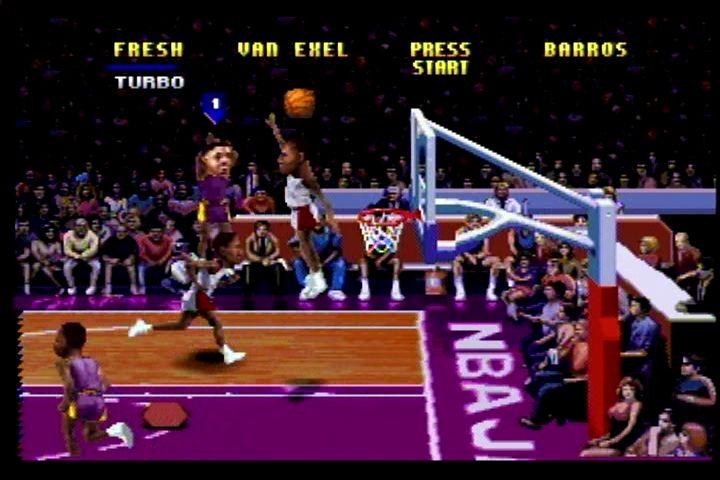
With NBA® JAM™ TOURNAMENT EDITION™, you're experiencing wham, bam, hoop action like you've never seen before! NBA JAM™ TOURNAMENT EDITION™ lets you wham it and slam it with rim-rocking superstars like Scottie Pippen, Patrick Ewing, Dominique Wilkins, Hakeem Olajuwon, Anfernee Hardaway and Karl Malone! All 27 NBA® teams are represented as you take to the boards in one-on-one, two-on-two, or two-on-one competition! Hit the hardwood with slams and turbo-charged Jams! Take the three-point shot from the far end of the court, or Jam it home from under your opponent's net!
Getting Started
After the opening intro, the Title screen appears. You can press Start at any time during the intro to bring up the Title screen. On the title screen press the START BUTTON to access the Main Menu.
At this point, the user can choose to either begin gameplay or access options, by highlighting an item and pressing the X BUTTON.
Player Positions
There are four different player positions in NBA JAM™ TOURNAMENT EDITION™. Players 1 and 2 are teammates, and players 3 and 4 are teammates who oppose them.
Head to Head Mode
HEAD TO HEAD mode places two human players on opposite teams. The person with controller 1 is player 1, but the person with controller 2 is player 3. You can play one-on-one, two-on-two, or two-on-one competitive games.
Team Game Mode
TEAM GAME mode puts both players on the same team (2 players vs. computer), making the person with controller 1 player 1, and the person with controller 2 player 2. It's you and a friend against the computer!
Options Mode
OPTIONS MODE allows you to customize your NBA® JAM™ TOURNAMENT EDITION™ game play in a wide variety of ways! For additional details on this mode, see CUSTOMIZE THE GAME.
Multi-Tap Adaptor
If you are using the Sony Multi-Tap™ adaptor, you will be asked to select the controller number corresponding to the player you wish to control: controller 1 is player 1, controller 2 is player 2, and so on. Everyone who wishes to participate should then press the START BUTTON on their respective controllers.
Initials and Birthdate
Whether you are using the adaptor or not, you will then be asked if you wish to enter your initials and birthdate for record-keeping. Press UP or DOWN on the D-PAD to choose, then press the X or START BUTTON.
This decision affects all players; no player can enter initials if "no" is selected. If "yes" is selected, each player will then be asked to enter his/her initials. Use the D-PAD to move the cursor to the desired letter, then press the X or START BUTTON to select.
If the initials entered are stored on an available Memory Card, your record will be immediately recalled. NBA JAM™ TOURNAMENT EDITION's™ record-keeping feature stores each player's record, ranking, winning percentage, and more!
Choosing Your Team
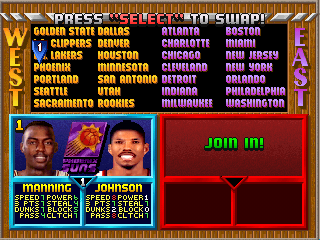
In all but the OPTIONS mode, you will then be asked to choose your NBA® team. Use the D-PAD to highlight the team you want. Both players can pick the same team.
Each team is comprised of two players from a roster of three or more NBA® teammates. In addition to the 27 NBA® teams, NBA® JAM™ TOURNAMENT EDITION™ features a rookie team made up entirely of NBA® newcomers. As with regular teams, both players can select rookie teams.
Player Statistics
For every player featured in NBA® JAM™ TOURNAMENT EDITION™, a field of statistical ability rankings appears below the player's portrait. These figures rate each player on a scale of 0 to 9 in eight important playing categories.
Attributes Rated
•
SPEED: How peppy the player is.
•
3 Pt: Rates how well the player hits the hoop from "downtown".
•
DUNK: A ranking of what kind of Jammer the player is.
•
PASS: How accurate a player's passing game is.
•
POWER: The power of a player is important in terms of both his strength and his ability to withstand injury.
•
STEAL: Rates a player's ability to strip the ball from opponents.
•
BLOCK: How good is this player at rejecting and deflecting attempted shots? The block rating tells no lie!
•
CLUTCH: Tells you whether this
.png)

.png)



.png)
.png)