Setting Up
Console Top View
Console Front View
1. Set up your PlayStation game console according to the instructions in its Instruction Manual. 2. Insert the Shellshock disc and close the CD cover.
3. Insert a game controller and turn the PlayStation game console on. Follow the on-screen instructions to start a game. Gettin' Round the Pen
Moving around the HQ is done by moving a target-shaped cursor with the D-Pad between several locations. Text at the bottom of the screen describes each location.
Pressing the "X" button on a location allows you to access it.
HQ Locations
Main Hangar
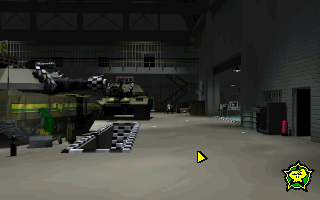
From your 'home' location in the Main Hangar, you can access 4 main locations: Tank, Basketball Court, Workshop Area and Briefing Area.
Tank
From here, you can climb aboard your M-13 Predator tank.
•
Climb Aboard Tank: Inside the Predator's cockpit, you'll find different controller setups to choose from. Follow the on-screen instructions.
•
Exit: Takes you back to your 'home' location in the Main Hangar.
Basketball Court
There's plenty to do here, even if you can't shoot hoops.
•
Go to Stereo System: This is where you can listen to those funky beats.
•
Exit: Takes you back to your 'home' location in the Main Hangar.
•
Enter Simulation Room: Here you can talk to Earshot, your communications man.
Workshop Area
This is the place to check your status and equip your tank.
•
Check Status: Accesses the Status Computers which provide the Dateline for each mission (your progress), and Tank Status (armor level, damage, and equipment level).
•
Armor Level: The amount of armor fitted, and its strength.
•
SAMS: How many missiles you have.
•
Engine Upgrades: How much the engine's been upgraded (affecting acceleration, top speed and turning ability).
•
Track Upgrades: How much your tracks have been upgraded (improving traction).
•
Reload Upgrades: How well-tuned the reloading mechanism on the main cannon is (the time between each shot).
•
Targeting Upgrades: How good your targeting computer is (speed of lock-on for chain-guns and missiles).
•
Cashflow: How much cash you got.
•
Score: How many points Dogg Tag's given you (or not, as the case may be).
•
Hit Accuracy: How well you performed.
•
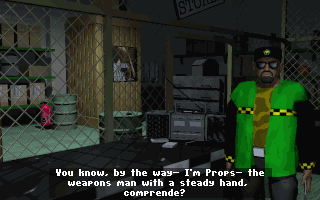
Talk to Props: You can upgrade your tank with Props in the Stores if you have the cash. Upgrades appear on the counter next to Props.
•
Next Item: Clicking on the D-Pad Left or Right lets you cycle through what's on offer.
•
Buy Item: Clicking on the X Button lets you buy it (so long as you got the cash).
•
Leave Stores: Hit Button.
Briefing Area
This is where you save your game and go to the Mission Briefings. Move the cursor over the first two lockers to "open" them.
Locker 1 will Load Games, Locker 2 Saves Games.
Locker 1
Move the cursor over Locker 1 and press X Button. The Locker opens and you are given a list of any previous Save Games. There are a maximum of five save games per Memory Card. Any unoccupied slots are displayed as Empty Slot.
To Load a previously Saved Game, select the slot you wish to load using the Up and Down Directional Buttons and press X Button. Your game will Load. Proceed to Briefing Room to commence Mission.
Locker 2
Move the cursor over Locker 2 and press X Button. The Locker opens and you are given a list of any previous Save Games. There are a maximum of five save games per Memory Card. Any unoccupied slots are displayed as Empty Slot.
To Save your current game, select the slot you wish to Save it to using the Up and Down Directional Buttons and press X Button. Your game will Save.
Other options in the Briefing Area are:
•
Enter Briefing Room: Starts the Mission Briefing sequence for your current mission.
•
Talk to Dogg-Tag: Chew the fat with the main Wardenz man.
•
Exit: Takes you back to your 'home' location in the Main Hangar.
Mission Briefings
This is where you get the main rundown regarding each and every mission in the game. Dogg-Tag provides the plan, and listening carefully is vital for survival.
Sometimes The Man talks to you, setting the scene with background details to the mission location. Everything said in the briefings is vital to successful mission completion. You can leave briefings at any time.
Offensive Air Support
This is your fourth main weapon, acting like a big smart bomb. You'll hear it before you see it, then it's "bye-bye to the bad guys."
A note from Earshot:
Hostages
Listen up and listen good. This is the lowdown on hostage rescue.
When you drive your tank to within a certain range of a hostage, they'll run toward you and climb aboard—but
.png)








.png)


.png)




_1.png)
_1.png)
_1.png)
.png)

.png)

 (En,Fr,De,Es,It).png)

 (En,Fr,De,Es,It).png)

 (En,Fr,De,Es,It).png)



 (En,Fr,De,Es).png)

