Remote Tactical Control
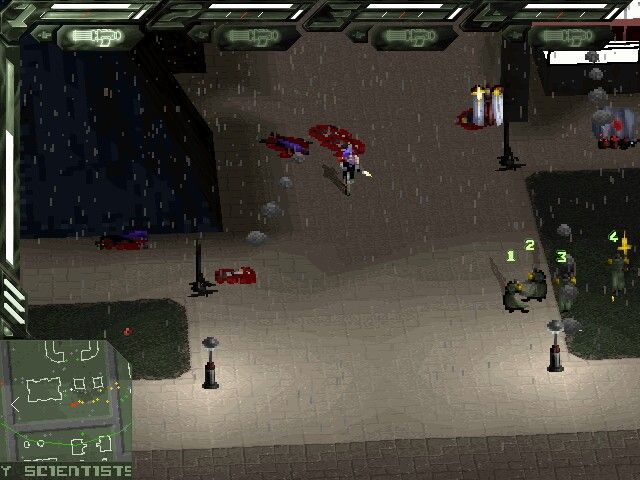
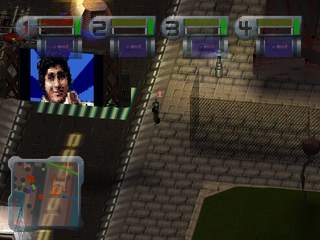
EuroCorp's rise to global supremacy was instrumental in the Remote Tactical Control technology. Via the Marionette desktop system, you can observe and influence any combat encounter in which your Agent team is involved.
New Game
Select this option to access the UTOPIA mainframe and take control of your Agent team.
Load Game
Select to return to a previously saved game.
Allegiance Panel
This panel confirms the agency/department for which you work. In this case, this is EuroCorp Syndicate Internal Security Agency. You can also select to play as Church of the New Epoch.
Ops Screen
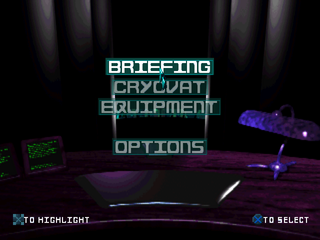
The Ops Screen gives you access to all of Marionette RD/OS's many applications. From here, you can communicate with your Agent Cryogenic facility and Central Armory, and handle necessary data administration. The Ops Screen is also your e-mail point of contact with EuroCorp Command.
Access the following options by selecting them with the D-Button and pressing X.
Select this option to read your mission briefs. Understanding each brief can lead to an efficient execution of EuroCorp orders.
Non-operational Agents are stored in the LIMBO-class Cryogenics Facility. While in deep-storage, they can also have their cybernetic components enhanced and restored, making your Agents even more formidable.
Contact EuroCorp Central Armory to purchase new weaponry for your Agents. Surplus or acquired items can be sold back to the Corporation. See the Equip Screen for more details.
Only available once the Briefing has been attended. Select to contact the EuroCorp Transport department and arrange Agent transfer to mission zones.
For further tweaks of your audio/visual system and adjustments to your Marionette RD/OS. You can also register your progress and return to previous combat situations. Please see Options for more information.
The Briefing
Select Briefing to receive a mission briefing. This informs you of recent developments in the global situation, the actions you are expected to take and the city in which you are to take them. In some missions, there is extra information that can be purchased from informants.
The Cryovat Screen
This screen puts you in contraction with your LIMBO-class Cryogenic Facility, where Agents are stored and surgically altered when inactive.
Agent Storage
You have been assigned your own LIMBO-class Cryogenic Facility for this purpose. Initially, you command one operational team of four Agents, so your usage of the Facility will be minimal. However, you will use it more as more Agents are assigned to you, or as you 'recruit' more.
To swap an Agent in storage for one that is currently operational:
•
D-Button (Left, Right, Up, Down) and press X on the relevant Agent number at the top of the screen (for example, 1 if Agent 1 is to be substituted).
•
Press X on the name of the Agent who is to take over, and the two Agents swap places. This procedure can also be used to alter the hierarchy of an Agent team.
Cybernetic Modification
The LIMBO Facility can also be used to install cybernetic implants into the bodies of Agents. Initially, only Level One Body augmentation is available, though as superior research filters through, more advanced options become available.
To have an Agent surgically modified:
•
Choose his Agent number.
•
Choose the surgical modification you want. A diagram and details of the modification appear in the window to the right of the screen, along with the cost of the modification.
•
If you wish to proceed with the implantation, select Accept and press X. The Facility auto-surgeon performs the operation immediately.
Note: You can select and press X on the Information icon, represented as a letter "i", to receive a short text description about the displayed object.
Initially, the following modification will be made available:
To increase chances of survival in hostile environments, encase an Agent's organs in triple-plate titanium alloy. An enhanced body gives a cyborg the single biggest protection from punishment.
Note: This modification must be completed before you make any other modifications.
As the game progresses, you have a greater choice of modifications. These are the first you encounter:
Add tungsten tendons and steel cybernetic arms to improve your Agents' accuracy and save ammunition. The life span of an Agent is also lengthened by the health boost that accompanies cybernetic enhancement.
These artificial legs increase an Agent's health and top speed. Stamina is also improved, increasing the range an Agent can cover at top speed.
This package increases basic perceptions and contains trauma management software to improve the cyborg's ability to withstand otherwise critical damage.
Later versions of these implants become available as research continues, as will wholly new Agent modifications.
The Equipment Screen
From here you can communicate with EuroCorp Central Armory, purchasing weaponry and equipment for your Agents. At the top of the screen there are four numbers, corresponding to the four members of your active Agent team.
Select an Agent's appropriate number with the D-Button and press X to confirm that selection.
To the left of the screen is the selected Agent's inventory. Each Agent can carry up to six weapons or items.
Weapon Details
Our R&D teams are at work developing new and deadlier weapons for our Agents.
In the center of the screen is displayed a list of the weaponry currently available from EuroCorp Central Armory
.png)