Top View
Setting Up
1. Set up your PlayStation™ game console according to the instructions in its Instruction Manual. 2. Insert the Tomb Raider disc and close the disc cover. 3. Insert a game controller and turn the PlayStation™ game console on. Follow the on-screen instructions to start a game. Starting the Game
Following a short introductory FMV sequence you will be presented with options.
Passport
The passport allows you to start a new game, load a previously saved game, or exit to the Title Screen (in-game option only).
Press the X Button to open the passport. Pressing right and left flips you through the pages.
•
The first page allows you to choose and load a previous save game.
•
The middle page will start a new game.
•
The last page of the passport quits the game (in-game option only).
NOTE: You will need a memory card in order to save a game.
Snapshot - Lara's Home
Choose the Snapshot to access the interactive training level. Lara will explain how the game controls work.
To exit the Gym, press the Select button and use the exit option within the passport, or complete the training exercises.
Screen Adjust
The Screen Adjust allows you to adjust the position of the screen using the directional buttons.
Personal Stereo
This controls sound effects and music. Press the X Button on the personal stereo to bring up two bars.
•
The top bar sets sound effects volume.
•
The lower bar sets music volume.
•
Press up and down to toggle between sound and music.
•
Press left and right to adjust volume.
Game Pad Control Configuration
•
Use Right and left to scroll through the three pre-set control configurations.
Quitting the Game
While playing the game, you can return to the Title Screen by holding down the Select button and then pressing and holding the Start button.
Actions
Running
Pressing Up moves Lara forward at a running pace. Pressing Down makes Lara jump back a short distance. Pressing Left or Right turns Lara Left or Right.
Walking
By pressing the walk button in conjunction with the up and down directional buttons, Lara can carefully walk forwards or backwards. While the walk button is held down, Lara will not fall off any edge. If you walk up to an edge, Lara will automatically stop.
Side Steps
Side Step Left and Right buttons do exactly as you might imagine.
Picking Objects Up
Lara can retrieve objects and store them in her inventory. Position Lara so that the object you want to retrieve is in front of her feet. Press the X button and she will pick it up.
Using Switches
Position Lara so that the switch is in front of her. Press the X button and she will use it.
Using Puzzle Items/Keys
Position Lara so that the object receptor is in front of her. Press the X button and the item ring will appear. Left and Right will allow you to select the object you want to try, and pressing X again will use it.
Pushing/Pulling Objects
Lara can push certain blocks around and use them to climb up to greater heights. Stand in front of the block and hold Down X. Lara will get into her ready stance.
Once she is ready, press backwards to pull the block, and forwards to push it. If you decide you no longer wish to carry on with this task, simply release the X button.
Looking Around
Pressing the look button will return the camera to directly behind Lara, whatever the camera is currently doing. With the look button held down, the direction buttons allow Lara to look around her.
Once you let go of the button, the view returns to normal. If you are trying to line Lara up for a jump and the camera is in an awkward position, pressing just the look button on its own will show you exactly what direction she is facing.
Swimming
Underwater
If Lara finds a pool of water, she can jump in and have a jolly good swim around. Lara can hold her breath for about two minutes. If she is still underwater after the air meter runs out, she'll take damage until she drowns.
Pressing up, down, left, or right makes Lara rotate in that direction. Pressing and holding Jump makes Lara swim.
Lara can pull levers and pick up objects underwater. Just position Lara as close as you can and press X.
Swimming on the Surface
Left and Right will rotate her, up and down make her swim forward and backward. You can also use the side step actions to swim Left or Right when on the water's surface.
Pressing jump will make Lara dive under the surface again. Pressing X when Lara is close to an edge will make her climb out.
Diving
To dive, preferably into water, simply hold the Walk button while also holding the jump button, finally pressing the up directional button. This move has no real advantage over jumping into the water other than it looks great!
Attacking
Lara starts the game carrying two pistols. Later in the game she may find some extra weapons.
Shooting
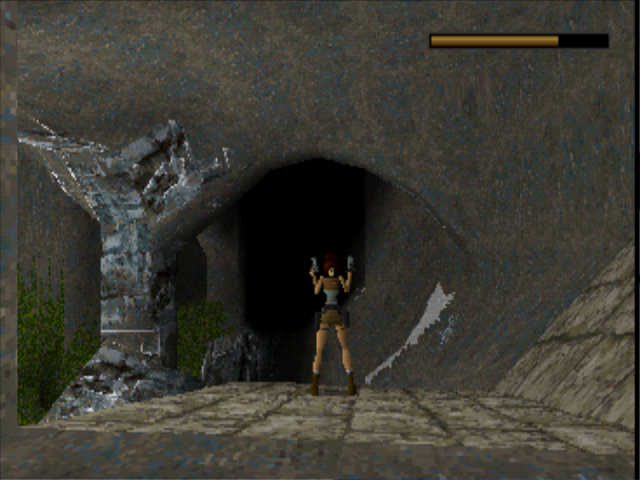
Press draw and Lara will draw her guns. If Lara sees something she doesn't like the look of, she will point her guns at it. If there are multiple enemies, Lara will lock on to different targets, choosing the best one as she sees fit.
Pressing X



_1.png)
.png)

_1.png)





.png)




_1.png)
_1.png)
.png)

.png)

 (En,Fr,De,Es,It).png)

 (En,Fr,De,Es,It).png)

 (En,Fr,De,Es,It).png)


 (En,Fr,De,Es).png)

