System Setup
Set up your PlayStation®2 computer entertainment system according to its Instruction Manual. Ensure the MAIN POWER switch (on the back of the console) is turned on.
•
When the power indicator lights up, press the open button to open the disc tray.
•
Place the BACKYARD WRESTLING disc on the disc tray with the label side facing up.
•
Press the open button again to close the disc tray.
•
Attach game controllers and other peripherals as appropriate.
•
Follow onscreen instructions and refer to this manual for software information.
Players and Controllers
BACKYARD WRESTLING is a 1-2 Player game. Connect two DUALSHOCK®2 analog controllers to controller ports 1 and 2 before starting play.
Soundtrack
During the game, you can cycle through the soundtrack by pressing the L1 + L2 buttons.
Saving Games
BACKYARD WRESTLING uses an Autosave feature. To save your progress, insert a memory card (8MB) (for PlayStation®2) into MEMORY CARD slot 1.
This game uses MEMORY CARD slot 1 only. Do not press the RESET button or remove the memory card while saving a game, or your game data could be lost or corrupted.
Reversal State
This state occurs for a split second during the opponent's attack. The player flashes briefly.
During this state, press the directional buttons or left analog stick and the X, □, or O button to reverse the opponent's attack. If you do this too early, you won't see the flash.
The following states can be reversed:
Pin State
This state occurs when the player is lying on the ground being held by the opponent. The only thing possible here is a pin reversal.
When your opponent is trying to pin you, you can try to kick out of it by using the controls below during the reversal window.
•
ACTION - CONTROL Pin Reversal - directional buttons or left analog stick + X, □, or O button Stunned State
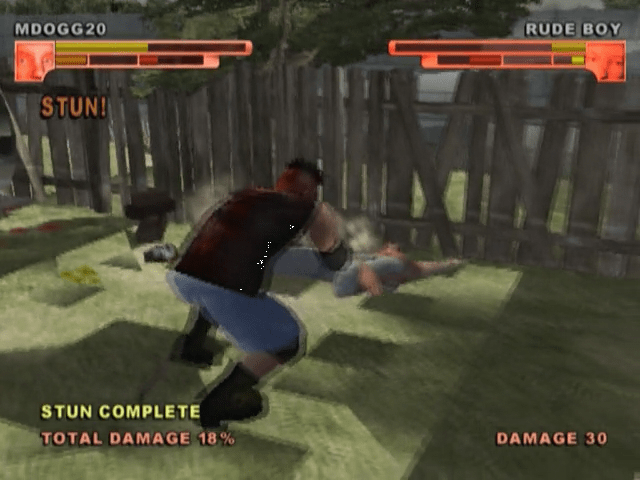
This state occurs when the player is stunned. When you are stunned, no action is possible, except that you can still have the presence of mind to kick out of a pin attempt. Stun Meter
Three stun meters appear on the game screen. Each meter is filled by different types of attacks.
•
The small yellow meter is filled from melee attacks such as punches and kicks.
•
The middle-size orange meter is filled by slams and attack throws.
•
The large red meter is filled by jumps, Irish whips and some weapon attacks.
Each meter, when filled, causes the player to be stunned. Watch your opponent's meters to see which form of stun you are close to inflicting, and pick the correct attacks to fill the meter.
The length of the stun corresponds to the length of the meter. All damage inflicted during the stun is tallied up at the bottom of the screen. Try to get the highest total possible.
Stun Combos
Any of the three stuns can be linked together for a longer stun, allowing you to severely punish your opponent.
•
Fill each meter to near full, but not completely full.
•
Once this is done, start off the first stun with a punch or two.
•
While your opponent is stunned, perform a slam. You'll notice the Slam stun meter (middle-size) flash, indicating that it is now also active.
•
Now continue the combo by jumping off a table onto your stunned opponent. The Jump stun meter (large) will now be active as well.
•
This should give you plenty of time to climb up to the top of a tall platform and leap onto your helpless victim...
Finishing Moves
If you have inflicted a lot of damage and your opponent is near to being knocked out, your meter starts glowing red. This means it's time to attempt a Finishing Move.
•
Grab your opponent and hit the �+� buttons at the same time. Your player will perform an irreversible move that does a lot of damage.
•
Now play it safe and go for the win.
Mind Games
Mess with your opponent's head by mixing up your attacks.
•
For instance, attack with a kick and then immediately hit the grab button. Your opponent may be expecting another kick so this will throw him or her off and lessen the chance for a reversal.
•
If your opponent is good at reversing slams, try using the same slam multiple times in a row. This will make him or her expect the reversal window at a certain time. Then switch it up and go for a slam with a different timing. Your opponent may get confused and miss the chance for a reversal!
•
Every move has a weakness. Experiment with them all to discover a winning strategy.
Shaggy2Dope
•
Attack Specialty: NORMAL
•
Weapon Specialty: BOTTLES, BRICKS etc.
Main Menu
The Main Menu appears on the Title screen when you power on. Use the directional buttons or left analog stick to select a game mode. Press the START or X button to confirm.
Game Modes
•
TALK SHOW MODE – Start a 1-Player game.
•
EXHIBITION MODE – Play single battles against a friend or computer-controlled opponent.
•
BONUS GAMES – Play special unlockable game modes suchs as Survival.
.png)


.png)
