GETTING STARTED
Set up your PlayStation®2 computer entertainment system according to the instructions in its Instruction Manual. Make sure the MAIN POWER switch (located on the back of the console) is turned on.
Press the RESET button. When the power indicator lights up, press the open button and the disc tray will open. Place the Blood Will Tell™ disc on the disc tray with the label side facing up. Press the open button again and the disc tray will close.
Attach game controllers and other peripherals, as appropriate. Follow on-screen instructions and refer to this manual for information on using the software.
MONOCHROMATIC GAME SCREEN
This game features a unique monochromatic presentation during the opening stages of the Story Mode. The screen will be displayed in full color once you successfully recover one of Hyakkimaru's eyes.
Memory Card (8MB) (for PlayStation®2)
Blood Will Tell™ is a memory card (8MB) (for PlayStation®2) compatible game. Please insert the memory card (8MB) (for PlayStation®2) into MEMORY CARD slot 1 before you turn ON the game.
A minimum of 620KB of free space is required to create a save file, and a maximum of three different data files can be saved per memory card (8MB) (for PlayStation®2). Do not switch the power to OFF or remove the memory card (8MB) (for PlayStation®2) while saving the game.
Select LOAD GAME from the Title screen or Select Mode screen to load previously saved files on your memory card (8MB) (for PlayStation®2). If you have no previous record, select NEW GAME and save your game through the Pause Menu screen (P. 18).
MODE SELECTION
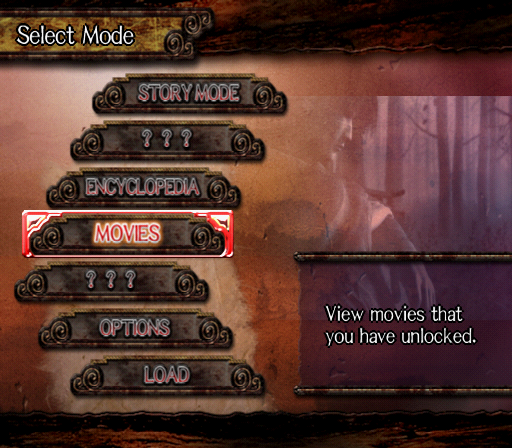
Select from the available modes by using the directional buttons/left analog stick to highlight the mode and press button to enter. Secret menu items [???] are unlocked once you clear the given requirements in Story Mode.
STORY MODE
Enter the main game mode and play the role of Hyakkimaru who is on a mission to restore his stolen body parts. The game supports simultaneous play between two players for the majority of this mode.
ENCYCLOPEDIA
Look up and learn more about the demons and Fiends you have defeated during your game.
MOVIES
Replay any of the movie scenes previously viewed during your game.
OPTIONS
Change or confirm various game settings.
LOAD
Load your previously saved game on your memory card (8MB) (for PlayStation®2). Manually load a saved file from your memory card (8MB) (for PlayStation®2) each time you need to access other game data.
Once your game data is loaded, select STORY MODE from the Main Menu to continue your game.
STORY MODE
The first time you play Story Mode, the game will automatically start from the Tutorial and Prologue. Hyakkimaru must confront oncoming demons to gain and upgrade weapons. As he finds and defeats more Fiends, his power will increase.
GAME FEATURES
MOVIE SCENES
Most chapters start with a movie to establish the story of the game, but some chapters will take you straight into battle to advance the stories.
MAIN BATTLE
The main battlefield is where most of the action takes place. This portion can be played with two players when both Hyakkimaru and Dororo are together on the field. Player 2 will take control of Dororo and support Player 1 (Hyakkimaru). SPECIAL EVENTS
Special events of the chapter features unique battle conditions, such as Hyakki's Non-Lethal Battle and Dororo's solo events. Make sure to check the rules and objectives of each event.
FIENDS
Defeat Fiends to restore Hyakki's body parts. There will be multiple Fiends in each chapter and the chapter is cleared when the final boss is defeated.
GAME OVER
The game is over when Hyakkimaru's Health Gauge drops to zero or Dororo fails to complete his events. Once the Game Over screen is displayed, the game will return to the Main Menu. Enter the Story Mode once again to retry from where you made your last Save (P.19).
HYAKKI IN ACTION
The following are the basic moves and attacks Hyakkimaru will perform to confront the demons and Fiends who stand in his way.
Jump
•
Use button to jump and reach higher grounds.
•
Press button again during a jump (in mid air) to perform a Double Jump.
•
A jump combined with attack actions will trigger a variety of combination moves.
Light Attack
•
Use button to attack your enemies with your sword.
•
For an immediate response, use this basic attack to effectively take out the demons.
Heavy/Slice Attack
•
Hold down and release the button to unleash the Slice Attack (P.13).
•
Note that Hyakkimaru is vulnerable to enemy attacks even during the Slice Mode.
Combo Attack
•
Use strings of and buttons to trigger Combo Attacks.
•
Check all of your Combos from the Pause Menu - Combo (P.19) screen.
Change Attack Mode
•
Arm Blade/Sword... L2 button





.png)

.png)



.png)


_1.png)

_1.png)