System Setup
Set up your PlayStation®2 computer entertainment system according to its Instruction Manual. Ensure the MAIN POWER switch (on the back of the console) is turned on.
•
Press the standby/RESET button.
•
When the power indicator lights up, press the open button to open the disc tray.
•
Place the BLOODY ROAR®4 disc on the disc tray with the label side facing up.
•
Press the open button again to close the disc tray.
•
Attach game controllers and other peripherals as appropriate.
•
Follow on-screen instructions and refer to this manual for software information.
Combat Mechanics
Throw
Press the button while holding the directional buttons towards your opponent to throw.
Throw Escape
Escape a throw by pressing the ,, or button immediately after the opponent executes a throw.
Recovery
To reduce the amount of time needed to recover while stunned or knocked down, press any of the buttons quickly and move the directional buttons in a circular motion.
Air Recovery
When launched into the air by an opponent's attack, press the ,, or button to recover in the air. Instead of being knocked down, players can attack.
Once this is achieved, push the , or button to enable the counter-attack. After being hit, press the button in precise timing with your opponent's follow-up attacks to perform mid-air fast evades.
Block System
Blocking may or may not be possible depending on the height of an attack and your character's state. You can also perform a single block in mid-air while jumping.
Light Block
Leave the directional buttons in the neutral position for an automatic Light Block. This is a quick move but cannot block Block Break moves.
•
Press ⬇ to perform a Low Light Block.
Heavy Block
⬅ or ⬆ button
Heavy block can stop Block Break moves, but it takes more time.
•
Press ⬇ + ⬆ button or ⬇⬅ for a Low Heavy Block.
Block Break
These strong attacks cause the defending character (Light Block only) to flash briefly, leaving them open for an instant. A Block Break will not affect the Heavy Block.
Block Attack
⬇⬇⬅ + ⬆ or ▲ button
This move is indicated by green lightning around the character and allows a counter-attack after a High/Middle Light Block.
Battle Strategy
In Bloody Roar 4, battle strategy is influenced by three main factors: Beast form, Hyper-beast form, and Beast Drive. Skillful use of all three is key. Beast Gauge
The blue gauge is your Beast Gauge. In Human Form, attacking your opponent or taking damage gradually increases it.
As long as your Beast Gauge is not completely depleted, you can push the O button to Beastorize. Once Beastorized, the gauge depletes each time your opponent hits you. If the gauge completely depletes, the next blow will knock you down and you will return to Human form.
Charge Power
Hold the O button in Human Form to convert health into Beast Gauge power.
•
Releasing the O button will cause you to Beastorize.
When in Beast Form
•
Beast moves can be performed by pressing the button.
•
When hitting opponents into the air, they will fly higher.
•
New cancel points (points where moves can be interrupted with another move) become available.
•
A Beast Drive can be performed once.
•
Attack power will increase.
Hyper-Beast Form
You can transform into Hyper-beast form at any time during battle by using Charge Power to completely exhaust your Life Gauge. In this form, you can use the Beast Drive without limit, and extra abilities are available.
Hyper-beast form benefits the player in the following ways:
•
Within the time limit, Beast Drives can be performed without reverting to human form.
•
Attack and defense power is greater than when in Beast form.
Game Modes
Arcade Mode
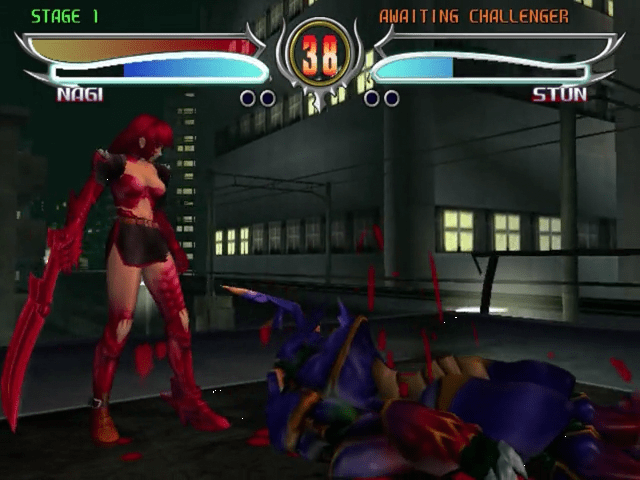
Arcade mode is for arcade-style, one-on-one fighting focusing on single-player versus COM (computer) battles. You can be challenged by another human opponent in the middle of Arcade mode. Starting Arcade Mode
•
Choose a character when the Character Select screen is displayed.
•
Press the SELECT button to return to the title screen.
•
Each character has different costumes which can be toggled by pressing the button.
•
Once a character and costume are chosen, press the button to enter the selection and begin.
•
The first opponent will be automatically chosen.
•
Win the battle to move on to the next opponent. If the battle is lost, the continue screen will be displayed.
Continuing the Game
•
Press the START button before the countdown reaches zero to continue the game.
•
When continuing, the character cannot be changed.
•
There is no limit for continues.
How to Challenge
Press the START button on a second controller plugged into controller port 2 to challenge someone playing Arcade mode. The battle will begin after a character has been chosen.
Time Attack Mode
This mode tracks how fast you can play through the game. Time Attack mode keeps track of total play-time and gives a time-based ranking when the game is over.
Versus Mode
This mode is specifically designed for two-player one-on-one fighting. Two controllers are necessary to play Versus mode. Starting Versus Mode
•
Each player must choose a character to use in battle once the
.png)


.png)



.png)
.png)


_1.png)