Menu Navigation
Main Menu
From the main menu, you can start a complete hunt in Career Hunt mode, go for a quick hunt, select game options, or watch the credits.
Profile Screen
Once you choose the Career Hunt mode, you are asked to choose from restoring a previously saved game or creating a new hunter character and starting a completely new career.
Quick Hunt
Hunt any game animal in any location that you have previously unlocked in Career Hunt mode, with no impact on your resources. You can practice weapon and item usage, learn more about the region, and apply all this in a complete hunt.
You cannot buy any items in Quick Hunt. As a result, there is no store screen and you may choose any equipment.
Career Hunt
Play a complete hunt, unlocking locations one by one, respecting all hunt regulations and carefully managing your resources.
The Career Hunt option gives you a full hunting experience, including progression from a novice with little equipment to an amateur hunter, then to a hunter with a cabin full of equipment and trophies. The goal is to fill all of the tags for each hunting region without running out of money, supplies or health, and without breaking the law. Disregard for the hunting regulations will result in penalties. Once you have completed a location, you will be able to choose to hunt in any of the 8 locations available (Montana, Arizona, Quebec, British Columbia, Texas, Alaska, Alberta and Northwest Territories). Though, after entering the desired location, all incomplete locations will remain locked until you complete the level you have chosen. You can try any of the unlocked locations in Quick Hunt mode.
Options
Set visual, audio, gameplay and controller options.
Credits
View the Big Game Hunter credits.
Difficulty Level
After creating your hunter character, you must select the difficulty level you wish to play.
Choose EASY if you're a new, inexperienced hunter. On this difficulty level, animals are more responsive to calls, have less acute senses and you can benefit from aids like the Trophy Beacon (which marks the position of every game animal on the map by a red dot) or the Bullet Camera (see through the bullet as it traverses the space between you and your target) and the game is more forgiving of your aiming. Game animals are frequent, but trophy scores are poor.
Location Selection
Here you can choose the location in which you wish to hunt. Choose carefully, as once you've entered a location, the incomplete locations will be locked and will remain so until the completion of the currently chosen level. Each of the 8 locations contains 4 different hunting areas. You are offered the possibility to hunt in every season on a selected map, and you can also select the area in which you wish to start.
The Log Cabin
In the log cabin you can see the trophies you have taken at a given stage in the game. You can view the 3D representation of a specific trophy, zoom in on it or access information, such as scoring, time of kill, shooting distance or weapon used.
Save Game
Saves the progress of the game.
Career Options
Controls
Select the preferred controller configuration from this menu.
The Target Range
This is an outdoor shooting and archery range, with targets placed at various distances. It is an important part of the game: after purchasing a firearm, you need to sight it in to ensure accurate kills during the hunt. Here you can also try out various firearms and bows you have purchased and select those that best match your skills.
Audio Options
Select this to set the music and sound volume.
Video Options
You can center the viewable area by accessing this option. You can also access the Motion Blur control setting here.
Hunting Guide
For each location, information regarding that location, including game animals, hunting regulations and professional hunting advice is available. Choose the hunting guide for that information. Always read the guide before entering a new location: knowledge about the game you're hunting and the location features could be the factors that make your hunt successful. Inventory
Here you can select the equipment you want to bring with you in the hunt from the items you own at a certain moment. You can add items from your inventory to your backpack or drop items you won't need on that specific hunt. You are limited to 6 items and you can't carry more than one weapon.
Store
From the location selection screen, you can also access the store of the location's main lodge. Here you can buy equipment and firearms or sell items you no longer need and get their refund price. You should carefully balance your choice of equipment, as in Career Mode your financial resources are limited, and bringing appropriate equipment can't only bring you the trophy you're after, but save your life as well.
Once you have purchased a piece of equipment, you can use it at any point in the game. Don't forget to buy tags, or you won't be able to take any legal trophies. If you are in a hurry, you can also use the Auto Equip function prior to entering the Store.
Playing the Game
Hunting
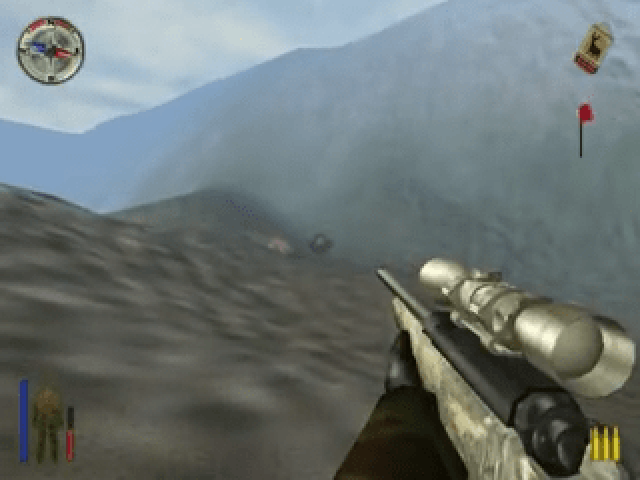
After having equipped yourself with the suitable items, the real hunt begins.
In Big Game Hunter there are two main camera modes: the 1st person view and the 3rd person view. You should use the 1st person perspective mainly for handling weapons and items, and the 3rd person view for moving through
 (USA).png)

 (USA).png)
 (USA).png)
.png)
 (USA).png)
.png)



.png)

.png)



.png)
