Console Ports and Buttons
Getting Started
1. Set up your PlayStation®2 computer entertainment system according to its instruction manual. If you wish to save your City Crisis game, insert a MEMORY CARD (8MB) (for PlayStation®2) with at least 230 KB of free space into MEMORY CARD slot 1.
2. Make sure the MAIN POWER switch (located on the back of the console) is turned on. Press the RESET button.
3. When the power indicator lights up, press the OPEN button and the disc tray will open.
4. Place the City Crisis disc on the tray with label side facing up, press the OPEN button again and the disc tray will close. Attach game controllers and other peripherals, as appropriate.
Follow on-screen instructions and refer to this manual for information on using the software.
Main Menu
The main menu screen is displayed when you press the START button on the title screen.
Training
The training mode is a great option for new City Crisis players. Here you can learn the basics of piloting your rescue craft, and handling some of the disasters.
Mission
Once you're familiar with piloting your craft, enter the mission mode. This is where you'll earn your keep! Before entering, you will be briefed on what your mission is.
By completing your mission objective quickly and efficiently you can earn the higher scores needed to unlock more challenging missions.
Time Attack
Here is where you can put your new found piloting skills to the test. Navigate your helicopter through the rings placed around the city as quickly as possible. The faster you complete the stages, the higher your rating.
Record
Selecting this option will allow you to view your high scores from Mission and Time Attack modes.
Option
Here you can select a controller configuration and save/load your game. You can also adjust music and sound effects volumes.
Mission Mode
When you enter the Mission Mode, you will be asked to select from a list of available missions. Pressing the directional buttons right or left will cycle though the missions that are available to you.
There are 3 Different Mission Modes:
Rescue Mission
A number of fires have broken out around your city. Your mission is to rush to the scene, rescue the survivors, and extinguish the fire before it's too late. Keep a watchful eye on the clock; if it runs out your game is over.
Chase Mission
The object of this mission is to assist the police in apprehending fugitives on the run. When you locate the fugitive, lower your helicopter so that the searchlight is on him. At this point, the fugitive will do anything he can to elude you. Hang tough, and keep your searchlight on him until the police can nab him!
Final Rescue Mission
Once you complete all missions, you will face the final mission. This is the ultimate test of all of the skills you have learned ... good luck!
After completing a mission, your performance will be evaluated. Try and achieve the highest rankings in order to unlock all of the missions.
Helicopter Condition
The damage sphere shows the condition of your helicopter. If it's Green then you're in good shape. If it turns Yellow then you're starting to take on a bit too much damage. If it ever turns Red, then you're in big trouble ... try to steer clear of any obstacles at this point.
Sub Window
As you are putting out a fire, a sub window may appear which will update you of another crisis in the making. Pay close attention!
Rescue Mission Map Key
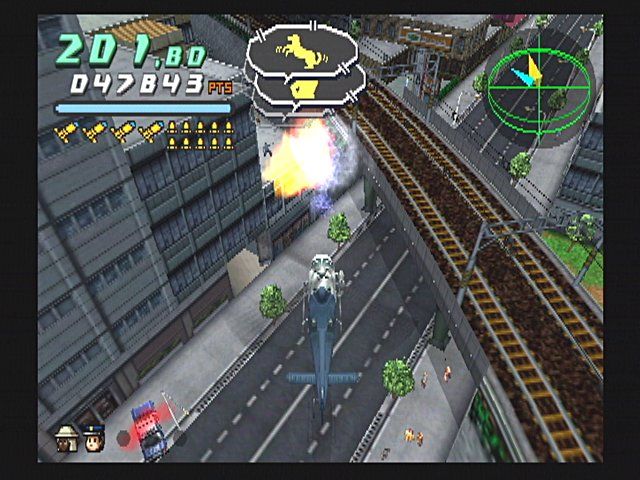
There is also a map that is displayed on screen during rescue missions using the following key:
•
Green H shapes indicate heliports.
•
Flashing red circles show the locations of fires.
•
Green, Yellow or Red dots represent survivors to be rescued with the color of the dot showing their health.
•
Light blue dots show the locations of other people who can be rescued but who aren't critical to complete the mission.
•
Dark blue dots are dead people who can't be rescued.
•
The white arrow is your helicopter, showing its position and direction.
Pause Menu
Pressing the START Button during the game will pause the game and bring up the Pause Menu. Here you are given 3 options:
•
Continue: Unpauses the game and resumes gameplay.
•
Retry: restarts your current mission.
•
End game: quits the game and returns you to the main mission menu screen.
Rescue Mission Description
Here you are briefed of your upcoming mission.
Fire Fighting Activity
Use your water cannon and fire-extinguishing missiles to put the fire out.
Extinguishing Missile
Aim your helicopter towards the fire and then push the extinguishing missile button (L2 button) to fire the extinguishing missile. Use the X button to select a particular blaze if several are present. Note that a green rotating circle appears over each possible target fire and your selected target has four red arrows in the circle.
Extinguishant
Push the water cannon button to spray the fire. Your helicopter has to be close to the fire for the water cannon to have an effect. The extinguishant meter shows you how much water you have remaining. If the meter is empty, you have to wait a few moments to use it again.
.png)

.png)



.png)

.png)



.png)

.png)

_1.png)

_1.png)
.png)
.png)
.png)

.png)
_1.png)
.png)