Title Menu
•
1 Player: Start the single player game.
•
2 Players: Start a two player game.
•
Options Menu: Go to Options Menu.
Options Menu
•
Controller: Change button configuration.
•
Character: Change player character between Bill and Lucia. •
Sound: Change sound options between stereo and mono.
•
Etc: See various extra and hidden options.
Memory Card
Save/load player data. To save, a memory card (8MB) (for PlayStation®2) is required with 108Kb of free memory space. It will only save on MEMORY CARD slot 1.
Language Settings
Choose text language.
Difficulty
Adjust the difficulty level of the game from Easy or Normal. Not all levels will be available in Easy mode.
Etc Menu
•
War Record: Player battle stats.
•
Training: Player can choose a stage to practice. The number of stages increases under certain conditions.
•
Extras: Items and incentives. Unlocked when certain conditions are met.
Stage Select Menu
Use the directional button to move left or right and hit the confirm [X] button. Panels with red indicate stages that have not been cleared, while black and white ones indicate stages that have been cleared. Cleared stages can be played again, to try to improve the ranking.
Game Screen
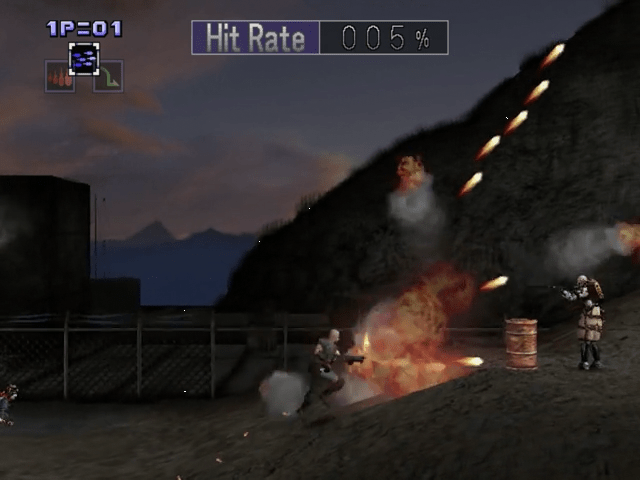
REMAINING LIVES INDICATOR
The number of remaining lives the player has. The left side indicates player one and the right side indicates player two. An additional life will be added at 15,000 points with additional lives every 20,000 points thereafter.
HIT RATE
A percentage of the destruction rate of selected enemies and objects throughout the stage. The percentage will be factored into your ranking in the Results window. The Hit Rate will greatly affect your overall ranking for the stage and ultimately the entire game.
WEAPON ICON
Currently selected weapon is indicated with a thick border. The left side indicates player one's weapon and the right side indicates player two's weapon.
ON-SCREEN MENUS
Pause Menu
•
Cancel: Cancel the pause and return to game.
•
Retry: Keep the number of lives the same while using a credit to return to the start of the stage. All Hit Rate percentages will be lost. You cannot retry if there are no remaining credits.
Game Over Menu
•
Continue: The player can continue the game by using a remaining credit. The game ends if there are no remaining credits. There are 2 types of continues.
•
01: From the middle. The player continues from a pre-determined mid-point of the stage. The player must have passed the mid-point of the stage to be able to select this option. The number of lives lost up to that continue point is reset to zero, however in the results screen, the continue counter will increase by one. The Hit Rate up to the mid-stage is retained.
•
02: From the beginning. The player starts at the beginning of the stage.
•
End: The game will ask if you would like to save the results. It is advisable to save on a regular basis since results affect what hidden options become available.
Results Screen
Results
•
Lost Remaining Life=00-000%
•
Mission Clear Ranking...........S
The player is given a ranking at the end of a stage. If a high ranking is achieved, this may affect the second half of the game and possibly even the ending!
Hit Rate
A percentage of the destruction rate of selected enemies and objects throughout the stage. If all percentage affecting enemies and objects are destroyed, a 100% Hit Rate can be achieved.
Continue
The number of times a player elects to continue from the mid-point of the stage. A 10% penalty will be assessed for each continue.
Lost Remaining Lives
The total number of lives lost on the stage. A 2% penalty will be assessed for each life lost.
Mission Clear Ranking
Hit Rate, Continue and Lost Remaining Life will all be used to determine the ranking. A letter grade will be assigned C (lowest), B, A or S (highest).
Total Ranking
The overall rank with data taken from all the stages that have been completed. Assigned a letter grade from C to S.
.png)

.png)
.png)
.png)



.png)

.png)



.png)
