System Setup
Set up your PlayStation®2 computer entertainment system according to the instructions supplied with your system. Check that the system is turned on (the on/standby indicator is green).
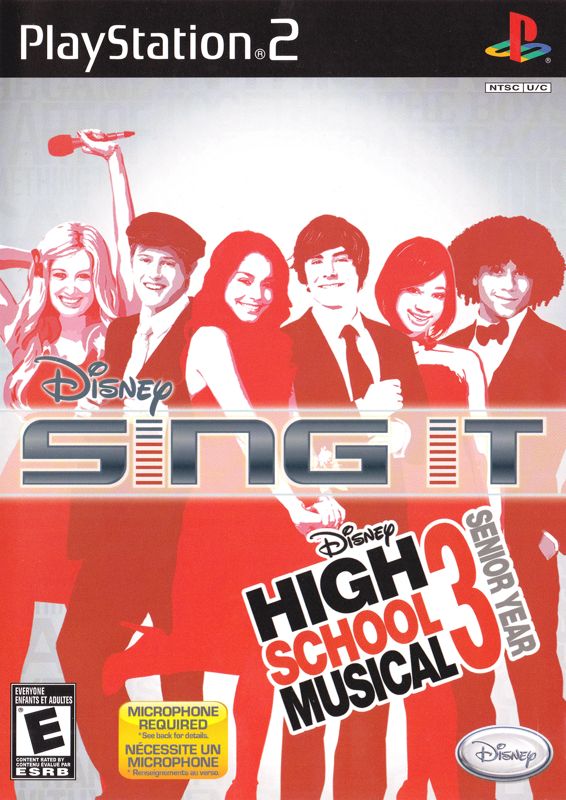
Insert the Disney Sing It disc in the system with the label side facing up. Attach game controllers and other peripherals as appropriate. Follow the on-screen instructions and refer to this manual for information on using the software. Memory Card (8MB)(for PlayStation®2)
To save game settings and progress, insert a memory card (8MB) (for PlayStation®2) into MEMORY CARD slot 1 of your PlayStation®2 system.
You can load saved game data from the same memory card or any memory card (8MB) (for PlayStation®2) containing previously saved games.
DISNEY SING IT BASICS
Song Selection
Once you decide which kind of game you want to play, choose any song to start the show! Scroll through the music videos to see and hear a preview. Decide if you want to sing part of the song or the whole song and choose your difficulty level. In multiplayer modes, each singer chooses his or her own difficulty level and everyone can sing together.
Pitch Detection Bar
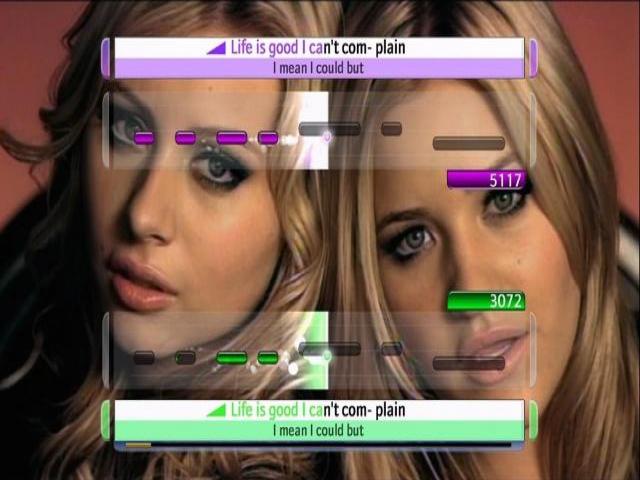
Follow along as the pitch bar and lyrics cross the screen to guide your tune. Keep the pitch indicator on the bars for the best performance!
When there are two singers, player one is always at the bottom and pitch bars and lyrics are color-coded green for Player 1 and purple for Player 2.
Options
From the Options menu you can load or save your profile, adjust your microphone settings, view credits, adjust screen position or adjust widescreen settings.
Multipliers
Hit all the notes on one screen to earn double points. Sing three screens flawlessly to earn triple points and five screens for quadruple points! Missing a note will end your winning streak and you'll lose your multipliers.
Quick Play
Time to sing! Select Quick Play at the main menu to go straight to singing.
Choose Solo to start a solo performance, Versus to sing against a friend or Duet to sing cooperatively. Pick a song and difficulty level and click the button on the screen to start belting it out.
SINGLE PLAYER
In Single Player mode you can take singing lessons in Sing It Pro or test your skills in You're on Your Own! Be the star of your own live concert in Gig Mode!
Sing It Pro
Singing lessons are fun with your own personal voice coach. In Sing It Pro you can perfect your singing voice while practicing pitch, accuracy, breathing techniques and harmony.
First listen to a portion of a song and sing it accurately to move on to the next song in the lesson. Get them both right and move on to the next lesson.
Then use the skills you've learned to earn excellent scores in real challenges. Go back to Sing It Pro anytime to master songs or brush up on your skills.
You're on Your Own!
Are you up to the challenge? Choose a song you know well enough to sing without lyrics, score or pitch marks to guide you. Your score will be displayed at the end of the song.
Gig Mode
Put on a live concert! Create and arrange your own personal set list of up to five songs to perform. Rock it out!
At the end of your gig your final score is averaged from all the songs you've played. Gig Mode can also be selected from multiplayer options.
Multiplayer
It's fun to play Disney Sing it with your friends. Sing together in a Duet, battle against each other in a Versus tournament, play together in Team Play or perform a concert in Gig Mode.
When there are two singers, player one is always at the bottom and pitch bars and lyrics are color-coded green for Player 1 and purple for Player 2. Players choose their own individual difficulty level so everyone can play together.
Some multiplayer options become available when two microphones are connected.
Duet / Versus
Sing any of the songs together in a Duet to create beautiful harmonies. Play against a friend in a Versus competition.
Team Play
Work together as a team singing Duets or competing in Versus tournaments. Choose a team name from the list and start singing.
You can sing alone or as part of a duet. Up to eight players can join Team Play. Save team profiles to keep track of wins and scores and the team's Most Valuable Player.
Gig Mode (Multiplayer)
Time to put on a show! You and a friend can perform a concert together by singing a duet of up to five songs consecutively.
Choose which songs you want to sing together. The player with the highest average score for all songs performed is The Star of the Show.
PERSONALIZE
From here you can choose your background theme and check out high scores.
Choose Theme
Customize the look of your game the way you prefer by choosing from seven themes, including Disney High School Musical, Hannah Montana and Camp Rock. TIPS
•
Use Quick Play to get straight to singing! Create a Solo or Duet performance or enter into Versus mode with a friend.
•
Become a better singer or master a tough song in Single Player mode by taking personal singing lessons at Sing It Pro or by relaxing your vocal chords in Warm Up sessions.
•
After mastering a difficult song during your lessons at Sing It Pro
.png)

.png)

.png)






.png)
_1.png)




.png)
.png)
.png)

.png)






_1.png)