Gameplay
Players advance through the game by successfully clearing missions. The game progresses through various stages.
New Game
Starting a Game from the Beginning
The adventure begins when you select "New Game" from the main menu. Caim leaps into the fray, ready to cleave through hordes of enemy forces to save his sister, Furiae. Ready for Battle
Before engaging the enemy, ensure you are properly equipped with the appropriate weapons.
Selecting a Weapon
From the weapon selection screen, you may choose up to eight weapons for Caim to bring with him into battle. Caim may switch his weapon at any time during a mission, but he may only choose from the weapons that he has taken with him. Following the Story
Once you are ready for battle, select "Continue." Brief movies or events may precede missions as the story unfolds.
Beginning a Mission
At last the battle begins! Your objective appears on the screen as the mission starts. The story progresses as each mission is cleared and the next mission presents itself.
The Next Mission
Subsequent missions arise as each objective is met. Note that you may choose to replay a particular mission more than once before moving on to the next.
Load Game
Continuing a Game
Select "Load Game" from the main menu to load saved data from the memory card (SMB) (for PlayStation®2). This will allow you to continue playing the game from your last save point.
Story
Select "Story" to continue from your last cleared mission. You may also choose to replay a completed mission.
Free Expedition
As you complete certain chapters and verses, various free expeditions will become available. These may be played at will between missions.
Selecting a Segment of the Story
When you select "Story," you may continue playing the game from your last save. You may also replay any of the missions you have completed thus far. Replaying missions provides an opportunity to hone your skills and gain experience points.
•
Use the left analog stick to select a chapter and verse.
•
Press the Ⓧ button to play that mission, movie, or event.
Ready for Battle
After selecting a mission, you are ready for battle. From this point forward, the game progresses in the same manner as a new game.
Preparing for Battle
Be sure to be properly equipped before heading into battle. Choose the right weapons and allies to bring with you!
Weapon Selection
After selecting a chapter and verse, select "Weapon" from the lower right corner of the screen. This will allow you to select the weapons Caim will take into battle. •
Using the left analog stick, select a weapon.
•
Press the button to confirm your selection.
Weapon Wheel
Use the weapon wheel to select and equip Caim's weapons during battle. •
Complete: This figure indicates what percentage of the game's weapons you have acquired.
Adding a Weapon
From the weapon menu, you may use the left analog stick to select a weapon to add (equip) or remove (unequip) from the weapon wheel. Press the button to confirm your selection. Remember: Only the weapons placed on the weapon wheel will be taken into battle.
Explanation
This allows you to check a weapon's status, including information on attack strength, sharpness, reach, weight, material, combo hits, and the number of kills required to reach the next level. You may also view the weapon's history by pressing the left or right directional buttons.
•
Select "Explanation" and press the button to view this screen.
•
Attack Strength: Indicates degree of damage inflicted on opponent
•
Sharpeness: Edged and unedged weapons handle slightly differently in combat
•
Reach: Indicates attack range
•
Weight: Affects attack speed
•
Material: Indicates weapon's basic component
•
Combo Hits: Indicates number of hits in a combo attack
•
Next Level: Indicates number of kills needed to reach the next level
Allies in Battle
Selecting an Ally
After you have selected a mission, select "Ally" on the next screen.
•
Use the left analog stick to select an ally.
•
Press the button to confirm your selection.
•
You may cancel your selection by pressing the button.
Summoning an Ally
If Caim is dangerously low on HP during a battle, you may be able to weather the storm by calling on an ally for help. Press the button to have your ally fight in Caim's place. When an ally fights in the place of Caim, he or she will lose HP over time - whether the ally receives damage or not. When the ally's HP reaches zero, Caim must fight again. •
Summon Limit: This indicates the number of times the ally may be summoned per mission.
Ground Battles
Eliminating Enemies on the Ground
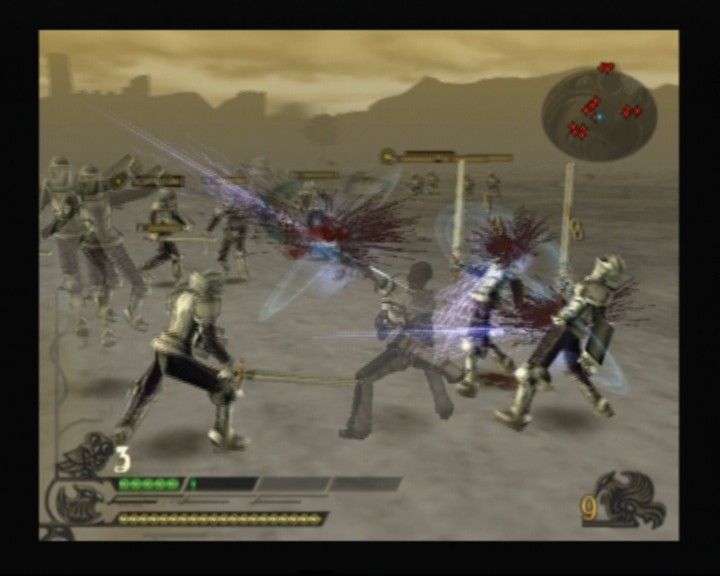
In this mode, Caim wields his weapon to destroy ground-based enemy forces. From here, he can take out enemies such as archers and wizards - crafty foes who strike at the dragon's weak points. If you can eliminate these enemies, attacking from the air will be a far more effective proposition. •
1) MP Gauge: Indicates your current MP (magic points). Caim's MP increases as he strikes enemies. Store up your MP, then unleash special attacks! •
2) HP Gauge: Indicates your current HP (health points). The game ends if Caim runs out of HP. .png)

.png)
