Getting Started
*Note: Illustration may not match all PlayStation 2 console types. For owners of SCPH-70000 series PlayStation 2 systems, refer to the setup instructions supplied with your system.* Set up your PlayStation®2 computer entertainment system according to the instructions in its Instruction Manual. Make sure the MAIN POWER switch (located on the back of the console) is turned on.
Press the RESET button. When the power indicator lights up, press the (OPEN) button and the disc tray will open. Place the KUON disc on the disc tray with the label side facing up.
Press the (OPEN) button again and the disc tray will close. Attach game controllers and other peripherals, as appropriate. Follow on-screen instructions and refer to this manual for information on using the software.
Starting the Game
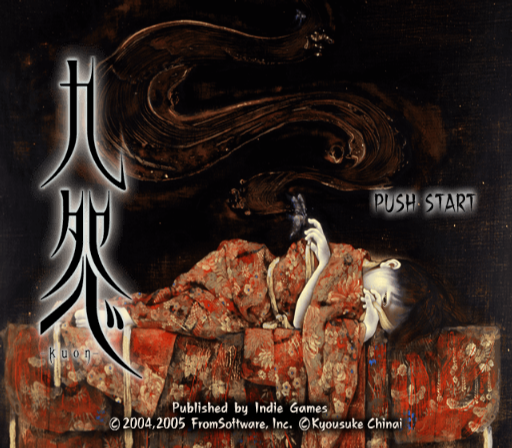
Press the START button at the TITLE screen to display the MAIN MENU options.
Main Menu Options
•
Begin: Start a new game.
•
Load: Load saved game data and resume playing where you last left off. Requires a Memory Card (8MB) (for PlayStation®2) containing saved KUON game data.
•
Settings: Access this menu option to adjust various game settings (Vibration, Control Set-up, etc.).
Combat
Enemies encountered during the game are dispatched through the use of magic and weapon-based attacks.
Using Magic
A character must possess magic cards in order to execute magic-based attacks. Magic cards come in two types, Spell and Summon, and are made available for use by assigning them to buttons at the EQUIPMENT screen.
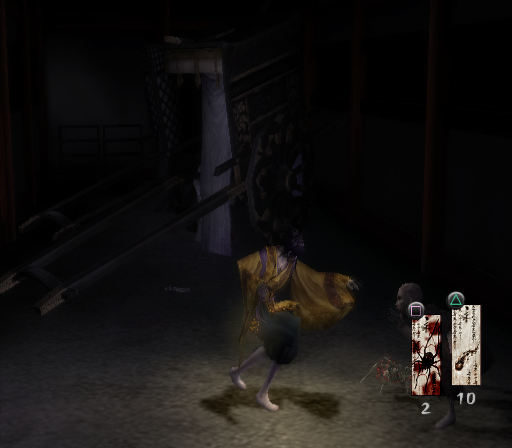
To execute a magic-based attack during the game, simply press the attack button that the magic card was assigned to. The number of remaining magic cards is displayed in the lower right-hand portion of the game screen.
Using Weapons
If no magic card has been assigned to an attack button, pressing that button will cause the character to execute a weapon-based attack with whichever weapon is currently equipped. There is no limit to the number of times a weapon can be used, but this form of attack is less powerful than magic.
Vertigo
Vertigo is experienced when a character encounters a tempest (area of concentrated evil energy), or sustains injury during combat. The bar at the top of the in-game menu screen indicates a character's physical condition.
The bar changes color from blue--> yellow --> red as a character's condition worsens. Physical well-being is also expressed through the character's heart rate (mimicked by the controller's vibration function).
Magic cards cannot be used when a character is experiencing vertigo. In order to recover from vertigo, one must either meditate or use spiritual medicine.
Death
Vertigo is a sign that a character's death is imminent. For this reason, it is always best to remedy the vertigo condition as quickly as possible.
Magic Cards
Magic can be obtained in the form of cards and are available in two varieties, Spell and Summon.
Spell Cards
These cards enable a character to attack enemies using the magic inherent to the card. Magic spell attacks are released as soon as the button corresponding to the card is pressed. Each use of a magic spell attack consumes one magic card.
Summon Cards
Activating a summon card calls forth an entity that fights for the character for a set amount of time. Entities called forth to assist the player can be released prematurely through either meditation, or by holding the R2 button and pressing the attack button the summon card was assigned to. Releasing summoned entities enables a character to recover some of their physical strength.
Specific Magic Cards
•
Spell Card - Hibari: Releases a small fiery arrow that is propelled forward. The range for this spell attack is short and its destructive potential is small.
•
Summon Card - Sutegumo: Calls forth a small spider that fights enemies on behalf of the character. The spider's durability and attack strength are rather low, but it is useful for holding enemy characters in check.
•
Summon Card - Fudobaku: Creates a magical golden circle that traps an enemy target and prevents it from moving for a set amount of time. This spell does not inflict damage on enemy targets, but is useful for evening the odds in situations where multiple enemies are encountered.
In-Game Menu
Equipment
Access this menu option to check the details of, or make changes to, currently equipped weapons and magic cards. To change equipped weapon or magic card, highlight the desired selection and press the button. Highlight the new selection using the directional buttons or left analog stick, and press the button again to confirm the change.
Item
View, select, and use items acquired during the game. To use an item in the inventory, simply highlight it with the directional buttons or left analog stick and then press the button.
Writings
Refer to writings acquired during the game. To read a particular document, highlight it using the directional buttons or left analog stick and then press the button.
•
button: Advance to the next page
•
button: Go back to the previous page
•
button: Return to the inventory screen
Maps
View maps of the game's environment and check on a character's current position. Press the button to enlarge/shrink the map. Use the directional buttons or left analog stick to cycle between different maps (enlarged view), or look around the current map (shrunk view).
.png)

.png)



.png)

.png)



.png)
