System Setup
Set up your PlayStation®2 computer entertainment system according to the instructions supplied with your system. Ensure the system is turned on (the on/standby indicator is green).
Insert the LUXOR: Pharaoh's Challenge disc with the label side facing up. Attach game controllers and other peripherals as appropriate. Follow the on-screen instructions and refer to this manual for information on using the software.
Memory Card (8MB) (for PlayStation®2)
To save game settings and progress, insert a memory card (8MB) (for PlayStation®2) into MEMORY CARD slot 1 of your PlayStation®2 system.
You can load saved game data from the same memory card or any memory card (8MB) (for PlayStation®2) containing previously saved games.
Main Menu
Start Menu
The Start Menu allows you to start a new game or to continue an existing one. When choosing to start a new game, you are given a choice of three different types of games: Adventure, Endless Tomb, or Practice.
Adventure
Travel along a path leading from the Nile delta deep into Egypt. The path is divided into many stages, each containing multiple levels.
When one level is completed, the next level becomes available to play. As you progress, a fantastical tale of Egyptian gods and a brave hero is revealed.
When starting a new Adventure game, there are three levels of difficulty to choose from: Casual, Gamer, or Hardcore.
Endless Tomb
This game type allows you to select and play any individual level completed in Adventure. Each time you fill the Progress Bar, the difficulty level automatically increases.
Your goal is to achieve the highest score before spheres inevitably reach the pyramid, ending your game.
Practice
This game type allows you to select and play any individual level completed in Adventure through successive waves of spheres, each increasing in difficulty from the one before.
Profiles
You can have up to four different profiles per memory card. You can access and manage these profiles from the Profiles Menu.
If no profile exists when the title is started, a default one is automatically created. Alternatively, if one or more profiles do exist, the one most recently played is automatically loaded.
Rankings
This displays the rankings and statistics for all profiles on the memory card.
My Badges
This screen displays badges earned by achieving certain goals during a game (e.g., not losing any lives for five levels). There are 25 different badges that you can attain.
Options
The Options Screen lets you adjust music volume, effects volume, plus view the "How to Play" screens or the game's credits.
•
Music Volume - When this menu item is highlighted, you can use the left and right directional buttons to change the volume of the music.
•
Effects Volume - When this menu item is highlighted, you can use the left and right directional buttons to change the volume of the sound effects.
How to Play
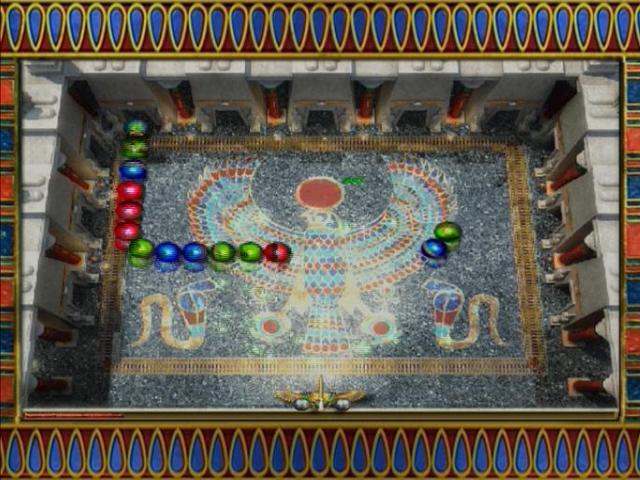
Chains of spheres are pushed along a path by scarabs. You control the shooter at the bottom of the screen which can fire spheres towards the approaching chain.
When a sphere collides with the chain, it forces its way in at the point of impact. If the fired sphere creates a set of three or more spheres of the same color, all of the touching like-colored spheres are removed.
If any sphere enters the pyramid at the end of the path, you will lose the level and a life!
Progress Bar
The Progress Bar at the bottom of the playing field fills up as you remove spheres (either through matches or by using power-ups). When the Progress Bar is completely filled, it turns to gold and no new sphere chains will enter the playing field.
All that remains to win the level is to remove any spheres remaining on-screen.
Power-ups
Power-ups drop down if you make three matches in a row. The power-ups appear at the point where the third match is made and fall down the playing field from there.
You must catch power-ups before they fall off the playing field or they will be lost.
Power-up Ranks
Increasing your total score causes power-ups to become stronger. Each power-up can increase in rank three times.
Power-ups are divided into two types: Instant Power-ups and Shooter Power-ups.
Instant Power-ups
Instant Power-ups activate immediately when they are caught. Their effects last for only a short time and multiple power-ups can be used at the same time.
•
Reverse Motion - Spheres move backwards instead of forwards.
•
Slow Motion - All scarabs pushing the spheres slow down.
•
Stop Motion - All scarabs pushing spheres stop moving.
•
Speed Shot - Sphere-firing speed increases and a targeting beam appears.
•
Color Bomb - Spheres matching the color of the bomb are eliminated.
•
Scorpion - A scorpion races out of the pyramid, along the path, destroying any sphere that it touches.
•
Net - A net appears below the shooter, catching all falling objects while it lasts.
Shooter Power-ups
Catching a Shooter Power-up transforms the sphere, currently in the shooter, into the relevant power-up. The power-up can then be fired like normal spheres or can be saved for later use by swapping to the next sphere in the shooter.
However, if you
.png)

.png)
.png)
.png)


 (Europe).png)

.png)
_1.png)


.png)