GETTING INTO THE GAME
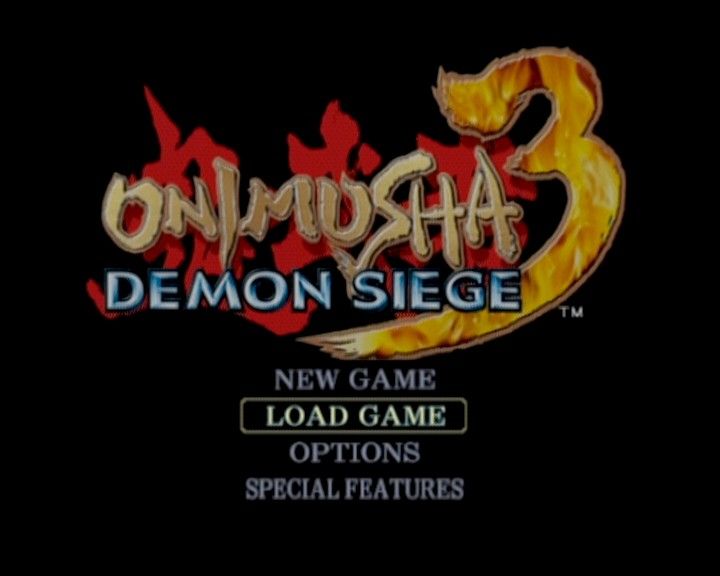
MAIN MENU
Press the START button on the Title Screen to display the Main Menu's list of options.
Move the left analog stick/directional buttons to highlight the option you want, and press the button to confirm.
•
NEW GAME: Start a new game from the beginning.
•
CONTINUE: Load a saved game and start from the point where you saved.
•
OPTION: View and change various gameplay settings. You can also change options during play by pressing the button to pause the game and using the Pause Menu.
•
SPECIAL FEATURES: View various rewards added to the gallery when you fulfill certain game requirements.
STATUS DISPLAY
•
Weapon Attribute / Equipped Orb
WEAPON ATTRIBUTE / EQUIPPED ORB
Shows the color of the elemental attribute of your currently equipped weapon.
SUB WEAPON
Allows you to check how many secondary weapons, arrows and/or grenades you have left in your Inventory. This indicates arrows for Samanosuke and hand grenades for Michelle. Since Jacques does not have a secondary weapon, nothing is displayed here for him.
VITALITY GAUGE
Shows the remaining vitality, or health, of your character. It decreases when your character is attacked by the enemy. If it reaches zero, the game is over.
OGRE POWER GAUGE
Shows how much Ogre Power you currently have. Ogre Power is used to perform special Magic Attacks, and each attack drains power from this gauge.
PURPLE SOUL STOCK
Shows the number of Purple Souls you currently have. When you collect five Purple Souls, you are able to enter Onimusha Mode. When time runs out and Onimusha Mode ends, all Purple Souls disappear.
If you enter into an event sequence while in Onimusha Mode, you will be automatically transformed back into your regular form and you will retain Purple Souls corresponding to the amount of Onimusha Mode time left at that point.
SOUL COUNTER
Shows how many Souls you have stored up. Souls are necessary to enhance your weapons and armor. Absorbing Red Souls increases the count.
While you are absorbing Souls, the yellow numerals on the gauge represent the amount of Red Souls absorbed, and the red numerals show your bonus for absorbing multiple Souls at once. The number to the right of the gauge indicates how many times you have completely filled the gauge.
GAME OVER
Your game is over when your vitality reaches zero from sustaining attacks from the enemy, or you become caught in a critical trap, unable to beat it. Failing to escape certain traps will result in game over regardless of how much vitality you have left.
When your game is over, you have the option to continue from your last save position. On the selection screen choose YES to automatically load that save and pick up where you left off. Choosing NO takes you back to the Title Screen.
BASIC ACTIONS
BASIC MOVEMENT
LEFT ANALOG STICK
This control relates movement to the compass points of the screen:
DIRECTIONAL BUTTONS
This control relates movement to the direction your character is facing:
BASIC ATTACKS
Press the button to attack with the character's weapon. You will automatically attack the enemy closest to the character.
Hold down the R1 button to put the character in Ready Stance. Fighting in Ready Stance allows you to move around in a circle with the target as your axis. In this way you can engage in high-level tactics such as getting behind the enemy to attack or dodging an attack at the last moment.
CHARGING UP YOUR WEAPON'S POWER
When you have a weapon equipped with an elemental attribute, you can charge up its power by firmly holding down the R1 button. The ability to charge up your weapon is not available until you obtain the Tenso Sword.
Once you have power charged up, press the button to have Samanosuke unleash his Charge Slash, or have Jacques unleash his Ogre Lasso. Enhance your Ogre Gauntlet through the Enhance Screen to make your Charge Slash and Ogre Lasso even stronger.
CHARGE SLASH - SAMANOSUKE
When controlling Samanosuke, you can charge up power, and while still holding the R1 button, press the button to unleash Charge Slash, a devastating attack that deals much more damage than a standard attack.
OGRE LASSO - JACQUES
When controlling Jacques, you can charge up power, and while still holding the R1 button, press the button to use whatever weapon you have equipped to grab an enemy and perform an Ogre Lasso.
Once you have an enemy lassoed, you can shoot it or perform Special Attacks on it while it is in your clutches to really do some damage. While Charge Slash and Ogre Lasso do not use up Ogre Power, using a Special Attack after an Ogre Lasso does.
USING SPECIAL ATTACKS
When you have a weapon equipped with an elemental attribute, press the button to perform devastating Special Attacks.
Special attacks become available as you meet the following conditions:
•
You have a weapon equipped with an elemental attribute.
•
You have the minimum amount of Ogre Power in the Ogre Power Gauge required to perform the Special Attack.
The amount of Ogre Power needed for a special attack depends on the move and the level of its enhancement. You can enhance a weapon's Special Attacks up to
.png)

.png)



.png)

.png)


.png)




.png)





.png)