GETTING INTO THE GAME
MAIN MENU
The Main Menu appears after you power-up the game. Use the menu controls to select the following options: SINGLE PLAYER
Fight through the hell of an urban civil war. You will fight alone or lead a coalition squad, depending on the mission.
MULTIPLAYER
Play online with up to 15 other Internet players (16 players total).
MULTIPLAYER LOCAL NETWORK
Play over a Local Area Network (LAN) connecting up to 16 PlayStation 2 consoles. OPTIONS
Adjust various game settings, including:
•
Controls - Select a control scheme.
•
Invert Vertical Axis - Toggle the camera view on (inverted) or off (normal).
•
Look Sensitivity - Adjust the camera response time.
•
Volume - Adjust the volume of SFX (sound effects), Music and USB Headset (multiplayer only).
•
Brightness - Adjust the brightness of your TV screen.
•
Vibration & Subtitles - Turn the controller's vibration function and game subtitles on/off.
•
Dolby® Pro Logic® II - Toggle Dolby Pro Logic II surround sound on/off. (Connect your console to a sound system with Dolby Pro Logic II or Dolby Pro Logic IIx decoding to experience the excitement of surround sound.)
PROFILE
The Profile screen appears after you select a game mode. Create a profile before you start playing PROJECT: SNOWBLIND™. The profile contains your save game files, option selections and online identity.
To create a profile:
•
On the Profile screen, select an unused profile.
•
To optionally enter a new name, select Rename Profile and use the virtual keyboard to enter the new name.
•
Select New Game to start a new game. You will be prompted to save the profile when you begin play.
WHO ARE YOU?
You are Nathan Frost, a bio-enhanced super soldier. In addition to weapons expertise with firearms and explosives, you can use specialized bio-augmentations. These bio-augmentations were surgically hard-wired into your body. You now have lethal combat skills never before seen on the battlefield.
But there is a tactical downside. You are vulnerable to EMP (Electro Magnetic Pulse) which can disrupt your onboard electronics and render you momentarily or permanently helpless. Your bio-augmentations begin to fail and you become snowblind until your systems recover.
MISSIONS
You must complete missions as issued by Coalition Command. In every mission you must complete all primary objectives (objectives are added as the mission proceeds), protect yourself and protect your men. You will undertake two different mission types:
•
Firefight missions that are all-out urban warfare.
•
Stealth missions where you attempt to infiltrate key areas before attacking the objective. Discovery in this type of mission makes the job much tougher.
MISSION OBJECTIVES
Your orders are assigned as mission objectives.
•
Mission objectives appear as yellow circles on the Radar.
•
Press the START button to see primary and secondary objectives (on the Pause screen) during play.
•
Press the SELECT button to toggle Navigational Display mode, which marks the direction to the next objective.
•
Coalition Command will be in contact via radio with objective updates and intel.
INVENTORY
The inventory has three categories: Primary Weapons, Secondary Weapons and Bio-augmentations. All inventory items must be acquired.
When you have items in inventory:
•
Press and hold the L2 button to open the inventory.
•
While holding the L2 button, use the left analog stick or directional buttons to select a category and item. You can select multiple items at the same time.
•
Release the L2 button to equip the selected item(s).
You can also make selections without opening the inventory. While in-game (with the inventory closed):
•
Press the directional buttons ↑/ to cycle forward/back through the primary weapons.
•
Press the directional button to cycle through secondary weapons.
•
Press the directional button to cycle through bio-augmentations.
WEAPONS
A briefing appears when you acquire a weapon. Study this to understand the weapon's full capabilities.
PRIMARY WEAPONS
BASIC PRIMARY WEAPONS
These are your three basic primary weapons. You will find more awesome firepower as you progress through battle.
•
PISTOL: Silenced close-range weapon perfect for stealth.
•
CARBINE: Standard military issue automatic rifle, highly effective during firefights.
•
SHOTGUN: Lethal weapon for close combat.
AIM & FIRE
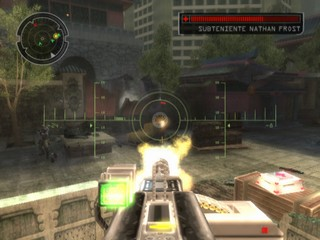
Use the right analog stick to aim your weapon and press the B1 button to fire (press and hold for automatic weapons).
•
The reticle turns red when aimed at an enemy. It projects a red pointer if you've taken damage from that enemy.
•
The reticle turns green when positioned over a friendly.
PRECISION AIM
Press the button to toggle zoom in/out.
•
The sniper rifle has 2x and 4x scope magnification.
•
The weapon automatically disengages from precision aim when reloading.
ALT FIRE
Primary weapons have an alternate fire mode. To use it, press the R2 button.
NOTE: Check the weapon briefing when you acquire the weapon to view special alt-fire characteristics. You can also see weapon use details by selecting the weapon in inventory.
SPECIAL TOOLS
These special non-weapon tools also reside in the primary weapons inventory:
•
KINETIC KICKER: Tool used to push or pull objects, and to collect ammo or other collectible items. •
ICEPICK: Hack tool for several types of electronic equipment. SECONDARY WEAPONS
To use
.png)

.png)
.png)
.png)


_1.png)


.png)
