Getting Started
Set up your PlayStation®2 computer entertainment system according to its Instruction Manual. Ensure the MAIN POWER switch (on the back of the console) is ON.
Press the standby/RESET button. When the power indicator lights up, press the OPEN button to open the disc tray. Place the RISK®: Global Domination disc label-side up. Press OPEN again to close the tray.
Attach game controllers and other peripherals as appropriate. Follow on-screen instructions and refer to this manual for software information.
Memory Card
Insert your memory card (8MB) (for PlayStation®2) in MEMORY CARD slot 1 to load or save a game. RISK: Global Domination requires at least 512K of free space to save your progress.
Network Adaptor Setup
A Network Adaptor (Ethernet/modem) (for PlayStation®2) is required for online play. Follow the Network Adaptor instruction manual during installation.
Voice Over IP (VoIP)
RISK: Global Domination supports VoIP, an optional feature for speaking with other players during online games. Each player needs a USB headphone/speaker combination headset that is 100% compatible with the VoIP protocol. Contact the headset manufacturer if unsure about compatibility.
Controller Support
The game supports DUALSHOCK®2 analog controllers. Digital controllers are not supported.
Main Menu Options
•
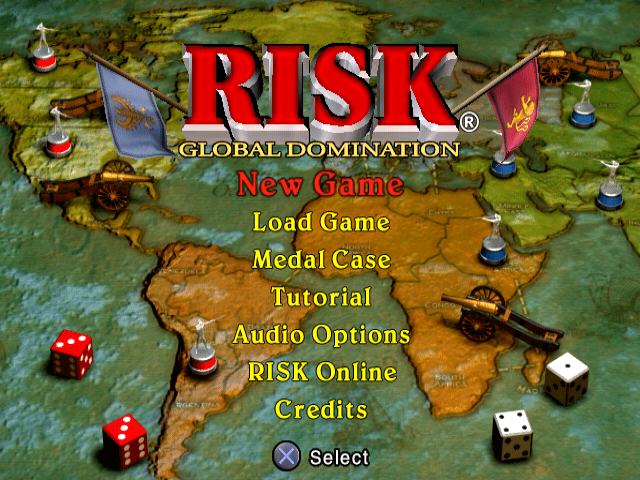
New Game: Set up and begin a new RISK: Global Domination game.
•
Load Game: Load a previously saved game.
•
Medal Case: View your medal case to see unlockable special items and Artificial Opponent (AO) players.
•
Tutorial: Walkthrough of the game.
•
Audio Options: Customize audio settings.
•
RISK Online: Play an online game.
•
Credits: View a list of game creators.
Audio Options
Customize sound and dialog settings from the Main Menu or the Game Options Menu during a game.
•
SFX and Voice Volume: Adjust sound effects and player/announcer volume level.
•
Music Volume: Adjust background music volume level.
•
Vocal Opponents: Set to YES (default) to hear generals "trash talking," or NO to turn off and speed up gameplay.
•
Announcer: Choose an announcer to "call" your game. Select None to turn off and speed up gameplay. Standard is the default; additional announcers are unlocked as you play.
Demo Mode
The game enters Demo Mode if left idle. Press the button to cancel Demo Mode and return to the Main Menu.
Pause Menu
Press the START button during a game to bring up the Pause Menu.
•
RISK Cards: View and trade RISK cards. The rotating colored star denotes the player occupying the selected RISK card territory.
•
Mission Card: View your Mission card (Secret Mission RISK game only).
•
Player Stats: View stats regarding each player's armies, territories, RISK cards, and die rolls.
•
Game Options: Display the Game Options Menu.
•
Save Game: Save your progress. Select a save game slot and press the * button to confirm. You cannot save during a battle sequence.
•
Quit Current Game: Exit the game. You will be awarded a "loss" if you quit before the end of an online game.
Help Screen
Press the SELECT button during a game to bring up the Help screen, which displays game controls.
New Game Menu
Set up and begin a new RISK: Global Domination game from this menu.
Player Setup
Up to six players can play. Use the left analog stick or directional buttons to select a player portrait, then press the button to display the setup screen. Press the button to return to the New Game Menu. Player settings cannot be modified after a game starts.
You can choose any combination of human and computer players. To reduce the number of players, configure one or more players to "Not Playing."
Human Player Setup
•
Player Type: Choose Human to continue with the current human player, New Human to clear and create a new one, or Load Human to load a previously saved human player.
•
Player Name: Create or modify a player name (up to 15 characters) using the on-screen keyboard.
•
Uniform: Choose a uniform style. Additional uniforms are unlocked by earning medals.
•
Color: Choose a player (uniform) color.
•
Dice: Choose a style of dice to roll. Additional dice are unlocked as you play.
Artificial Opponent (Computer) Setup
•
Player Type: Choose Computer.
•
Commander: Choose from several Artificial Opponents. Additional AOs are unlocked by earning medals.
•
Difficulty: Choose Easy, Medium (default), or Hard.
•
Color: Choose player (uniform) color.
•
Homefield Advantage: Available only for unlocked Artificial Opponents. When set to YES, the AO starts with all territories in their historical "Homefield." Default is NO.
Game Objectives
Use the left analog stick or directional buttons to toggle between Classic RISK, Secret Mission RISK, and Capital RISK games. The objective cannot be modified after a game starts.
The Classic RISK Game
Battle to conquer the world. Win by launching attacks, defending, and sweeping across continents. Victory is achieved when a single player occupies every territory on the map. This game requires careful strategic planning, especially for initial army placement and early moves.
As you become an expert, use the Game Rules Setup Menu to create interesting game variations.
The Secret Mission RISK Game
A


.png)
.png)
