System Setup
Set up your PlayStation®2 computer entertainment system according to its Instruction Manual. Ensure the MAIN POWER switch (on the back of the console) is on.
•
When the power indicator lights up, press the open button to open the disc tray.
•
Place the Shinobi™ disc on the disc tray with the label side facing up.
•
Press the open button again to close the disc tray.
•
Insert game controllers and other peripherals as appropriate.
•
Follow on-screen instructions and refer to this manual for information on using the software.
Memory Card
Shinobi™ supports MEMORY CARD slot 1. Game data is automatically saved onto a memory card (8MB) (for PlayStation®2).
To load saved game data, select "CONTINUE" on the Main Menu. Inserting or removing the memory card after switching the console on may cause data to be overwritten or lost.
Controller
Shinobi™ is a one-player game played using the DUALSHOCK®2 analog controller. Connect the controller to be used to controller port 1.
Do not remove or insert controllers when the power is on.
Movement
In this manual, 1, , and are used to denote the direction of both the directional button and the left analog stick.
DUALSHOCK®2 Analog Controller
The DUALSHOCK®2 analog controller will default to ANALOG mode (mode indicator: Red) on boot-up. The vibration function can be turned ON/OFF from the "VIBRATION" section of the Option Menu.
Starting a Game
After inserting the Shinobi™ disc and turning the power on, the opening scene begins.
•
Press START button to display the Title Screen.
•
Press button or START button to display the Main Menu.
Main Menu
NEW GAME
Start a new game and prepare for intense battles. As you progress, more difficulties will become available. Hotsuma will be the only playable character initially, but more will become available. CONTINUE
Resume gameplay from a previous game (displayed after you have played the game once). You can restart gameplay from the stage immediately following the last stage successfully cleared with a character, or from a level saved in a previous game.
EXTRA
Initially, all extra items will be marked with question marks and remain locked. Progress through the game to unlock these items and reveal their secrets. In Stage Select, you can only play the stage chosen.
OPTIONS
Change settings such as gameplay settings, button configuration, and extra features.
SUBTITLE
Turn English subtitles on or off.
VOICE
Set voices to English or Japanese in the game and movies.
VIBRATION
Turn controller vibration on or off.
SOUND
Set sound to stereo or monaural.
BUTTON CONFIG.
Change the button configuration.
SCREEN POSITION
Adjust the position of the screen.
BRIGHTNESS
Adjust the brightness of the screen.
FINISHED
To save the current settings and return to the Title Screen, press or button. To return to the Title Screen without saving, press or button.
Save & Load
SAVE
The following data is automatically saved onto a memory card (8MB) (For PlayStation®2) (sold separately) even after the power is switched off:
•
The last stage cleared during your previous play session.
•
The results displayed when you cleared a stage.
To save game data onto a memory card (8MB) (For PlayStation®2), insert a memory card (8MB) (For PlayStation®2) into MEMORY CARD slot 1. At least 370KB of free space is required. Only one file can be saved onto a memory card (8MB) (For PlayStation®2).
LOAD
If a memory card (8MB) (For PlayStation®2) with saved game data is already inserted into MEMORY CARD slot 1 upon boot-up, the saved file will be automatically loaded so that you can resume your game.
Game Flow
PLAY
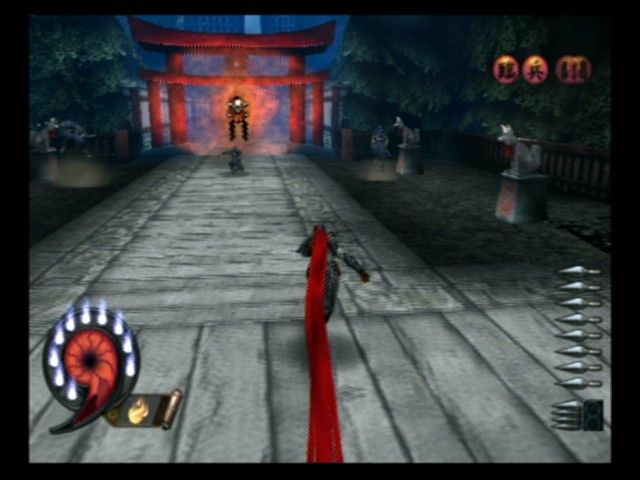
Defeat enemies and proceed through the game. Keys to a good score are:
•
Defeat as many enemies as possible.
•
Defeat enemies quickly and continuously.
•
Perform various actions when defeating enemies.
KEKKAI
To open one gate, you must defeat all enemies. To open another gate, you must destroy all existing stone pillars.
TATE
During the game, you can perform an action called "TATE" by defeating at least 4 enemies or more altogether using Akujiki within a limited time. When "TATE" is completed, the camera view will change. By succeeding "TATE," you can obtain approximately 3 times as much Yin. BOSS BATTLE
You have to defeat a boss in order to clear a stage. Use your skill to defeat the boss and proceed to the next level!
Pause
During gameplay, you can pause the game. Select options below using / button.
RETRY
Quit the game and restart the previous stage.
QUIT
Quit the game and return to the Main Menu.
RESUME
Exit the Pause Screen and resume the game.
Stage Clear
After clearing a stage and defeating a boss, the results screen will be displayed. The results will be saved onto a memory card (8MB) (For PlayStation®2) automatically.
.png)

.png)



_1.png)


.jpg)


.png)

.png)



.png)



_1.png)



_1.png)
