STARTING THE GAME
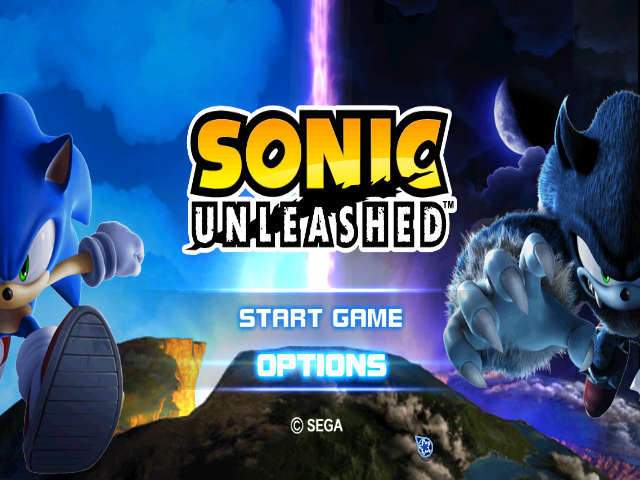
During the introductory demo movie, press the START button to display the Main Menu. Select one of the following options.
•
START GAME: Start the game.
•
OPTIONS: Change the game settings. See below for details.
SELECT FILE
After selecting GAME START, select a game file: either an existing one or one of the NO DATA slots.
If you selected one of the existing files, select one of the following:
•
START GAME: Start the game with this file.
•
DELETE: Delete the selected file and return to SELECT FILE.
•
COPY: Make a duplicate copy of the file. Select the target slot to copy to.
•
BACK: Cancel Selection and return to SELECT FILE.
GAME DATA
You must first create game data to save your game progress. After you select an empty slot, you will be confirmed to create your game data.
When confirmed, select OK to create. You will be returned to the SELECT FILE Screen, so select the newly-created data to begin the game with it.
OPTIONS
Language Settings
Select the language you prefer in the game from English, French, German, Spanish, Italian, and Japanese.
Audio Settings
Select the audio output from Monaural, Stereo, and Dolby Pro Logic® II.
Vibration Settings
Toggles the vibration setting of the controller ON/OFF.
HOW TO PLAY
STAGES
The Stages of Sonic Unleashed are divided into two types: Day Stages played with Sonic the Hedgehog, and Night Stages played with Sonic the Werehog. The play styles between the two are completely different. Each Stage has a mission to achieve, and they are divided into two types: Main Missions and Sub-Missions. Main Missions are cleared by simply reaching the Goal Ring with the given amount of Lives.
In Sub-Missions, you must fulfill a given task (many are tutorials for the controls) within a limited time. You must finish a series of Missions in order to clear the Day/Night Stage of the area. If you fail, you must try the same Mission again.
DAY STAGES - SONIC THE HEDGEHOG
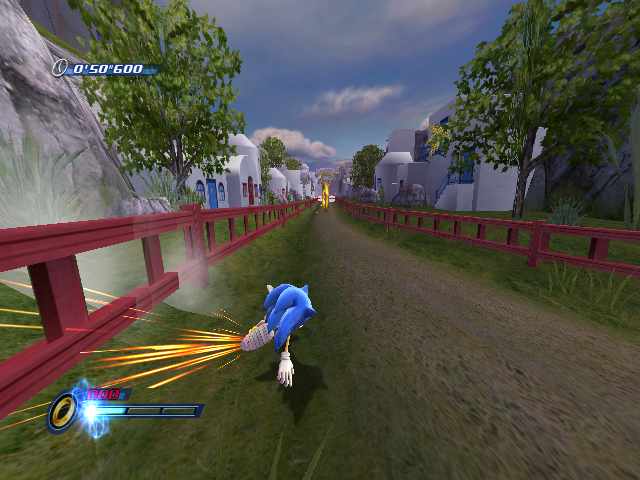
Day Stages are fast-paced Stages with a combination of 3D View sections and classic Side-View sections. Many stages have more than one route to the Goal Ring.
•
Lives Remaining (Main Missions only)
•
Target Time (Main Missions only)
•
Elapsed Time (Main Missions only)
•
Time Remaining (Sub-Missions only)
•
Rings Collected/Needed (Sub-Missions only)
Note: The screen layout depends on whether you are playing a Main Mission or Sub-Mission. The screen layout of Sub-Missions may also vary.
LIVES AND RINGS
Lives are the number of tries you have to reach the Goal Ring (clear the Mission). You will lose a life if you fall off a bottomless area, drown, or take damage with no Rings in possession.
Rings protect Sonic from enemy attacks and harmful objects, and even only one Ring in possession will prevent you from losing a life. You will lose a portion of the Rings you have when you take damage. •
Rings: one each (left) or amount shown inside (right).
STOMPING
While jumping, press the button to stomp on an object. Stomping on a fragile floor will allow Sonic to break through it. NIGHT STAGES - SONIC THE WEREHOG
In Night Stages, Sonic uses his new abilities to both fight against enemies and explore. REAL-TIME INTERACTION
In some situations, you will be prompted to press specific buttons. Quickly press the correct button(s) displayed on the screen to advance.
If you make a mistake, depending on the situation, the result could be anything from losing an advantage to costing you one Life.
RESULTS SCREEN
If you reach the Goal Ring to clear a Main Mission, the Results Screen will be displayed. Your performance will be evaluated, and you will be given a Rank and earn Moon Medals: three Medals for Rank S, two for Rank A, and one for Rank B.
For clearing a Sub-Mission, you will earn one Moon Medal.
Note: You can retry Missions from the World Map (p.18). Note that, with Main Missions, even if you retry and receive a higher Rank, you will only receive the number of Medals you did not get before.
SOME OTHER GIMMICKS AND ITEMS
•
Grind Rail: Hop onto it, and Sonic will slide along the rail. •
Ramp: Run over it to be launched into the air.
•
Dash Panel: Run over it, and Sonic will be launched running in a set direction, at a speed faster than his top speed. •
Speed Ring: Pass through one of these and Sonic will be launched into the air. •
Springs: Touch one and Sonic will bounce in a set direction. These are possible targets for the Homing Attack. •
Crane Lift: Grab it to be lifted up. These are possible targets for the Homing Attack.
•
Item Capsules: These contain items that can be viewed on the Extras Screen of the World Map (p.19). Most of these items are in hard-to-find places.
LIVES AND RINGS
The way you lose a Life is completely different in Night Stages. Sonic has a Vitality Gauge, and .png)


.png)



.png)

.png)



.png)


_1.png)

_1.png)