GETTING STARTED
Set up your PlayStation®2 computer entertainment system according to its instruction manual. Make sure the MAIN POWER switch (located in the back of the console) is turned on.
Press the RESET button. When the power indicator lights up, press the open button and the disc tray will open. Place the Splashdown® Rides Gone Wild™ disc on the disc tray with the label side facing up. Press the open button again and the disc tray will close.
Attach game controllers and other peripherals, as appropriate. Follow on-screen instructions and refer to this manual for information on using the software.
Console Ports
GET READY, GET WET, GO!
Splashdown® Rides Gone Wild™ combines watercraft racing, theme park spectacle, and wild arcade fun for the ultimate adrenaline rush! Blaze through incredible, dynamic environments, kicking off a huge variety of acrobatic tricks – it's so much fun, you'll wet yourself!
CONTROL Modes
You can choose between two different control modes whenever you race in Splashdown® Rides Gone Wild™:
•
Arcade: Your watercraft automatically hydroplanes and handles better around corners. This control mode is more forgiving and is recommended for novice racers.
•
Simulation: You must manually control your watercraft's hydroplaning and use advanced turning techniques. This mode is for the true Splashdown experts!
SLALOM BUOYS
These flag slalom buoys define the shape of the course. You must pass each buoy on the side indicated by the arrow.
Failing to properly pass a slalom buoy decreases your Performance Meter and slows you down. If your Performance Meter is maxed out, it can be a good strategy to skip a buoy or two if it means you can cut a few seconds off of your time - just don't do it too often!
RAMPS
Ramps are stunt opportunities for the watercraft. Missing a ramp means missing an opportunity to perform a death-defying vehicle stunt and boost your Performance Meter. There are no other penalties for failing to leap off them.
OFF-COURSE
If you fly off of the course, you've got a few seconds to get yourself back on track. If you don't return to the course before the timer expires, you are automatically reset on the course and slapped with a brief time penalty.
You can also press the button to automatically return to the course.
PAUSE MENU
Pressing the button during a race pauses the game and brings up the Pause Menu, which contains the following options:
•
Continue: Resume the race.
•
Restart Event: Start the race over from the beginning.
•
Stats: Show or hide your lap statistics.
•
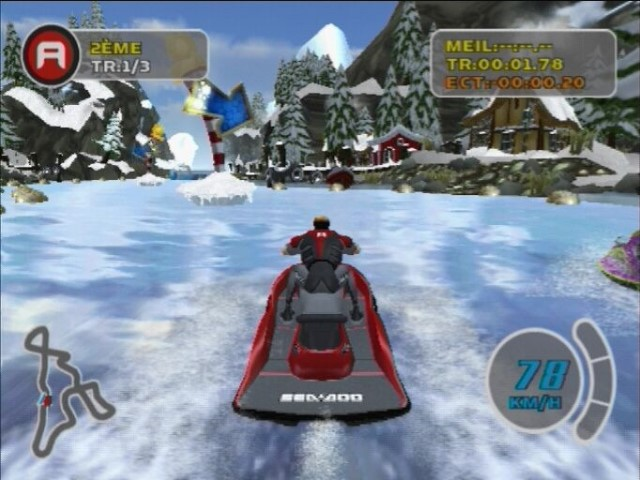
Speedometer: Show or hide the speedometer.
•
Performance Meter: Show or hide the performance meter.
•
Map: Show or hide the course map.
•
Camera Roll: Toggle the Camera Roll ON or OFF.
•
Sound Options: Choose the Music Track you want to listen to and set the volume levels for the Game Music, Overall Sound Effects (SFX), Engine, Environment, and Dialogue.
•
Quit Event: Exit the race and return to the Main Menu.
STUNTS
To keep your Performance Meter high and your speed and acceleration competitive, you need to perform as many stunts as possible. There are 360 separate stunt combos in Splashdown® Rides Gone Wild™, so you shouldn't run out of them any time soon!
The best way to master stunts is to use the Stunt Library option in Training mode.
RIDER STUNTS
To perform a stunt, hold down either the L1, R1, or R2 buttons and use the directional buttons or left analog stick to perform a basic Tier 1 stunt. The name of the Tier 1 stunt appears at the bottom of the screen when you successfully perform it.
To boost your Performance Meter above the first segment, you need to perform Tier 2 and 3 stunts. To perform these advanced stunts, link to them from a Tier 1 stunt.
After performing a Tier 1 stunt, continue to hold down the stunt button (L1, R1, or R2 button) and use the directional buttons or left analog stick to perform the next stunt in the chain. Each Tier 1 stunt leads into three different Tier 2 stunts, and each Tier 2 stunt leads into two different Tier 3 stunts.
If you try to enter a stunt command that doesn't lead to a real stunt, nothing happens and you earn no points. Also, if you release the stunt button, your stunt combo ends, and the next stunt you perform will be a Tier 1 stunt. Non-linked stunts are not worth as much as linked combos of stunts.
You can enter the commands for a combo of stunts without pausing between the stunts, even if you haven't finished the first stunt yet. The game remembers your commands and executes them in order.
VEHICLE STUNTS
Unlike rider stunts, vehicle stunts can only be performed when you're flying off ramps. Vehicle stunts carry low, Tier 1 point values. They don't just apply to the first block of the Performance Meter, though they add boost to the block you currently have filled.
You can also combine vehicle stunts with rider stunts to create spectacular combos and add much more boost to the Performance Meter as well! There are three different vehicle stunts that you can perform:

_1.png)


_1.png)


.png)
.png)


.png)