GETTING STARTED
Using the PlayStation®2 System
Illustration may not match all PlayStation 2 console types. For owners of SCPH-70000 series PlayStation 2 systems, refer to the setup instructions supplied with your system. Set up your PlayStation®2 computer entertainment system according to the instructions in its Instruction Manual. Make sure the MAIN POWER switch (located on the back of the console) is turned ON.
Press the RESET button. When the power indicator lights up, press the OPEN button and the disc tray will open. Place the THE INCREDIBLE HULK: Ultimate Destruction disc on the disc tray with the label side facing up. Press the OPEN button again and the disc tray will close.
Attach game controllers and other peripherals, as appropriate. Follow on-screen instructions and refer to this manual for information on using the software.
Memory Card (8MB) (for PlayStation®2)
To save game settings and progress, insert a memory card (8MB)(for PlayStation®2) into MEMORY CARD slot 1 of your PlayStation®2 system.
You can load saved game data from the same memory card or any memory card (8MB)(for PlayStation®2) containing previously saved games.
MAIN MENU
STORY MODE
•
New Game - Start the game from the beginning.
•
Load Game - Load a previously saved game.
•
Continue Game - Continues the most recently saved game and provides access to the computer Interface. The computer in Banner's hideout contains all the hints you have collected in the game, your stats, and the move acquisition menu.
OPTIONS
•
Save/Load - Allows you to manage The Incredible Hulk: Ultimate Destruction games saved on your memory card (8MB) (for PlayStation®2). •
Controller - Controller Configuration and turn Vibration on/off.
•
Camera Options - Invert axes, toggle targeting.
•
Sound Options - Change audio levels on sound effects, music and dialog. Choose between mono, stereo and surround.
•
Progressive Scan - This option will be available if your television and system support it.
EXTRAS
•
Stats - View your stats.
•
Art Gallery - View bonus art galleries.
•
Movie Gallery - View bonus movies.
•
Cheats - Toggle cheats, code input.
•
Credits - Check out the credits for the game.
PAUSE SCREEN
•
Continue - Return to the game in progress.
•
Map - Provides a full-screen map of the Hulk's surroundings.
•
Mission Objectives - Shows the objectives for the current mission.
•
Options - Takes you to the options menu.
•
Move Gallery - Lists your available moves.
•
Abort Mission - Return to free roaming gameplay.
•
Restart Mission - Start the current mission over.
•
Exit to Main Menu - Quits current mission and returns to Main Menu.
HOW TO PLAY
Playing as the Hulk, you must avoid or eliminate any opposition in your quest to build the machine that will cure you. Each mission you complete will bring you one step closer to your goal.
After each mission you will have the choice to go and accept the next mission right away, explore the world, or undertake challenge missions for extra smash points. You will need to deal with the military forces led by your old nemesis General Ross, as well as some new enemies who have yet to reveal themselves. Objectives
The Hulk must accomplish some challenging objectives in order to complete his missions. These objectives will be marked with colored icons on the mini map, and similarly colored indicators at corresponding locations in the world. These in-game indicators are:
•
A red fist for things the Hulk is supposed to smash.
•
A yellow hand for things the Hulk is supposed to pick up.
•
A blue shield for things the Hulk is supposed to protect.
•
A golden arrow to mark a place where the Hulk is supposed to put something down.
•
A green house indicates the Hulk's base where he can buy moves.
Hypnotic Sequences
In order to exercise some control over the Hulk, Dr. Samson is using implanted hypnotic suggestions. Pay attention to these dream-like sequences since they will provide clues on how the Hulk can accomplish his missions.
MOVEMENT
Running
Holding down R1 while moving the left analog stick will make the Hulk run.
Jumping
Tapping will cause the Hulk to do a small hop. Holding down briefly before releasing it allows the Hulk to charge his jumps, giving them more range and speed.
Holding during a jump and releasing it just as the Hulk lands performs a Chained Jump, allowing the Hulk to cross large distances with great speed.
Wall Running
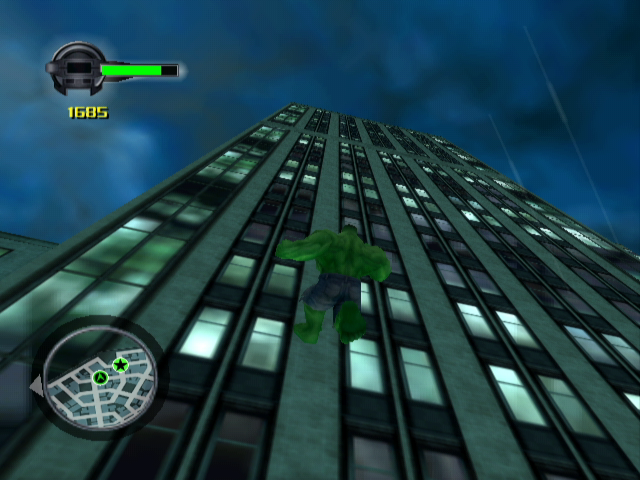
The Hulk can run up and along walls by running or jumping into any vertical or near-vertical surface at speed. Climbing
Press by a wall to make the Hulk grab it. Use the left analog stick to move along the surface. Detach using or .
COMBAT
Attacks
Use to do a basic punch. Hold down briefly before releasing it to apply more force to the punch.
Different attack combinations can be accomplished by pressing different combinations of the and buttons. Try pressing these buttons in different combinations to discover some of the Hulk's special moves.
Grabbing & Throwing Objects
Use to pick up many objects throughout the world. Objects like lampposts make great clubs. The Hulk can even pick up and throw large objects like cars or 




.png)

.png)



.png)
