Getting Started
Set up your PlayStation®2 computer entertainment system according to the instructions supplied with your system. Check that the system is turned on (the on/standby indicator is green).
Press the OPEN button to open the disc cover. Place THE RED STAR™ disc with the label side facing up in the disc holder, and then close the disc cover. Attach game controllers and other peripherals as appropriate.
Follow the on-screen instructions and refer to this manual for information on using the software.
Memory Card (8MB) (for PlayStation 2)
To save game settings and progress, insert a memory card (8MB)(for PlayStation 2) into MEMORY CARD slot 1 of your PlayStation 2 system. You can load saved game data from the same memory card or any memory card (8MB)(for PlayStation 2) containing previously saved games. Main Menu
•
Start Game: Start a new Red Star game or load a saved game.
•
Options: Change game options.
Options
•
Audio Mode: Choose mono, stereo or surround sound modes.
•
Music Volume: Adjust music volume.
•
Effects Volume: Adjust sound effects volume.
•
HUD Opacity: Change the opacity of the Heads Up Display.
•
HUD Position: Change the location of the Heads Up Display.
•
Vibration: Choose to play with vibration effect ON or OFF.
•
Controls: Review in-game controls.
•
Credits: View game credits.
•
Progressive Scan: Switch to progressive scan mode for high definition monitors.
•
Save Options: Save options settings to your memory card.
•
Load Options: Load saved options settings.
Menu Navigation
•
Directional button - Highlight/navigate
Once you choose Start Game, you will advance to the File Select Screen. If you have a previously saved game in any slot, you can select it and resume that game. Otherwise, simply press the button to advance and begin a new game.
Combat
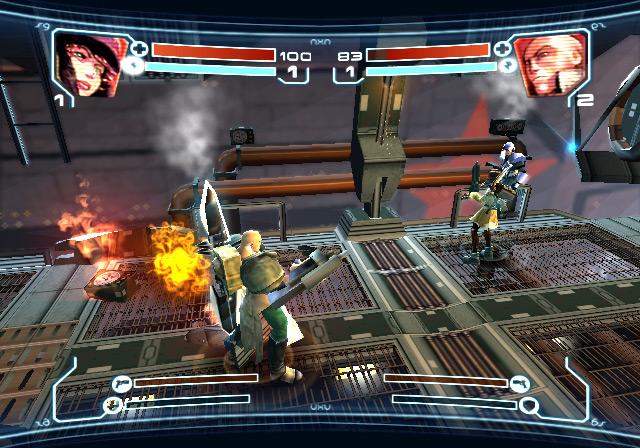
There are three basic forms of combat; Melee Attack, Projectile (gun) Attack and Protocol Attack. Make sure to look at the Moves tab on the Subscreen for in-game controls.
Melee Attacks
Melee Attacks are your basic hand to hand combat techniques using hand-held weapons.
Strafing/Lock-on
Pressing the R1 button will lock on to targets and maintain that lock until the target falls to the ground or you release the R1 button.
Basic Combinations
String together Melee button presses to execute the character's basic combo. Basic Combinations are easy to perform, but deal low damage.
Most of the hits in a basic combo string can be interrupted into Special Moves, Protocol Attacks, and Gunfire.
Special Moves
Hold the R1 button then press the left analog stick TOWARDS or AWAY from the direction of your character and press the Melee Attack button (for example, R1 button + TOWARDS + button) to pull off your Special Move.
Special Follow-ups
Many Special Moves have additional actions that can be performed afterwards. These are called Special Follow-ups.
To perform a Special Follow-up, hold the R1 button then press the left analog stick TOWARDS, NEUTRAL, or AWAY from the direction of your character and press the Melee Attack button.
Custom Combos
Basic Combinations lead into Special Moves, and Special Moves lead into Special Follow-ups. This means that you can perform extended combos by starting with a Basic Combination, canceling into a Special Move, and then finishing with a Special Follow-up.
Choose the right sequence of moves to perform on an enemy based on the amount of damage dealt and safety desired.
Ground Attacks
You can attack an enemy that is lying down on the ground by using the Ground Attack. When close to an enemy that is lying down, hold the R1 button, then press the Melee Button while the left analog stick is NEUTRAL.
Projectile Combat
Each character has a default weapon with which they can perform Projectile Attacks. As long as you don't overtax your heat gauge, you can fire your projectile weapon at will.
This attack, like the melee, can be used independently or in conjunction with the basic melee combinations to perform more diverse combo strings.
Protocol Attacks
Protocol Attacks are powerful feats of Military Industrial Sorcery. Each character has a Protocol Attack that is performed by pressing the button when the Protocol Meter is full.
Each character can purchase upgrades that increase the effectiveness of a Protocol Attack. When flinched by an enemy attack, the player can use a Protocol Counter to avoid further damage or to prevent enemies from overwhelming the player.
Press the button while getting flinched by an enemy attack. However, the Protocol Counter requires 50 percent of a Protocol Meter to perform.
Defense
Defense is generally done by using your Guard Shield and by simply dodging out of the way of attackers and hostile environmental objects. You are instantly invulnerable to damage from both standard melee and standard projectile attacks when the Guard Shield button is held.
The Guard Shield button can also be held down to continue guarding. The Guard Meter is found at the bottom of the screen, and increases as you guard against attacks. When it is full, you will temporarily be unable to guard. Shields are highly effective in blocking melee attacks, but less useful at stopping projectiles