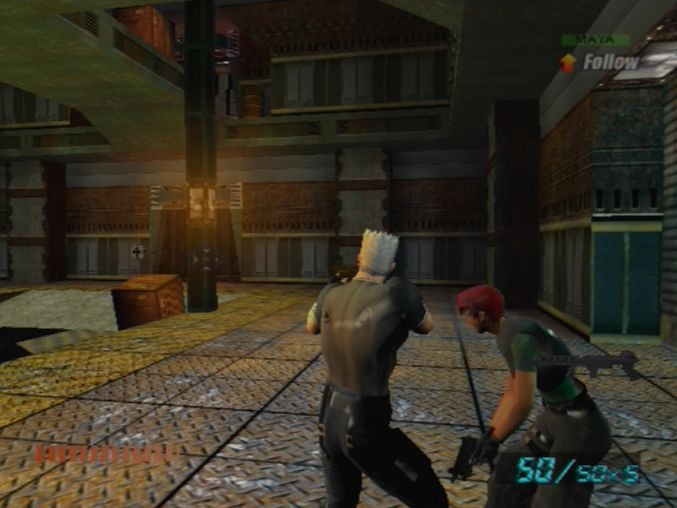
X SQUAD TEAMMATE COMMUNICATION DISPLAY
The indicator in the upper right corner of the screen shows the name of the X Squad member you are communicating with and the command given. If your teammate is out of communication range, the command field reads DETACHED.
The color of squad members' names indicates their health status. Names are green initially and turn red as health decreases from hits. A gray name with "Disabled" means your squad member has been hit too many times to fight.
Restoring Teammate Health
•
Assign the MED KIT to the disabled X Squad member.
If you leave wounded teammates unattended, they cannot help you until you complete the current mission by yourself.
SELECTING ITEMS
You can select any weapon to equip from the inventory. This same procedure applies to selecting other items.
To choose a specific weapon:
•
Press to display the Weapon Selection screen.
•
Use the directional button or left analog stick to select a specific weapon.
•
Press to equip the weapon.
Even when selecting items, fighting continues and the enemy can shoot you. To avoid this, tap SELECT to access the Game menu and change weapons in the TACTICS option.
SELECTING COMMANDS
When you are in communication range with your squad member, you can order them to assist you by selecting commands.
To give your squad member a command:
•
Press to display the squad command screen.
•
Use the directional button or left analog stick to select the command.
•
Press to confirm the selection. Member names are displayed.
After selecting the command, you must select which player to give the command to:
•
Use the directional button or left analog stick to select the member.
•
Press to confirm the selection.
•
Your squad member follows the selected command.
Press or select CANCEL to cancel squad commands.
COMMANDS
There are five categories of commands: follow, recon, attack, spread, and stay.
•
FOLLOW (non-combat and combat): Follow you
•
RECON (non-combat): Scout around for enemy
•
STAY (out of combat): Tell your teammate to remain put until further orders are given
•
ATTACK (during combat only): Orders your teammates to directly attack the enemy.
•
SPREAD (during combat only): Maintain a safe distance from each other when engaging the enemy
Squad members can also be told which strategy to use.
•
ASSAULT: Attack-emphasized, Move aggressive strategy
•
STEALTH: Defense-emphasized, The element of surprise
RECON changes to ATTACK when in Combat mode. STAY changes to SPREAD when in Combat mode.
For the RECON or ATTACK command, move your gun sight to specify where your squad member goes. Move your sight first and then issue a command. The destination is indicated by an arrow.
Only use a Recon command when you have enough space to launch a destination point. Do not use a Recon command in front of a wall or in a confined space.
CHECK POINTS
There are check points throughout each stage. When your health meter runs out and your game ends, you can resume the game starting from the most recent check point you have reached. This is useful when you're deep into a level.
PAUSE MODE
When you press the START button in the middle of the game, the Pause Mode screen appears. Here you can view the map which shows your current position and surroundings.
Press START to exit Pause Mode at any time.
GAME MENU
When you press the SELECT button during gameplay, the Game menu appears. You can equip weapons, use items, or assign them to a squad member. You can also change the game settings or quit to the Main menu.
TACTICS
According to the progress of your mission, devise your strategy and select the most suitable settings. You can change the settings at any time during the game.
•
Use L1/R1 or the directional button to switch between squad members as you perform various operations.
•
Press to exit the Game menu at any time.
WEAPONS
To select a weapon:
•
Select TACTICS from the Game menu.
•
The Weapons Inventory screen appears. Use the directional button to make your weapon selection.
•
Press to return to the Game menu.
The weapon you have equipped appears in the lower right hand corner as you cycle through available weapons.
EQUIPMENT
To select equipment:
•
Select TACTICS from the Game menu.
•
Press to confirm your selection.
•
The Equipment screen appears.
To use, assign, or discard an item:
•
Use the D-Button to make your selection.
•
Press to display the three options: USE, ASSIGN, and CANCEL.
•
Press to cancel and return to the Game menu.
Press to discard the item.
Items that are equipped are indicated by an E mark. Selecting an E-marked item allows you to put it away. (You cannot put away weapons this way).
ASSIGN
You can hand over items to another squad member by selecting this option. Select a squad member by name and press x. If you have several of the same items, use the directional button to specify the number of units you want to hand over.
You can also assign amounts of ammo to your squad members. Use the directional button to assign ammo in sections of 10 units. Use the directional button to
.png)

.png)
.png)
.png)