Getting Started
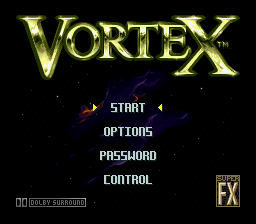
Insert your "Vortex" game cartridge into your Super Nintendo. Make sure the power is on. When you are ready to begin the game, press Start. Title Screen Options
The Title Screen contains several options to choose from:
Starting the Game
If you select Start, press Start to begin the adventure.
This will take you to a sub-menu where you can select either Training mode or Game mode. Move the cursor Up or Down to select Training or Game, and then press Start.
Options Menu
If you select Options, press Start to enter the Options menu. This screen displays various options you are able to choose from:
•
CPU Targeting (or UPC Target)
Language Option
You can play the game in English or Spanish. To select a language, move the cursor to Language, then press the Control Pad either Left or Right to cycle through the choices. Move the Control Pad Up or Down to select another option or press Start to exit the Options Menu and return to the Title Screen.
Difficulty Option
To select a difficulty level, move the cursor to Difficulty, then press the Control Pad either Left or Right to cycle through the choices. The three choices are Easy, Normal, or Hard. Move the Control Pad Up or Down to select another option or press Start to exit the Options Menu and return to the Title Screen.
Targeting Option
Select the targeting system to be operated by the computer or manually. If you select ON, the target will appear automatically on the screen and will lock onto the nearest enemy during battle. If you select OFF, no target will appear on the screen.
Transmission and Speed
In the modes of the Walker, Land Burner, and Hard Shell, you will be able to adjust your speed by controlling the Morphing Battle System's transmission. Your speed can be seen in a meter found in the lower left corner of the Adventure screen.
The Morphing Battle System is capable of three forward speeds, neutral, and reverse. Only the Walker, Hard Shell, and Land Burner forms are capable of all speeds. The illuminated box next to the Morphing Battle System's radar indicates the current speed:
•
Forward Fast—top yellow box
•
Forward Medium—middle yellow box
•
Forward Slow—bottom yellow box
Training and Mission Areas
Your adventure takes place in two separate planetary systems, Deoberon and Aki-Do, which are linked together by the Interdimensional Vortex. Before your Morphing Battle System is sent to the Aki-Do System, you should first complete three simulator Training missions. Lt. Dante will give you a full debriefing on what is expected of you.
The training simulations consist of:
•
Training 2: Navigation Test
•
Training 3: Seek and Destroy
Once the simulations have been successfully completed, you will journey to the Aki-Do System, via the Vortex, and land on each planet one by one:
•
Mission 6: Return through The Vortex
Your Mission
Your mission is to recapture the Core segments and take them back to Trantor. One Core segment is located on each of the four planets of the Aki-Do System, and the final piece is located somewhere in the Interdimensional Vortex. This final piece can be retrieved only after you have retrieved the first four pieces.
With the pieces of the Core safely in tow, you will navigate through the mazes of the Citadel on Trantor and search for the resting place of the A. I. Core where it will be reassembled. When you have collected a Core segment from a planet surface, you will be picked up by the Mother Ship and taken to the next planet's mission area.
Adventure Screen Indicators
Watch the Adventure screen closely during the entire course of your adventure. It will tell you the following things:
•
Lives Remaining: The number of replacement Morphing Battle Systems you have remaining is shown in the top left corner. Your game will be over when your last Morphing Battle System is destroyed.
•
Time Remaining: The time displayed in the top center of the screen will count down. If the timer reaches zero, your mission is considered a failure and your Morphing Battle System will be destroyed, reducing your lives by one. You will encounter the timer in some mission areas and all bonus stages.
Game Start
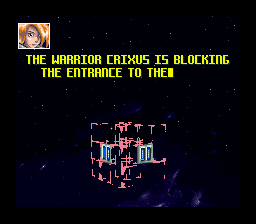
At the beginning of every level, Lt. Dante will give you a mission debriefing. Listen closely to what she has to say, as she will guide you through the mission areas to the Core segments. On the screen, you will see the Core segments you have or have not picked up. When you are ready to begin the adventure, press Start.
Sonic Jet Mode
The Sonic Jet is a jet aircraft that allows the Morphing Battle System to fly to areas that are otherwise inaccessible. As a default weapon, the Sonic Jet can fire the same laser as the Walker. Like the Land Burner, it can only fire weapons carried on the Morphing Battle System's right arm, and you cannot change the left arm weapon in Sonic Jet mode.
The Sonic Jet normally cruises at very high speeds, but can use a turbo boost or air brakes to speed up or slow down for short periods. Be warned,
 (En,Es).png)

 (En,Es).png)
