SETTING UP
Set up your PlayStation™ game console according to its Instruction Manual. Make sure the power is OFF before inserting or removing a compact disc. Insert the AQUANAUT'S HOLIDAY™ disc and close the CD door. Insert game controller(s) and turn ON the PlayStation™ game console. Follow on-screen instructions to start a game. Memory Cards
If you want to save games, insert one or two memory cards. You can continue previously saved AQUANAUT'S HOLIDAY games by loading them from the Start-Up menu. See "Saving & Loading Games" for instructions.
If a memory card is full, you will not be able to save games to it. Delete data or reformat the card before starting. See the hardware manual for instructions.
STARTING A GAME
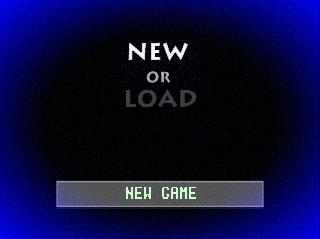
The Start-Up menu offers two game modes:
•
NEW: Start a game from the beginning.
•
LOAD: Continue a saved game from a memory card. (See "Saving & Loading Games" for information.)
•
Begin the game from the Options menu.
After selecting a game mode, you advance to the Name menu, where you can create a name for the current game:
•
Highlight characters and press ☒ to place them on the name line.
•
SPACE adds a blank to the name line.
•
BACKSPACE deletes the last character or blank in the line.
•
END exits to the Options menu in a NEW game, or to the Base's Extended Screen in a LOADed saved game (see "Base Operations").
Options Menu
Use the Options menu to select Sound and Window modes.
•
Select STEREO or MONO depending on your audio system. Use the Up/Down Directional buttons and press ☒.
•
Select a SQUARE or OVAL viewing window. Use the Left/Right Directional buttons and press ☒.
•
Press Start to begin the game.
COMMAND ICONS
Your undersea exploration is packed with discovery opportunities. The HOLIDAY provides the following onboard command icons to assist you.
Launch Point
This icon launches a "point" or marker buoy at your current location. For example, you might launch a buoy near a submerged city or sunken ship. Once you set a buoy, you can return to it easily for further exploration. (See "Point View.")
You can set up to 256 points. When two buoys are launched too close together, one of them will disappear.
Return
Use this icon to automatically return to the Base.
OTHER EXHILARATING ACTIVITIES
Conversing with the Fish
You can broadcast sounds from the HOLIDAY to attract and talk to the marine life around you. Some fish may respond readily, others may show no reactions.
Press the Shift buttons to send four different sounds. Each sound displays an icon in a different corner of the window. Try combining the sounds, or changing their broadcast order, and see what happens. The ocean is full of surprises. Experiment!
Changing the View
You can easily get a 360° view on your surroundings.
1. Press and hold Select.
2. Press L1 or R1 to begin rotating to the left or right.
3. Release L1 or R1 to stop rotating.
4. Release Select to return to your original orientation.
•
L1 - Rotate to the left.
•
R1 - Rotate to the right.
INDICATOR ICONS
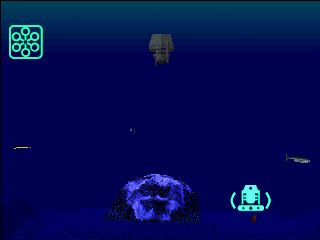
Several icons appear regularly in the Holiday's viewing window to indicate your current movements.
Speed
Lighted circles in this icon cycle at the same rate as your current speed. Counterclockwise cycling indicates forward motion. Clockwise cycling is reverse motion.
Motion
Lighted bars cycling upward indicate that the HOLIDAY is ascending. Bars cycling downward indicate descent.
Compass & Angle
The ball circling the icon indicates the direction the HOLIDAY is heading (south, in this example). The ball moving vertically in the center shows the HOLIDAY's angle in the water, as represented by the horizontal lines.
Maximum Ascent
This icon alerts you that the HOLIDAY has reached its highest underwater altitude.
Maximum Descent
This icon appears when the HOLIDAY strikes the sea bottom, or an obstacle on the sea bottom.
BASE OPERATIONS
The Base is your stationary center of operations during your ocean stay. Use the Return command icon to swiftly enter the Base from anywhere in the ocean.
From the Base, you can build a reef, go on to any previously set point, return to your explorations, save the current game, load a saved game, or quit.
Leave Port
Return to exploration, starting in front of the Base.
USING POINTS
Use the Point View menu to jump to previously set buoys, change their color, or remove buoys.
1. Select POINT VIEW on the Extended Screen. A grid appears showing the locations of all previously launched buoys. The most recently set buoy is red; all others are green.
2. Use the Directional buttons to scroll around the grid, or press to hop from buoy to buoy in the order sequentially launched and to hop from buoy to buoy in the order of most recent launch. While on a buoy, press to select it, then press any Shift key to change its color (you cannot re-color the red buoy
.png)

_1.jpg)
.png)





.png)
.png)
.png)
_1.png)