Console Top View
Console Front View
Setting Up
1. Set up your PlayStation™ game console according to the instructions in its Instruction Manual. 2. Make sure the power is off before inserting or removing a compact disc.
3. Insert the PANDEMONIUM disc and close the disc cover.
4. Insert game controllers and turn on the PlayStation™ game console. 5. Follow on-screen instructions to start a game.
Note: It is advised that you do not insert or remove peripherals once the power is turned on.
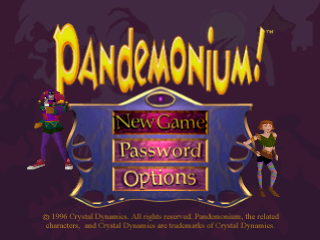
Main Menu
1. At the Main Menu, highlight your selection and confirm by pressing X.
Main Menu Items
Start a new game from the first Mystic Map level.
Use a password earned in a previous game to resume the game at a later level. On the Password screen, use the Directional buttons to enter the password (UP/DOWN to change a symbol; LEFT/RIGHT to move the entry point). Confirm by pressing X.
If the password you entered is invalid, try again or quit to the Main Menu by pressing.
Note - To see your current password, on the Mystic press SELECT. Write down the password and use it to play your game later.
Display the OPTIONS menu to adjust game preferences. Press Up/Down to highlight the desired option.
•
SOUND FX/MUSIC: Adjust by pressing the Directional buttons LEFT/RIGHT.
•
CONTROLS: Remap the Jump, Fire and Special controls by pressing the Directional buttons LEFT/RIGHT.
Mystic Map
You start games from the Mystic Map.
1. Press to choose Fargus or Nikki as your guide. (You can switch characters before every level.)
2. Move your character to the red spot on the first island (in new games), or to the red spot on any available island (in Password games).
3. Press X to begin.
4. When a level ends, you'll return to the Mystic Map. If you finished the latest level, the next level becomes available. If you didn't complete the latest level, you can try it again or replay an earlier level.
Pausing a Game
To Take a Brief Break:
1. During play, press START to pause the game.
2. Press START again to resume play.
To Quit the Game:
1. On the Mystic Map, press START to pause.
2. Press SELECT to quit the game.
3. Highlight QUIT and press X to quit game or highlight CONTINUE and press X to return to game.
Coins
Collect 300 Coins to gain an extra Life.
•
Green Coins are valued at 1.
•
Red Coins add 5 to the number.
•
Purple Coins are worth 25.
•
Double Treasure Timer doubles the value of any Coins you collect in the next 10 seconds.
Coin Bonus
Picking up all (or almost all) of the Coins in a level earns you entry into one of the Bonus Rounds!
•
Collect 80% of the Coins and find out how fast you are!
•
Collect 95% of the Coins and get ready to bounce, flip and tilt!
•
Secret Areas - Explore levels to find special doors and hidden chutes that take you to areas packed with hidden surprises!
Shapechanging
Run through special gates and you could find yourself magically changed!
You're the "air apparent." Press the Directional button UP to fly and DOWN to dive. NOTE: Dragon is an expert at breaching fire.
Charge through enemies and obstacles, wreaking wreckage without taking hits. You've gotta be running to avoid damage; a rhino standing still is a sitting duck.
Jump super high as an agile amphibian.
Press the Directional button DOWN and it's "no trespassing" while you're holed up in your shell and invulnerable.
 (Rev 1).png)



 (Rev 1).png)
.png)

_1.png)







 (En,Fr,De,Es,It) (No EDC).png)



_1.jpg)


_1.png)
 (En,Fr,De).png)

_1.png)