GETTING STARTED
Set up your PlayStation® game console according to its instruction manual. Ensure the power is off before inserting or removing a compact disc. Insert the Twisted Metal 4 disc and close the disc cover. Insert one or two game controllers and turn on the PlayStation game console. Follow the on-screen instructions to start a game. Three or four player games require the use of a Multi-Tap.
Memory Card
The MEMORY CARD can be used to save game configurations, Tournament progress, and created cars. Insert the MEMORY CARD in Card Slot 1 (Card Slot 2 is not used).
To save your game configuration:
•
Select OPTIONS on the Main Menu and make the game modifications you want.
•
Save your changes to a MEMORY CARD when prompted.
To load a game configuration:
Insert your MEMORY CARD before turning on the PlayStation game console, and your configuration loads automatically when you start the game. If you insert your MEMORY CARD after starting up the game (while still in the setup menus), Twisted Metal 4 will prompt you to load your configuration. To save your created vehicle:
•
Select CREATE A CAR on the Vehicle Selection screen and make your car.
•
Save your created car when prompted.
To load a created car:
•
Select LOAD CAR on the Vehicle Selection screen and load your created car.
To save your progress in a Tournament:
As you complete each Tournament level, you will be prompted to save your progress.
To load a Tournament:
•
Choose LOAD GAME on the Main Menu.
•
Choose the saved Tournament you want to continue playing from the list of saved games.
SETTING UP THE GAME
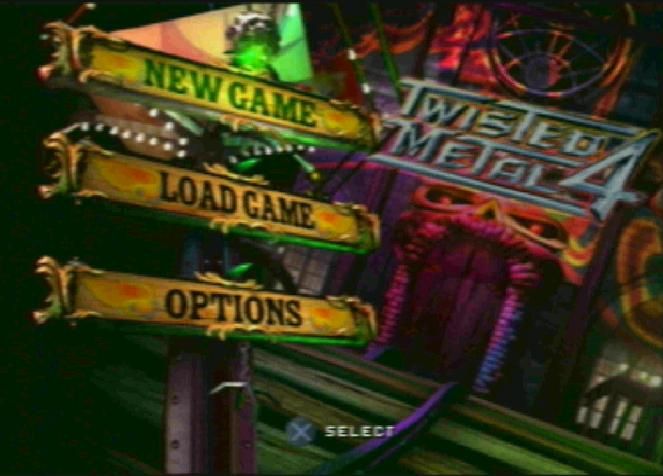
At the main menu screen, press the D-Pad up/down to highlight an item and press the button to open it. Press the D-Pad left/right to change a setting and press the button to confirm the selection.
NEW GAME
Choose Game Type
•
Tournament—Try to make it through all eight battlezones.
•
Deathmatch—Single battles in the world of your choice.
Number of Players
•
One to four players attempt vehicular assassinations against each other and everyone else.
•
Three or four player games require a Multi-Tap.
OPTIONS
Audio
•
Sound FX Volume - Press the D-Pad left/right to adjust volume.
•
Music Volume - Press the D-Pad left/right to adjust music volume.
Video
•
Dithered Display - Dithering helps display color transitions better. A non-dithered display shows sharper detail. Select YES/NO.
•
Refresh Priority - Choose GRAPHICS to emphasize graphics over gameplay speed. Choose GAMEPLAY to emphasize gameplay speed over graphics.
•
Adjust Screen - Press the D-Pad left/right and up/down to center the screen display.
•
Password - Enter password here to unlock secret areas of the game.
•
Credits - Meet the body and fender folks at 989 Studios.
LOAD GAME
•
Select a saved game at MEMORY CARD screen.
TOURNAMENT
You'll fight through eight deadly battlegrounds, advancing to each new level only after wiping out all opponents. Enemy vehicles are chosen automatically.
As you progress through each level, the bad guys get tougher to beat. You begin the Tournament with five lives. When you run out of lives, you lose and the Tournament is over.
If you make it through all eight levels, you win and are the champion of our freak-filled, twisted tournament. Tournament play is a one or two player game.
You can save your game during Tournament play when you complete a level.
After selecting your vehicle, select YES or NO for the following Tournament options:
CPU Ally
Drive into battle with a computer-generated friend of your choice who will blow away anything that moves except you. It's great having someone to take your bullet, but when you win, you won't see the ending movies.
If you say YES to CPU Ally, press the D-Pad left/right to review potential battle partners and press the button to confirm your choice.
Pool Lives
If you select a CPU Ally, you can combine the total lives, starting the Tournament with ten lives between you. Each time someone gets creamed, one life is eliminated.
DEATHMATCH
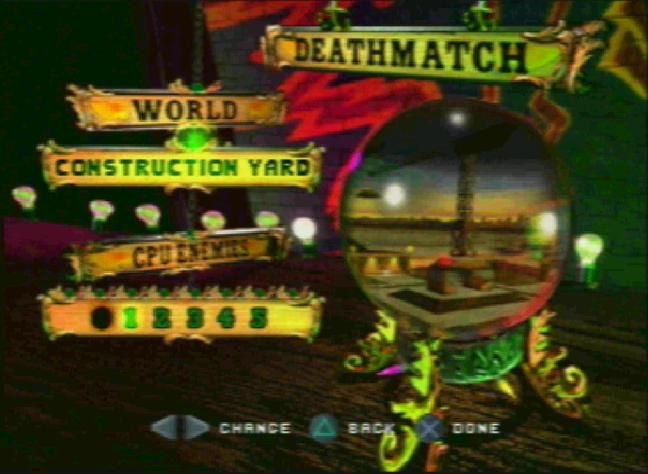
Deathmatch mode lets one to four players wreak automotive devastation in the world of their choice. You can pick exactly who and how many opponents you want to fight. You can also make the match one quick showdown or an infinite number of rematches.
Check out the following options for making the Deathmatch your own wacked out world.
1. Press the D-Pad up/down to highlight a category.
2. Press the D-Pad left/right to change the setting.
3. Press the ▲ button to close the screen.
World
Select the world where you want to get crazy. Review the "Twisted Worlds" section to get help with your travel plans.
CPU Cars
Select how many opponents you want. Seven is the maximum.
Options
•
Press ■ button to enter Deathmatch Options.
DIFFICULTY LEVEL
Choose Easy level for the easiest gameplay, Medium for more difficult gameplay, and Hard for maniacal, no holds barred war.
CHOSEN WORLD REPEATS/ADVANCES
Play one world over and over or move each Deathmatch to a new location after you win.
CPU CARS CHOSEN
•
Random or By Player - Select RANDOM if you want cars randomly chosen. Select BY PLAYER
 (Rev 1).png)

 (Rev 1).png)
.png)


_1.png)
.png)
.png)