System Setup
Set up your PlayStation®2 computer entertainment system according to its instruction manual. Ensure the MAIN POWER switch (located on the back of the console) is turned on.
Press the standby/RESET button. When the power indicator lights up, press the open button to open the disc tray. Place the BASS Strike™ disc on the disc tray with the label side facing up. Press the open button again to close the disc tray.
Attach game controllers and other peripherals as appropriate. Follow on-screen instructions and refer to this manual for information on using the software.
Memory Cards
To save game settings and progress, insert a memory card (8MB) (PS2) into MEMORY CARD slot 1 of your PlayStation 2. You can load saved game data from the same card, or any memory card (8MB) (PS2) containing previously saved BASS Strike™ games. BASS Strike™ only uses Memory Card slot 1 for saving and loading.
Start Menu/New Game
From the Title Screen, press the START button to view the Main Menu. You can select from two options:
•
New Game - Start a new game of BASS Strike™.
•
Load - Continue the game where you last saved it.
Sign In
After selecting NEW from the Main Menu, your first job is to sign in. Use the Directional buttons or the Left Analog Stick to navigate the onscreen keyboard and enter your angler's name. When you are finished, select OK to move to the next screen.
Difficulty
For your first time on the lake, you should select AMATEUR to get a feel for the game. Once you can catch fish with the best of them, notch up the difficulty level to PROFESSIONAL for a "reel" challenge.
The bass are fickle and finicky in PROFESSIONAL mode, just like in real life. You will have to be at the top of your game to make it on the PROFESSIONAL difficulty level.
In PROFESSIONAL mode, the split screen camera mode is only available to find fish in practice boating mode. You'll have to use your knowledge based on the weather, time of day, and lake conditions to find the lunkers!
Main Menu
Select from the following list once you reach the Main Menu:
•
Arcade - In Arcade mode, it's you against another angler. The winner is the one who catches the most fish (by weight) at the end of the time allotted. You will only be able to select Michael as your angler. He's a good all-around angler, so you should do well. But the other anglers have specialized traits that help them score big in certain conditions. Beat your opponent at five different locations and you will unlock that character for future games. You can then play as that character in future Tournaments, Practice, or Time Trial modes.
•
Tournament - Do you have what it takes to compete against the best? Then check out Tournament mode.
•
Practice - Want to polish your skills before the big tournament? Then head on out to Practice Mode, where you get unlimited fishing until 6:30 pm. Watch how the fish behave according to the time of day and varying water temperatures. They will also react differently depending on the weather conditions of the lake. Knowing your fish behavior is essential if you hope to win the BASS Masters Classic®!
•
Time Trial - Test your speed and ability against the clock - can you hook the fish and reel them at a record time? Time trial is a good way to practice getting the fish in the boat as quickly as possible. During Tournament mode and Arcade mode, the competition is fierce. If you can land the fish and get it back in the boat quicker than your opponent, you will have an edge.
•
Lake Records - View the best performances on each of the game's lakes. Challenge yourself to beat your personal bests. Only fish caught in Tournament and Practice modes apply.
•
Options - You can save your game from this menu as well as reload a previously saved game. You can also adjust the music, sound effects, voice volumes, as well as adjust the game controls.
Saving & Loading
You can save up to six different games onto a memory card (8MB) (PS2). First, start a new game and enter your name. Now complete any of the game modes to save your game, or simply enter the "Options" menu from the Main Menu and select "Save" to save data before playing.
Saving a Game
After playing a game mode, you may be asked to save the game. Select YES to view the Save Game screen. Press LEFT/RIGHT on the directional buttons to select a save game slot. The number in the top-right corner shows the saved game number as a fraction, between 1 and 6. Press the button to confirm the save.
Loading a Game
From the Main Menu, highlight LOAD and press the ☑ button to view the Load Menu. Now choose a saved game to load by pressing LEFT/RIGHT on the directional buttons. Press the button to confirm. You will return to the Main Menu to continue where you left off!
Catching Fish
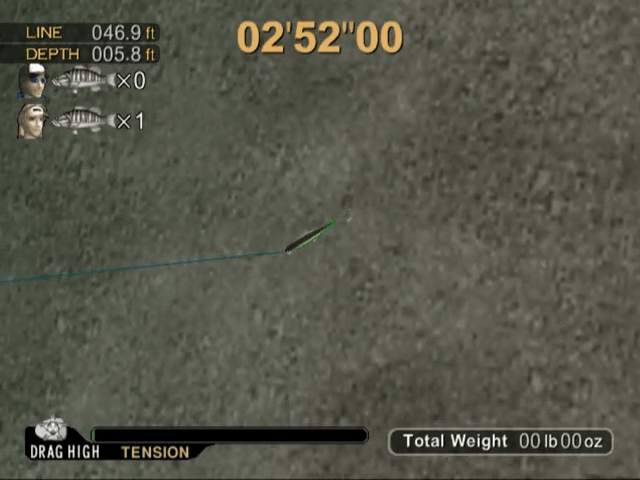
Are you ready to land quality lunkers and compete for first place on your way to the BASS Masters Classic®? Here are the screens you will be looking at and some helpful hints on landing huge hawgs.
Line Length
Depth of Lure
Spool Setting
Line Tension
.png)

.png)

.png)


.png)

_1.png)

.png)


_1.jpg)



.png)
