GETTING STARTED
Set up your PlayStation®2 computer entertainment system according to the instructions supplied with your system. Check that the system is turned on (the on/standby indicator is green).
Insert the BEN 10 ALIEN FORCETM: Vilgax Attacks disc in the system with the label side facing up. Attach game controllers and other peripherals as appropriate. Follow the on-screen instructions and refer to this manual for information on using the software.
Memory Card (8MB) (for PlayStation®2)
To save game settings and progress, insert a memory card (8MB) (for PlayStation®2) into MEMORY CARD slot 1 of your PlayStation®2 system.
You can load saved game data from the same memory card or any memory card (8MB) (for PlayStation®2) containing previously saved games.
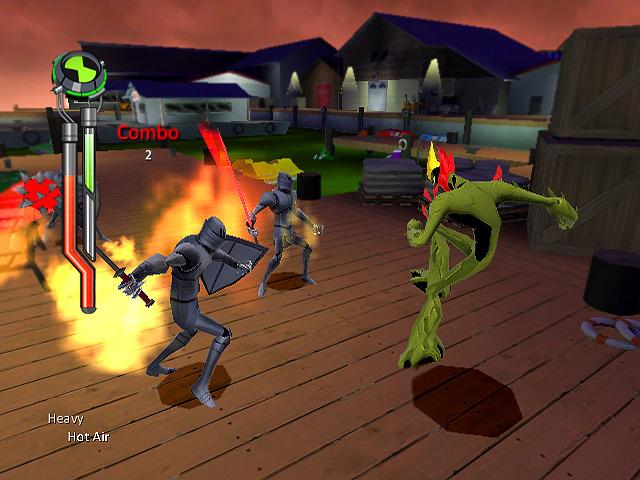
Game Screen
Saving Your Game
BEN 10 ALIEN FORCETM: Vilgax Attacks has an auto-saving feature that will automatically save your game after you complete a level. You will need 606Kb of free space on your Memory Card in order to save your game.
The game automatically saves when you complete a level. If you quit a level that you have not completed, your progress through the level will not be saved; however, all collectibles, experience, and abilities that you gained when you quit a level will be saved.
TO START
•
power/standby/reset button
Install your PlayStation®2 entertainment system by following the instructions provided with the system. Make sure the console is on (the standby indicator is green).
Insert the BEN 10 ALIEN FORCE™: Vilgax Attacks disc into the console, label side up. Connect the controllers and other peripherals and follow the on-screen instructions. This manual serves as a reference for the use of this game software.
Memory card (8 MB) (for PlayStation®2)
To save your settings and current games, insert an 8 MB memory card (for PlayStation®2) into slot 1 of your PlayStation®2. You can load saved game data from any 8 MB memory card (for PlayStation®2) containing saved games.
Game screen Point of Interest
Save
BEN 10 ALIEN FORCE™: Vilgax Attacks automatically saves at the end of each level. You must have 606KB of free space on your Memory Card to save your game.
Because the game automatically saves at the end of each level, your progress will not be saved if you quit the game before completing a level. The items, powers, and experience you have acquired will be saved.
.png)

_1.png)
.png)
.png)
.png)
_1.png)
_1.png)
.png)

.png)

.png)
_1.png)
.png)


_1.png)