Setting Up Your System
Set up your PlayStation®2 computer entertainment system according to its Instruction Manual. Ensure the MAIN POWER switch (on the back of the console) is turned on.
Press the RESET button. When the power indicator lights up, press the open button to open the disc tray. Place the DINO STALKER™ disc on the tray with the label side facing up. Press the open button again to close the disc tray.
Attach game controllers and other peripherals as appropriate. Follow on-screen instructions and refer to this manual for information on using the software.
Before Starting
Adjusting the Guncon™2
•
Correctly insert the Guncon™2 in the controller slot and turn on the power. The Adjust Aim Screen will appear.
•
A mark will appear in the middle of the screen. Aim and fire at it. Stand as centered and as close to the TV as possible while adjusting your aim.
•
After that, another mark will appear, this time in the upper left. Aim and fire at the mark as before.
•
When you're finished with your adjustments, point the Guncon™2 at the screen and check to see if the aim is aligned correctly. Readjust your aim settings by pressing the A or B button.
•
Press the START button to proceed to the next screen.
To switch from the DUALSHOCK®2 analog controller to the Guncon™2 during gameplay, you must first select the ADJUST GUN option and adjust the gun's aim. If you start the game without adjusting your aim, the aim could be off and your game experience will be flawed.
Survive! #1
Master the Sniper Shot
The best possible way to ensure survival is not to meet any enemies. The second best way is not to get near enemies.
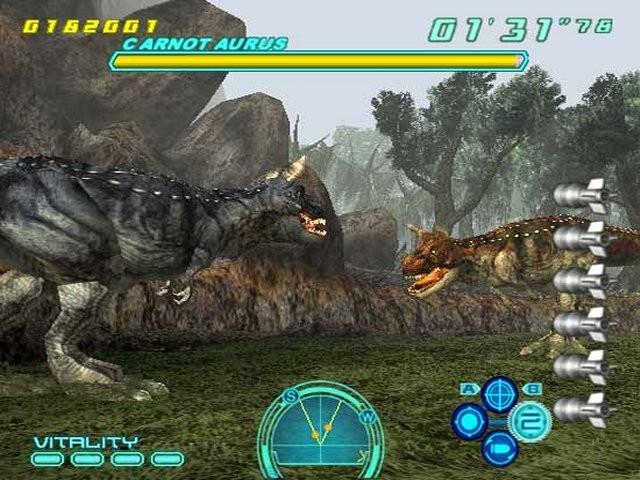
Use your Motion Sensor well, and take out any enemies long-distance before they detect your presence. This is one of the most important means of survival.
Mode Select Screen
Press any button to display the Mode Select Screen. Then, press the directional button ▲ or ▼ to highlight different mode settings, and pull the trigger or press the ✖ button to select a mode.
Load Game
When you choose this mode, you go on to the Data Selection Screen. After you select a save file to load, you will start at the beginning of the last saved stage.
New Game
After choosing this mode, you must choose a game difficulty level (EASY, NORMAL or HARD). Once you choose, a brand new game begins.
Option
Use this mode to adjust various game options. See page 18 for details.
Survive! #2
If You Get Lost ...
The Motion Sensor is an important tool that will navigate you through difficult situations. When you're in the middle of a huge jungle or scorching desert, there's nothing more dangerous than losing sight of your target.
If you do happen to get lost, check your Motion Sensor. An arrow will always be displayed — head in the direction it points to.
Player Moves
Use the Control Pad, directional button or left analog stick to move your character. Shoot enemies at long range with the Sniper Shot and at close range with the Single Shot. Master using your Motion Sensor, Special Shot and Items for ultimate victory.
Depending on the stage, there are times when you freely control your character, and other times when you ride in a vehicle and follow a predetermined path.
Result
After you beat a stage, your results for that stage are displayed on screen.
Continue
If your Vitality reaches zero and you aren't carrying any revive medicine, or if your Timer reaches zero, the Continue Screen will appear.
Game Over
On the Continue Screen, if the counter reaches zero, the game is over.
Combo
If you defeat an enemy while the Combo Gauge is displayed, bonus points are added to your score. Each time you defeat an enemy or use an item, your Combo Gauge increases slightly.
Move from area to area quickly and defeat several enemies in succession to increase your Combo Gauge.
Save/Load
Save your play data to a memory card (8MB) (for PlayStation®2), and load it from the same memory card to resume play.
•
SAVE: Save your game at the result screen displayed at the end of a level.
•
LOAD: Your saved game will load automatically when the game powers up.
To save games, you must be using a memory card with at least 145KB of free space. Don't turn off the power or disconnect the memory card while saving or loading game data. Doing so may destroy the data.
Option Mode
Change various game settings in Option Mode.
•
ADJUST GUN: Adjust the aiming for the Guncon™2.
•
KEY CONFIG: Select different control sets for the Guncon™2 and DUALSHOCK®2 analog controllers.
•
SOUND: Choose between STEREO and MONAURAL to match your speaker setup.
•
ADJUST SCREEN: Center your game screen on your TV or monitor.
•
MONITOR TUNING: For optimum image quality, adjust the game brightness by modifying the color bars below the red line until they disappear. (Available only for TVs that allow brightness adjustment.)
•
EFFECT COLOR: Select the color of the damage effect.
•
VIBRATION: Turn the vibration function on the DUALSHOCK®2 analog controller ON or OFF.
•
AUTO SAVE: When this option is ON, the game will automatically save its data at the end of each stage.
.png)

.png)

.png)

.png)
_1.png)
.png)


_1.png)