PlayStation 2 System Components
System Setup
Set up your PlayStation®2 computer entertainment system according to the instructions supplied with your system. Check that the system is turned on (the on/standby indicator is green).
Insert the Disney Sing It: Pop Hits disc in the system with the label side facing up. Attach game controllers and other peripherals as appropriate. Follow the on-screen instructions and refer to this manual for information on using the software. Memory Card
To save game settings and progress, insert a memory card (8MB) (for PlayStation®2) into MEMORY CARD slot 1 of your PlayStation®2 system. You can load saved game data from the same memory card or any memory card (8MB) (for PlayStation®2) containing previously saved games.
Compatible Microphones
For an updated list, please refer to the online manual.
Microphone Usage
Your microphone must be plugged in at all times while playing the game. Some multiplayer options become available only when two microphones are connected. Choose Mic Volume from the Options menu to adjust volume levels for each microphone.
Disney Sing It: Pop Hits can be used with either the SingStar® microphone or the Logitech USB microphone(s). If both are used at the same time, only the SingStar® microphone(s) will be recognized. Additionally, if you remove a microphone of a certain type during play, you must replace this same type of microphone in order to continue playing. Connecting Your Microphone
•
Make sure the power is switched OFF.
•
Attach your microphone's USB connector to one of the USB connections on the front of your PlayStation®2 entertainment system.
Main Menu
Sing It
Start the game and use the or to move through the navigation tabs at the bottom of the screen and choose Sing It. Once in the game setup screen, you can select:
Once you've made your selections, enter the player name. Then, select the song(s) that you want to sing. The buttons that control your selections are shown at the bottom of the screen.
Sing It Pro
Select Sing It Pro to access various vocal exercises – from breathing to pitch accuracy.
Awards
Select Awards to check out all the rewards you have collected for excellent singing performances and reaching goals in Sing It Pro.
High Scores
View all the top scores for all songs in the game.
Options
Go to the Options menu to change the volume, save or load a game. You can also select a new theme and view the credits.
Game Modes
Start singing on your own in single player or invite some friends for a Disney Sing It: Pop Hits party! One Player
Solo
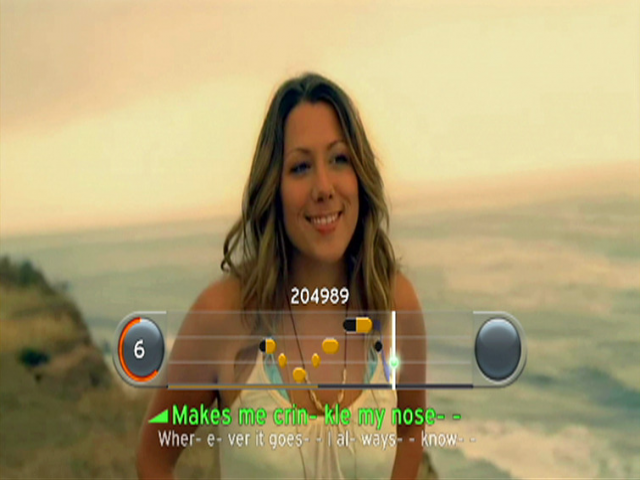
Choose a song or playlist and start singing! You'll see your scores and can rate the songs once you're finished.
You're On Your Own
Choose a song you know well enough to sing without lyrics, score or pitch marks to guide you. Your score will be displayed at the end of the song.
Hints & Tips
•
Win pins by finding hidden bonuses in songs. Sing harmonies, hit multiple correct notes in a row, add effects and find other ways to score and add to your numbers.
•
Earn ribbons by completing lessons in Sing It Pro, singing all the game's songs in one mode, tagging favorites, getting Superstar ratings and winning bonuses.
Multi-Player
Single Mic or Dual Mic Duet
Sing a duet using one or two microphones. Either pass the mic back and forth or use one for each singer. When you use two mics, you can choose which part of a duet you want to sing. For multi-player games, pair up and sing against other teams. The team who sings together the best wins!
Showdown
Sing against your friends in an all out sing-off. You each sing the same songs and lyrics, and whoever gets the highest score wins! Sing one song or select a playlist and see your cumulative score at the end of all the songs.
Run the Risk
Think you know how well you'll score before you sing a song? Then try Run the Risk and compete against your friends to try to predict your score. Sing together with your opponent and watch the scoreboard to meet or exceed your score prediction.
You're On Your Own
You can play You're On Your Own mode with two or more players. Find out who can sing the best with no on-screen help.
Team Play
Separate all players into two teams. Each team member takes turns singing against another player. At the end of the performances, the highest scoring team wins!
More Cool Features
Sing It Pro
Get Master Class status in Sing It Pro with improved voice coaching. Different exercises focus on distinct aspects of your singing performance. In each exercise, you'll receive prompts telling you to breathe, start singing, go higher or lower, sing louder and so on.
Select an exercise and repeat it as many times as you want. Your performance in each activity will be scored. Unlock awards and additional exercises when you score well
.png)

.png)
