GETTING STARTED
*Note: Illustration may not match all PlayStation®2 console types. For owners of SCPH-70000 series PlayStation®2 systems, refer to the setup instructions supplied with your system.*
Set up your PlayStation®2 computer entertainment system according to the instructions in its Instruction Manual. Make sure the MAIN POWER switch (located on the back of the console) is turned ON.
Press the RESET button. When the power indicator lights up, press the OPEN button and the disc tray will open. Place the FLOW: Urban Dance Uprising™ disc on the disc tray with the label side facing up. Press the OPEN button again and the disc tray will close.
Attach game controllers and other peripherals, as appropriate. Follow on-screen instructions and refer to this manual for information on using the software.
MEMORY CARD (8MB) (FOR PLAYSTATION®2)
To save game settings and progress, insert a memory card (8MB)(for PlayStation®2) into MEMORY CARD slot 1 of your PlayStation®2 system.
You can load saved game data from the same memory card or any memory card (8MB) (for PlayStation®2) containing previously saved games.
LANGUAGE SELECTION
FLOW: Urban Dance Uprising can be played in English, Spanish, or French. To change a language, select the one you want in the PlayStation®2 console browser before booting up the game.
EYETOY™ USB CAMERA (FOR PLAYSTATION®2)
Wanna see yourself on-screen instead of one of the preset characters? FLOW: Urban Dance Uprising supports the EYETOY™ USB camera (for PlayStation®2). Hook it up and make yourself the star of the show.
Insert the EYETOY™ USB camera (for PlayStation®2) into either the upper or lower USB connector on the front of the console. The LED power indicator (blue) should be on.
Place the EYETOY™ USB camera (for PlayStation®2) on top of or immediately below your television and stand back 5 to 7 feet. Rotate the manual focus ring to focus the lens. Try to ensure that your body shape is clearly defined on the screen.
If your television is positioned on the floor, simply tilt the EYETOY™ USB camera (for PlayStation®2) for extra elevation. Alternatively, swivel the camera base around to reposition the camera.
Players of different heights should tilt the angle of the camera for extra convenience. DO NOT move the whole camera, just tilt it gently. Cover the camera lens to exit the current game.
By all means find a waving style that suits you, but it is recommended to wave with your fingers apart as this creates more motion feedback.
Make sure that there is no movement in the background as background motion may hinder gameplay.
Make sure you have enough room to play. Consider the space around you and watch out for shelves, doors, walls, pets, and above all, other people.
INTRODUCTION: WHAT IS FLOW: URBAN DANCE UPRISING?
FLOW: Urban Dance Uprising is the first true hip-hop dance game. It can be played with a DualShock®2 analog controller. But for the freshest moves, we recommend a dance pad. The basics are simple – follow the arrows and stay on rhythm.
*Note: FLOW: Urban Dance Uprising needs at least 73 KB of memory card (8MB)(for PlayStation®2) data to save each game. Make sure there is enough free space on your memory card (8MB)(for PlayStation®2) before starting play.*
HOW TO DANCE
BASICS
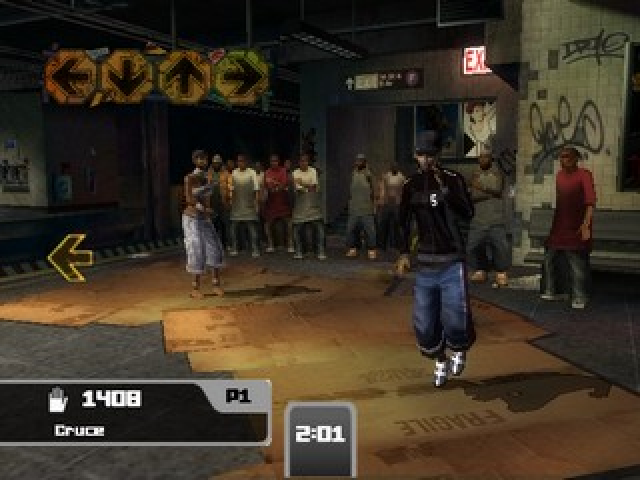
Your goal is to hit the button (if using a controller) or arrow (if using a dance pad) that corresponds to the arrow in the cue box - and to hit it at exactly the right time. You'll get feedback about your accuracy:
•
Fine: You're almost on time.
•
Average: You're a little early or late.
•
Sloppy: You almost missed the arrow.
•
Missed: You missed the arrow.
If you hit consecutive arrows with a Superb or Fine rating, a combo counter will appear. Try to keep this combo counter as high as possible to increase your score. The combo is broken as soon as you get an Average rating.
SPECIAL ARROWS
•
Jump arrows: When two arrows appear at the same time, you will have to jump and hit them both simultaneously. Jump arrows are marked with a chain link.
•
Hold arrows: When a hold arrow appears, you will have to hit it at the right time and then hold until it disappears. If you do not hold long enough or miss the arrow entirely, it will be scored a miss. If you hold until the end, the arrow will be scored with the initial hit.
•
Outside Rhythm arrows: Arrows outside the rhythm of the song are a different color. You usually will need to move quickly to hit those arrows.
•
Power Move trigger: The Power Move trigger is
.png)

.png)
.png)
.png)

.png)

.png)
_1.png)
.png)


_1.png)


_1.png)



.png)

.png)