PlayStation 2 Connections
System Setup
Set up your PlayStation®2 computer entertainment system according to its Instruction Manual. Ensure the MAIN POWER switch (on the back of the console) is turned on.
Press the RESET button. When the power indicator lights up, press the open button to open the disc tray.
Place the NINJA ASSAULT™ disc on the disc tray with the label side facing up. Press the open button again to close the disc tray.
Attach game controllers and other peripherals as appropriate. Follow on-screen instructions and refer to this manual for software usage information.
Guncon™ 2 Setup
When playing with a Guncon™2 controller, calibrate it on the Guncon2 Calibration Screen at the beginning of the game. Aim may not be accurate without calibration.
Reloading
To reload bullets, shoot the Guncon2 away from the screen. Reload quickly when you run out of bullets to avoid attacks.
Using Two Guncon™2 Controllers
Two players can play NINJA ASSAULT™ simultaneously by connecting two Guncon2 controllers to the PlayStation®2.
Connect the A/V cable from the PlayStation®2 to the male/female portion of the External Cable. Plug this into your television set.
Connect the RCA pinjack from the Guncon2 into the remaining portion of the External Cable. For two guns, connect the second gun to the remaining free side of the External Cable.
Connect the USB plug into the top USB connector on the front of the PlayStation2. For two guns, insert Player 2's USB plug into the bottom USB connector.
Starting the Game & Saving
This section explains Guncon2 calibration and saving/loading the game. Read carefully before playing.
How to Calibrate the Guncon™2
If the Guncon2 controller is connected, the Guncon2 Calibration Screen will automatically appear when you start the game.
On the calibration screen, aim the Guncon2 at the "+" mark in the center and pull the Trigger. Pull the Trigger as many times as needed to adjust your aim.
When done adjusting, press the A or B button to proceed. Your aim may be off if you play without calibrating.
2-Point Adjustment
The Guncon2 offers a 2-Point Adjustment for better calibration on wide-screen TVs. This is not necessary for standard TVs.
To perform 2-Point Adjustment, aim the Guncon2 away from the screen and press the Trigger + C button.
If using a progressive scan TV, the Guncon2 should automatically perform 2-Point Adjustment. If it doesn't, point the Guncon2 away from the screen, press the Trigger and C button to manually switch to progressive scan.
NOTE
•
Guncon2 does not support hi-vision, LCD, plasma display, or projection TVs. Some progressive-scan or hi-level TVs may also not be supported.
•
If Guncon2 controllers are connected to both USB connectors, TV type is determined by Player 1.
Saving
To save game data (Save or Auto Save), you need a memory card (8MB) (for PlayStation®2) in MEMORY CARD slot 1. The first save requires at least 48KB of free space.
This game has an Auto Save feature. To enable Auto Save, select "memory card" in the Options Menu (See Pg. 16) and turn Auto Save ON. Option settings, Ranking, and hidden items will be automatically saved.
To save game data manually, select "Save" under "memory card" in the Options Menu. Existing save files will be overwritten.
Loading
If a save file is on a memory card, the game will automatically load the data when you start the system. To manually load, select "Load" under "memory card" in the Options Menu.
Screen Layout
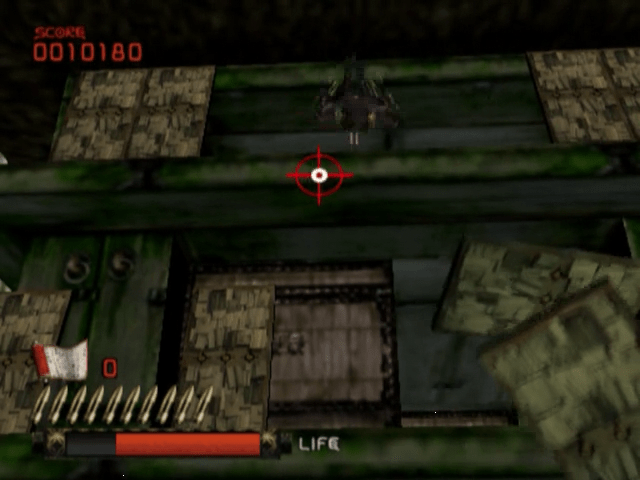
CURSOR: The cursor indicates your aiming point when using a controller. The red cursor is Player 1, and the blue cursor is Player 2. The cursor is not displayed when using the Guncon2.
ENEMY LIFE: Decreases as enemies are hit by bullets. Enemies are defeated when the gauge reaches zero.
SCORE: The current player's score. Red is for Player 1, blue for Player 2.
SCROLL: Ninjutsu ("Art of Ninja") can be used when carrying a scroll, damaging all on-screen enemies. Scrolls are not present in Arcade Mode.
1P AMMO: Player 1's remaining bullets. Replenished upon reloading.
PLAYER'S LIFE: Red is Player 1's life gauge, blue is Player 2's. The gauge flashes red when near death.
2P AMMO: Player 2's remaining bullets. Replenished upon reloading.
Screen Layout and Rules
Advance by shooting and defeating enemies. Life diminishes when hit, and the game ends when your life gauge reaches zero.
Rules of the Game
The following rules apply to Story Mode. For Bonus Games rules, see Pg. 14.
STAGE
The game progresses as each Stage is cleared. Defeat all enemies to clear a Stage. Your character loses life when hit. The game is over when all lives are lost.
CONTINUE
If your life gauge reaches zero and you have credits remaining, a CONTINUE
 (Guille Suhr's conflicted copy 2015-02-01).png)

 (Guille Suhr's conflicted copy 2015-02-01).png)
.png)
.png)
