GETTING STARTED
1. Set up your PlayStation®2 computer entertainment system according to the instructions in its instruction manual.
2. Make sure the MAIN POWER switch (located at the back of the console) is turned on.
3. Press the RESET button. When the power indicator lights up, press the OPEN button and the disk tray will open.
4. Place the Quake III Revolution™ disc on the disc tray with the label side facing up. Press the OPEN button again and the disc tray will close.
5. Attach game controllers and other peripherals, as appropriate.
6. Follow on-screen instructions and refer to this manual for information on using the software.
PlayStation®2 Computer Entertainment System
COMMAND REFERENCE
DUALSHOCK™2 ANALOG CONTROLLER CONFIGURATIONS
•
directional buttons (D-Button)
•
left analog stick (L3 button when pressed down)
•
right analog stick (R3 button when pressed down)
Main Menu Options
New Campaign
Press the directional button UP/DOWN to highlight NEW CAMPAIGN in the Main Menu, then press the button to start a single player Campaign.
Continue Campaign
Highlight CONTINUE CAMPAIGN in the Main Menu and press the button to load a previously saved Campaign from your Memory Card (PS2).
Arena
Press the directional button UP/DOWN to highlight ARENA in the Main Menu and press the button to start a multiplayer game.
Options
Highlight OPTIONS in the Main Menu and press the button in order to adjust video, audio, and controller preferences. You can also save your preferences to a Memory Card (PS2).
GAME SCREEN
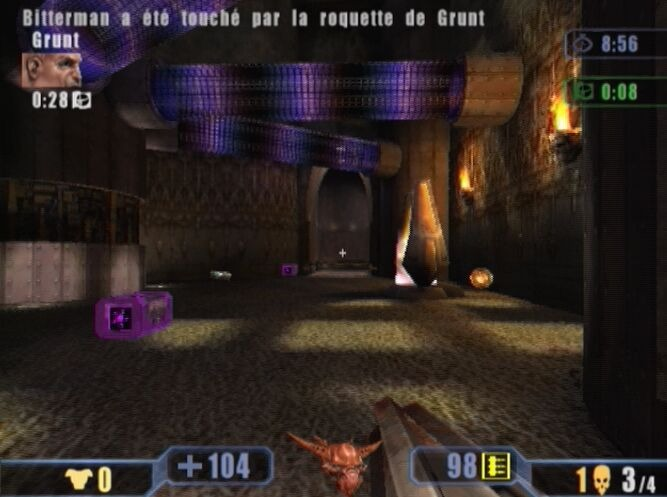
Would-be gladiators should pay attention to the information displayed on the game screen; it could make the difference between staying alive and becoming another arena statistic.
On-screen information differs depending upon the challenge (i.e. a Possession game screen indicates how long you have held the flag and who is currently in possession of it, while team challenges display team scores).
The existence and location of game screen information varies, depending on the number of players taking part. Descriptions in this manual assume a 1-player game is being played.
Game Screen Elements
•
Current power-up and time remaining until it wears off
•
0/20 Current Frags/Required Frags (Deathmatch only)
•
25+131 Weapons available
•
Current weapon and ammo remaining
•
Current position out of all competitors
Health Level
The Arena's a dangerous place; do not underestimate it! Even the best are going to get hurt or even fragged when pitched into battle, so it is vital that you keep an eye on your health level, which is displayed in the bottom left-hand corner of the screen.
Throughout the arenas, it is possible to increase your health beyond your character's current maximum value, although the level counts back down to the current maximum when this occurs.
Armor Level
Wearing armor reduces the inevitable decrease in your gladiator's health level when attacked by an enemy. Your current armor rating is displayed to the left of your health level.
You can pick up items and power-ups that allow you to temporarily increase it beyond your character's current maximum level. As with Health, whenever your armor rating is above the maximum, it counts down gradually until it reaches that mark, even if you aren't under attack.
Weapons and Power-Ups
The weapon and/or power-up currently in use are represented on-screen by icons.
•
Amount of ammo remaining for current weapon
•
9 Weapon currently in use
When you run out of ammo for your current weapon, you automatically transfer to the next weapon in your arsenal.
•
Power-up currently in use
•
米13 Time left until effect of power-up times out
Selecting Weapons
•
To cycle forward through the weapons you have picked up, press the button.
Other Game Screen Information
Basic on-screen information also indicates how much time there is left until the limit imposed by the Vardrigar is reached, your total frags, and your current position in the challenge.
In-Game Options Menu
You can pause the game by pressing the START button. From the in-game Options menu you can choose the following options:
•
CONTINUE: Return to the current game.
•
CONTROLLER SETUP: Allows you to adjust selected controller settings.
•
AUDIO SETUP: Allows you to change selected audio preferences.
•
RESTART: Begin the current game again.
•
QUIT: End the current game.
In multiplayer team challenges with 2-4 players, the in-game Options menu also gives you the opportunity to change teams.
CAMPAIGN (SINGLE PLAYER)
Campaign mode allows you to challenge Arena combatants in a quest for freedom. In single-player mode, Quake III Revolution is split into five tiers of five arenas each.
In order
.png)

.png)
.png)
.png)
