STARTING THE GAME
During the opening movie, press the START button to bring up the Title Menu. Use the left analog stick or directional buttons to choose from the following modes.
•
1P Game Single player mode
•
2P Game Two player battle mode
•
Options Change a variety of game settings
1P GAME
From the 1P Game menu, select from the following gameplay options.
•
Story Mode Play the game to reveal the truth about Shadow.
•
Select Mode Replay previously completed Stages to improve on your original scores. This option is not available until you complete the first Stage.
2P GAME
Split-screen battle mode for two players. A second analog controller is required for this game mode.
OPTIONS
Make changes to a variety of game settings.
SOUND TEST
Listen to the soundtracks that you've already heard during gameplay.
AUDIO OUTPUT
Set audio output to Stereo, Monaural or Dolby Pro-logic II.
LOAD
Load your previously saved game file from a memory card (8MB) (for PlayStation®2). Once a game file has been loaded, your progress will be saved automatically.
VIBRATION SETTING
Set the vibration feature of the analog controller ON/OFF.
SUBTITLE LANGUAGE
Set the language of subtitles to Japanese, English, French, Spanish, German, or Italian.
SPOKEN LANGUAGE
Set the language of in-game speech to Japanese or English (default setting: English).
Using Dolby Digital PRO LOGIC II
In "5.1 channel Dolby Digital" mode, the audio from the PlayStation 2 system's AV MULTI OUT may be disabled. When "5.1 channel Dolby Digital" mode is activated, sound may only come from the unit's DIGITAL OUT (OPTICAL). The PlayStation 2 system's DIGITAL OUT (OPTICAL) should be connected to the "digital optical in" of a receiver with Dolby Digital decoding. This game uses both Dolby Digital and PCM audio. Some receivers will switch between both audio formats automatically, and others will not. Please refer to your receiver's instruction manual to determine if it is necessary to activate an "auto-detect" feature.
Dolby, Pro Logic, and the double-D symbol are trademarks of Dolby Laboratories.
SPECIAL ACTIONS
Chaos Control
As Hero Shadow (the Hero Gauge is full), use Chaos Control to manipulate time and fast-forward through the stage at breakneck speed until the gauge is empty. Items or operations necessary for the completion of your chosen Mission may be missed, so use with caution, and if necessary cancel the move by pressing the button.
During Boss battles, Chaos Control has the effect of slowing down time, giving Shadow the advantage.
Chaos Blast
As Dark Shadow (the Dark Gauge is full), use Chaos Blast to wipe out everything within a 20-yard range. The destructive discharge will not discriminate between Dark and Hero targets, so choose your timing carefully.
Grind
Jump towards rail to slide along beams, ropes, vines and other narrow rails.
•
While Grinding, press the button to increase speed.
•
Press the button to jump.
•
Press the button to attack.
Poles
Jump near a vertical or horizontal pole to take hold of it.
•
With a vertical bar, move the left analog stick ↑↓ to climb and to rotate.
•
With a horizontal bar, use to shuffle along it.
1P GAME
STORY MODE
Lead Shadow through a series of action Stages to reveal the story. Along the way, Shadow will encounter both Dark and Hero Mission Characters who will offer alternative Missions to complete. Depending on Mission choices, subsequent Stages and story development will vary considerably. Typical Missions are as follows:
•
Dark Mission Incapacitate a specified number of GUN agents.
•
Normal Mission Touch the Goal Ring at the end of the Stage.
•
Hero Mission Incapacitate a specified number of Black Arms.
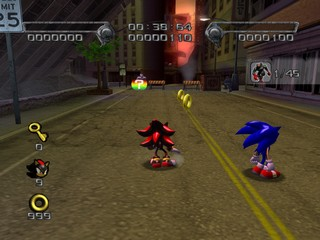
Access the Pause Menu, or use the directional buttons to switch between Dark, Normal and Hero Missions. When a Dark or Hero Mission has been selected, the requesting Mission Character will travel with Shadow assisting and recommending actions in line with the Mission goals. Mission progress will also be displayed on the left or right side of the screen.
Any Mission can be completed, even if a different Mission and Mission Character are selected. Depending on circumstances, it may become impossible to complete the selected Mission ("Mission Fail") and you will need to complete the Stage via other means.
SHADOW'S MIND SYSTEM
Depending on Shadow's behavior, it is possible to awaken Hero Shadow and Dark Shadow for a short period of time. During this time, the following special abilities become available.
•
Chaos Control (Hero Shadow only)
•
Chaos Blast (Dark Shadow only)
MISSION CLEAR
On completion of a Mission, the Mission Clear screen is displayed together with a breakdown of your score. The Total Score is calculated differently depending on the Mission as detailed below. With Dark and Hero Missions, you will get a higher score if your behavior is consistent with the Mission objectives.
The Normal Score represents points earned for normal actions such as speed and technical merit, Ring count and picked-up Items. A Time Bonus is also awarded if you complete the Stage in under 10 minutes and 25 seconds. Quicker completion times yield a larger Time Bonus.
.png)

.png)
