Title Screen
When you turn the game on, the title screen will appear. You can either begin game play or select options.
Options
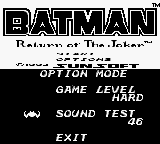
Options to select from are Game Level and Sound Test.
•
Game Level — Press the control pad left or right to select from three levels of difficulty: Normal, Easy or Hard.
•
Sound Test — Use the A Button to hear all the sounds used in the game. These sounds cannot be selected. They can only be sampled.
Title Screen Selections
Stage Select
Once you have selected "Start" on the title screen, the Stage Select screen will appear. There are 4 levels making up the game.
You may choose from levels 1 – 3 by pressing the control pad left or right. Once you have completed the level you have selected, the Stage Select screen will reappear giving you the option to select from the two stages remaining.
Upon completion of all 3 levels, you will proceed onto level 4.
Power Life
Batman is equipped with only 1 power life. Each power life consists of 5 life increments. Once all life increments are lost the game is over.
Continue
Once the game is over, you will have the option to continue up to 5 times.
When the continue screen appears, you will have the option to begin at the beginning of the level where you left off or select another level to begin playing.
Game Play Screen



.png)

.png)
