Console Ports
System Setup
Set up your PlayStation®2 computer entertainment system according to the instructions in the Instruction Manual. Make sure the MAIN POWER switch (located on the back of the console) is turned on.
Press the RESET button. When the power indicator lights up, press the open button and the disc tray will open. Place the STREET FIGHTER® EX3 disc on the disc tray with the label side facing up. Press the open button again and the disc tray will close.
Attach game controllers and other peripherals, as appropriate. Follow on-screen instructions and refer to this manual for information on using the software.
Game Rules
Winning
The first team to drain the vitality of all characters on the opposing team wins the round.
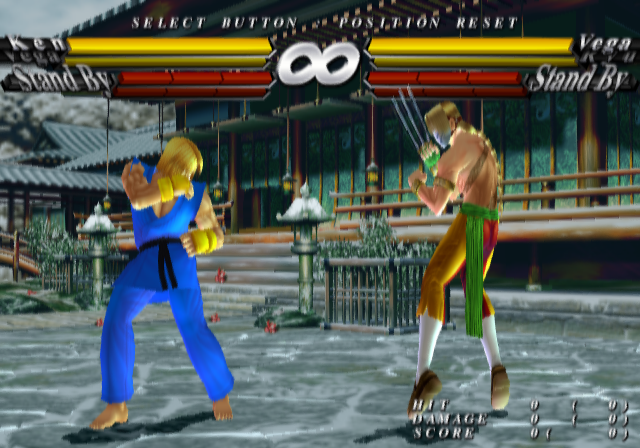
When the Tag Gauge (see page 11) is full, you can change your characters. The red part of the Vitality Gauge of the waiting character recovers gradually. (Rules may differ depending on the match specifications.)
Time Limit
Each round has a time limit. If the time limit is up and both teams still have vitality left, the team with more vitality wins. You can turn the time limit ON/OFF in Option Mode. See page 19.
Draw Game
A draw game occurs when both fighters lose all vitality at the same time (a double K.O.) or when both fighters have the same amount of vitality left when time is up. A draw game is won by decision.
Starting a Game
Game Mode Select
Press START at the Title screen to display the Game Mode Select screen. Select a game mode with the Directional buttons and press the X button to confirm.
Player Select
Select your fighter(s) with the Directional buttons and press the X, O, or Triangle button to confirm. When you first begin the game, 15 preset fighters and one editable character can be selected. More fighters become available as you play through the game modes.
Pause Menu
Press START during gameplay to open the Pause Menu. Select from the following:
•
EXIT - Return to gameplay.
•
KEY CONFIG - Change button settings (see page 19).
•
RESET - Return to the Game Mode Select screen.
Basic Moves
Punch and Kick moves have three strength levels: Light, Medium and Heavy. Light attacks are quick and allow you to work into the next move immediately. Heavy attacks deliver maximum damage but slow the fighter down. Medium attacks are midway between Light and Heavy.
Special Moves
Perform Special Moves by inputting a combo command (a Directional button move + attack button). Special Moves reduce the opponent's vitality somewhat even if they are blocked. See pages 22-36 for each character's special moves.
Advanced Moves
In the moves below, the Directional button presses refer to fighters facing right. Reverse the left/right presses for fighters facing left.
•
Block - ← or K (for characters facing right)
You can use both standing and crouching blocks.
•
Throw - → or + LP + LK (press simultaneously near opponent)
Throws are effective against an opponent who's always blocking because throws cannot be blocked. Some characters can also throw with MK or HK.
•
Throw Escape - → or + LP + LK (press simultaneously)
To escape from a throw move, perform your own Throw the moment the opponent tries to throw you. If you succeed, the message "TECH HIT" will appear and your Super Combo Gauge will increase.
•
Hard Attack - MP + MK (press simultaneously)
If you hit an opponent with this attack while the opponent is doing lower block, the opponent's block will be broken.
Super Combo Gauge
The color bar in the Super Combo Gauge builds up as you attack. The gauge level can increase up to level 3. When you have a certain amount charged in the gauge, you can perform various attacks such as Super Combo and Meteor Combo.
Super Combo
More powerful than Special Moves, Super Combos inflict great damage. They require Level 1 in the Super Combo Gauge. Like Special Moves, Super Combos reduce the opponent's vitality somewhat even if they are blocked.
Meteor Combo
The most powerful move, requiring Level 3 in the Super Combo Gauge.
Tag Gauge
You use the Tag Gauge to change characters. By combining the Tag Gauge with the Super Combo Gauge, you can perform powerful combination attacks. The Tag Gauge will drain once it is used, but it will gradually recover. When the Tag Gauge is full, "STAND BY" is displayed next to it.
•
Character Change - HP + HK (press simultaneously)
Change characters using the Tag Gauge.
•
Critical Parade - + HP + HK (press simultaneously)
This attack requires a Tag Gauge and Level 2 Super Combo Gauge for both characters. During this attack, you can use unlimited Super Combos. For your partner character's actions, you can choose from MANUAL, SEMI AUTO, and MANUAL2P (see page 14).
This attack can be performed only with certain combinations of characters. It requires a Tag Gauge and Level 3 Super Combo Gauge.
Original Mode
The objective of this mode is to defeat the final boss, Bison. You
.png)

.png)



.png)
.png)
_1.png)
_1.png)
_1.png)
.png)
.png)


