HOW TO PLAY SOLOMON'S CLUB
The rooms where Dana studies Magic are divided into 5 levels. Each level has ten rooms (fifty rooms in all).
SELECTING A LEVEL
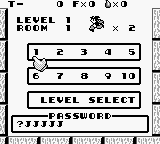
When the screen on the right appears, choose a level with the + Control Pad. Level 1 is the easiest. Level 5 is the most challenging.
•
After selecting a level, press A Button.
SELECTING A ROOM
When the screen on the right appears, choose a room with the + Control Pad and then finalize your selection with A Button.
•
When you want to change your level selection, place the cursor on "LEVEL SELECT" and press A Button.
HOW TO CLEAR
There is a key for each room. When a key is taken and placed in the door, it is cleared and you can go on to the next room.
Don't waste any time! There are limits on the amount of time Dana can spend in each room. If the timer reaches "0", Dana's strength is exhausted.
If you can clear the room within the time limit, you receive a bonus (money). When a level is cleared, you receive an even bigger bonus.
•
If you must use CONTINUE, your money is reduced by half.
EXPLANATION OF THE INDICATORS
•
(2) Number of fairies you have caught
•
(3) Remaining number of items you are now using
EXPLANATION OF THE SUB-SCREEN
You can see the sub-screen by pausing during a game and pressing the right side of the + Control Pad. Now you can choose the item you will use and method for operating the Dana.
•
(1) Level of the room you are now in.
•
(2) The number of the room you are now in.
•
(3) Number of Dana lives remaining.
•
(4) The amount of money Dana has.
•
(5) The names and number of items Dana can use.
•
(6) Switching the mode of operating Dana.
•
(7) Return to the main screen.
PAUSE FUNCTION
If you press the START Button during a game, the pause signal sounds, and the game temporarily stops. It is convenient when you want to stop on a particular screen and carefully consider it.
•
When you press the START Button again, you can continue playing.
CONTINUE
When the game is over, the screen shown in the photograph appears. If you want to continue, use the SELECT Button to place the cursor on "CONTINUE", and press A Button.
•
When you want to stop playing, set the cursor on "END" and press A Button, and the title screen will appear.
SHOP & ITEMS
At the shop, magical items which help Dana are sold. Select the item you want with the + Control Pad, and press A Button.
The number of which you can buy differs for each item. When "SOLD OUT" indicator appears, you cannot buy any more.
•
Press B Button to leave the shop.
MAGICAL ITEMS
There are 13 different kinds of items. Some can be bought at the shop, some are hidden inside rocks, and others appear when you create and then destroy rocks.
•
The items which you can buy at the shop have their price shown after their name.
.png)

.png)
.png)
.png)
