GETTING STARTED
To begin playing BOXING FEVER™, follow these initial steps:
•
Turn off your Game Boy® Advance System, then insert the BOXING FEVER™ Game Pak.
•
Turn on the system and press START until the Main Options Screen appears.
Important Note: If nothing appears on the screen when you turn the power on, turn the power off, check that the Game Pak is inserted correctly, and try again.
LINKING UP
To play multiplayer, you will need the following equipment:
•
One Game Boy® Advance System per player.
•
One BOXING FEVER™ Game Pak per player.
•
One Game Boy® Advance Game Link® Cable per link.
Follow these instructions to set up a link:
•
Turn off each Game Boy® Advance System and insert the respective Game Pak.
•
Connect the Game Boy® Advance Game Link® Cable to each system.
•
Turn on the systems and press START until the Main Options Screen appears.
MAIN OPTIONS
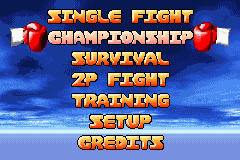
Press START on the Title Screen to access the Main Options Screen. Here you can choose from five different game modes, adjust audio settings, or enter passwords to resume Championship Mode.
To make a selection, press UP or DOWN on the Control Pad to highlight your choice, then press the A Button to confirm.
SINGLE FIGHT
Play a single match exhibition against a boxer of your choice.
CHAMPIONSHIP
Choose to play through the ranks until you become a champion.
SURVIVAL
Beat as many boxers as you can without being knocked down.
2P FIGHT
Pound a friend into submission.
TRAINING
Sharpen your reflexes and fine-tune your combos.
SETUP
Access the Game Options Screen to adjust audio settings and enter passwords.
CREDITS
View a homage to the BOXING FEVER™ gang.
BOXER SELECTION
On the Boxer Selection Screen, choose which boxer to play as.
To select your boxer:
•
Press the Control Pad RIGHT or LEFT to move the rotating blue cursor to the desired boxer.
•
Press the A Button to confirm your choice.
To select your opponent (Single Fight Mode only):
•
Press the Control Pad RIGHT or LEFT to move the rotating red cursor to the desired opponent.
•
Press the A Button to confirm.
Note on Two-Player Mode: When you select your boxer, it will be highlighted by a white circle. This circle does not appear on the other player's screen, allowing for strategic ambiguity. Both players can move their cursors to highlight different boxers than their actual choice. Your opponent will only see your rotating cursor, meaning neither player knows who the other has truly selected until the match starts.
FIGHT OPTIONS
On the Fight Options Screen, you can select the round duration, the number of rounds, and the opponent's "class."
•
Press UP or DOWN on the Control Pad to highlight an option.
•
Press the A Button to select it.
GAME OPTIONS
The Game Options Screen allows you to adjust audio settings and access the Password Entry Screen.
•
Press UP or DOWN on the Control Pad to highlight your choice.
•
Press the A Button to select.
•
Press the B Button to return to the Main Options Screen.
SOUNDS
Sets the volume of the game's sound effects.
MUSIC
Sets the volume of the background music.
ANNOUNCER
Sets the volume of the ring announcer's voice.
ENTERING THE RING
HEALTH METERS
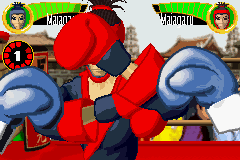
Health Meters are located in the top corners of the Main Game Screen.
•
Every hit you take decreases your Health Meter.
•
When the meter is completely depleted, the next punch will knock you down.
•
Upon getting back up, a portion of your Health Meter is restored. The amount restored decreases with each subsequent knockdown.
•
The color of the Health Meter indicates your stamina. It appears red when stamina is low.
•
Taking a break between punches increases stamina and returns the meter's color to green.
ROUND TIMER
Located on the left-hand side of the Main Game Screen, the Round Timer displays the remaining time in the current round. When a round ends, boxers can retreat to their corners to rest.
THE RETRY OPTION
After the game ends, you may choose to continue without starting over.
•
When the retry prompt appears, select "YES" to continue from that point.
•
Select "NO" to return to the Main Options Screen.



.png)
