Setup
Turn OFF the POWER switch on your Nintendo® Game Boy® Advance. Never insert or remove a Game Pak when the power is on.
Insert the BRATZ™ Forever Diamondz™ Game Pak into the slot on the Game Boy® Advance. To lock the Game Pak in place, press firmly.
Turn ON the POWER switch. The logo screens will appear (if you don't see them, begin again at step 1).
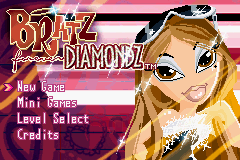
After the intro plays, you will automatically be brought to the Main Menu.
Getting Started
On the Main Menu, choose from the following selections by using the Control Pad to scroll through the menu. Use the A Button to make your choice or the B Button to back out.
•
New Game: Here is where you start a new Bratz™ Forever Diamondz™ game.
•
Load Game: Load your last saved game with all the progress that you have made so far.
•
Minigames: This allows you to play any of the Minigames you've unlocked during the story.
Strike a Pose
Hit the buttons shown in the correct order before time runs out in order to strike a rockin' pose!
•
Control Pad: Selects the Control Pad Icons
•
A Button: Selects the A Button Icon
•
B Button: Selects the B Button Icon
•
L Button: Selects the L Button Icon
•
R Button: Selects the R Button Icon
Horse Fashion
Dress up your horse in the most stylin' fashions! Can you pick the right accessories to match the flashing model?
•
A Button: Stop the spinning and select the current accessory
Skiing
Try to ski between the flags as you ski down the Middleton Slopes! Watch out for trees and logs, and try to make jumps off the moguls!
•
Control Pad: Move your character
Ice Skating
Build up speed by skating around the rink. Can you perform the most tricks and get the most air?
•
Control Pad: Moves your character
•
A Button: Performs trick
•
B Button: Performs trick


.png)

.png)
.png)
 (En,Fr,Es,It).png)
