Audio CD Control Panel
If you turn on the power without inserting a CD, the Audio CD Control Panel appears.
To play a game, place the Sega Saturn CD in the unit. Press the D-Button to move the cursor to the top left button on the Control Panel, and press Start. The opening screens of a Game will appear. Your Sega Saturn CD-ROM contains a security code that allows the disc to be read. Be sure to keep the disc clean and handle it carefully. If your Sega Saturn system has trouble reading the disc, remove the disc and wipe it carefully, starting from the centre of the disc and wiping straight out towards the edge. Handling Your Sega Saturn CD-ROM
•
The Sega Saturn CD-ROM is intended for use exclusively with the Sega Saturn System. •
Be sure to keep the surface of the CD-ROM free of dirt and scratches.
•
Do not leave it in direct sunlight or near a radiator or other sources of heat.
•
Be sure to take an occasional break during extended play, to rest yourself and the Sega Saturn CD. Welcome to Strike
“War: Something we humans are quite good at. There was a time when we knew the bad guys. Battle lines were set. Choices were defined. But now madmen and terrorists have changed all of that.”
“Our Global STRIKE Force responds to this new world disorder. We operate…outside normal channels. Our job is to anticipate potential wars and stop them before they begin. When things need to happen without 'uncomfortable' political repercussions, we get the call.”
“STRIKE maintains a world-wide network of covert facilities. Each location has regional operatives, hardware, munitions, and the best computers money can buy. If there's trouble brewing, you know that we won't be far away.”
“But now we've got a nightmare scenario in Eastern Europe: The former Soviet Union. It's a lit powder keg with enough nuclear firepower to turn this planet into glass. And when situations like this reach the boiling point, we call in the best of the best. That's you.”
Main Menu Navigation
The Main Menu is where you take care of any necessary business prior to launching a campaign. Press C to select the highlighted option.
Press B at any time to exit a category and return to the Main menu.
To select an option on the Main Menu:
1. D-Pad LEFT/RIGHT to highlight a category.
2. Press the C button to select the highlighted category.
3. D-Pad UP/DOWN to highlight an option.
4. Press the C button to select the highlighted option.
5. Press the START button to begin a campaign.
•
Press the START button to bypass a video or exit a demo.
INFO and STATUS
Press B once for a brief text overview of the selected item from the upper row.
Press B a second time for more INFO,- usually a voice annotated video file from STRIKE.net.
Press C to view the current status of the Mission, Enemy, Assets, or Intel categories.
Press Z if it is blinking. You view additional screens of text if more information is available.
The Heads-Up Display (HUD)
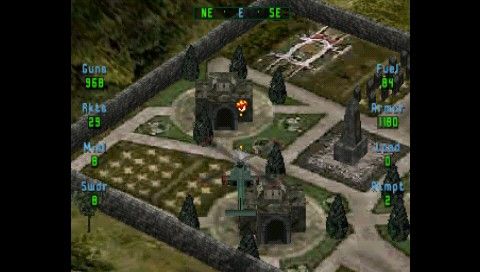
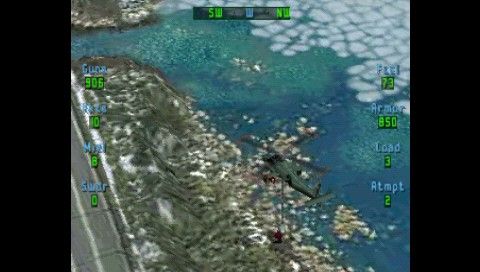
Firepower is meaningless if you can't manage your resources. Fuel, Armour, and Ammo are your life blood. Use them with care. STRIKE will pre-position fuel pods, armour crates, and ammo packs for each campaign. You might even get lucky and find a special repair kit...
The Heads-Up Display (HUD) allows you to keep track of your Super Apache's resources and view your Directional Compass. There are also on-board warning signals to alert you to low fuel and armour. Pay attention to them.
•
To toggle the Heads Up Display (HUD) and Compass on/off, press the Z button.
•
To adjust the brightness of the HUD, hold the Z button and the LEFT/RIGHT SHIFT buttons.
Note: When the STRIKE.net icon appears, press the START button to access the message. (Press A to bypass the movie.)
Attempts
You start with three attempts per campaign. The Super Apache can withstand substantial abuse, but only to a point.
Your Smart Armour will realign to the Super Apache's interior space and cover the damaged areas after your first two crashes. After your third crash, the plug gets pulled.
Fuel
You begin each campaign with 100 units of fuel, unless you configure the chopper with the Fuel Drop Pods on your wingtips (200 units). Don't loiter. Check the HUD for your fuel status and check the SMFD to locate pre-positioned Fuel Pods.
Winch these pods up when you need to refuel. If you run out of fuel and crash, the Super Apache drains its internal systems to refill the fuel tanks.
Armour
You begin each campaign with 1500 units of Smart Armour. Each time you get hit your armour depletes, based on the Power (Damage) of the enemy weapon.
While unloading passengers at a Landing Zone, your Super Apache will refurbish its internal armour plating. Check the HUD for your armour status. Armour Repair Crates also provide magnetic armour plates if winched aboard, although they are notoriously hard to find.
Ammo
By default, you begin each campaign with a standard loadout. Check the HUD for your weapons status and refer to the SMFD to locate pre-positioned Ammo Packs.
Winch these packs up for a full reload.
Note: Pre-positioned Ammo Packs do not reload Wingtip Weapons.
Weapons Loadout
•
Chain Gun: 1178 rounds | 3 Power Points
.png)

.png)
.png)