Getting Started
1. Insert your BREATH OF FIRE II Game Pak into your Super Nintendo Entertainment System and turn the power ON.
2. Watch the introduction or press the START button to skip to the title screen.
3. When the title screen appears, use the control pad to move the cursor next to an option and press the START button.
Title Screen Options
•
GAME START: Select this option and press the START or A button to display a list of previously saved games. If no games have been saved, this takes you to the NEW GAME option.
•
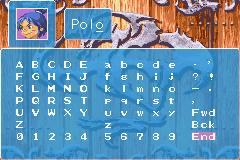
NEW GAME: Select this option to begin a new game in one of three available slots. Enter your four-character name using the control pad Up or Down, then press START or the A button to begin. You must play through a story introduction before normal play proceeds.
•
COPY: Copy a saved game to another slot.
•
ERASE: Delete a saved game slot.
Basic Button Controls
•
A BUTTON: The all-purpose action controller. Use it to confirm choices in Command Screens, talk to characters, open treasure chests and doors, and operate switches.
•
X BUTTON: Mainly used to access your Command Screens. It is not available during combat.
Main Command Screen Elements
•
Location: Shown in the upper left (displays the current town, castle, or dungeon).
•
Monster Meter: Located in the upper middle. When the figure is sleeping, no monsters are around; the more active it gets, the more dangerous things are.
•
Coins: Shown in the upper right, followed by a slashed Z.
•
Character Stats: The large central area displays each character's picture, name, Hit Points (HP), Ability Points (AP), Experience points, current Level, and experience needed for the next level.
•
Sub-Menus: Listed on the left side of the screen.
•
Battle Order: A diagram in the bottom left corner showing the current battle formation.
Items Menu Commands
•
USE: Use an item on a specific character. Items that cannot be used are grayed out.
•
TRASH: Discard an item from your inventory.
•
ORDER: Organize the items in your inventory.
•
CLEAN: Automatically clean up and organize your inventory.
•
SPCLS: Access special items.
•
B BUTTON: Press at any time to back up to the previous screen.
Character Stats Definitions
•
LV (Level): Reflects how experienced the character is and how good they are with their abilities.
•
HP (Hit Points): How much damage a character can take before going unconscious. Displays current amount on the left and maximum on the right.
•
EXP (Experience): Total experience points accumulated, followed by the amount needed for the next level.
•
AP (Ability Points): Points used to cast spells. Displays current amount on the left and maximum on the right.
•
STR (Strength): Affects the character's offensive capability.
•
STMNA (Stamina): A measure of the character's ability to endure.
•
AGIL. (Agility): The character's ability to move and strike fast.
•
WISDOM: Measures intelligence, which affects magic performance.
•
LUCK: Influences various random factors in a dangerous world.
•
OFF. (Offense): Measures attacking ability.
•
DEF. (Defense): Measures defensive ability.
•
VIGOR: Shows how well the character holds up in long battles.
•
COND. (Condition): Shows the general health of the character.
Switch (SWCH) Menu Options
•
Swch: Change the party formation to Normal, Scramble, Defense, or Parallel. Characters in the front of the formation are more likely to be hit.
•
Order: Change the marching order. Choose Manual to swap any two characters, or Auto to automatically place vulnerable characters in protected positions.
•
End: Exit back to the Main Command Screen.
Combat Messages
•
"Special": Indicates a very good hit.
•
"Lead-off Attack": Allows your entire party to strike before the normal combat round begins.
•
"Defense": Indicates an enemy has adopted a defensive posture for the turn.
Combat Screen Controls
•
Action Area: The upper screen shows characters, opponents, and active spell effects.
•
Command Center: The bottom screen displays character HP, AP, and Levels.
•
X Button: Press and hold to view status bars comparing each character's current HP to their total HP.
•
B Button: Backs out of a selected command, unless it is the last character's turn.
Combat Commands
•
AUTO: Characters automatically attack the first enemy with weapons, moving to the next target once it is destroyed. Press the B button to exit Auto mode at the end of the round.
•
ATC. (Attack): Attack a selected enemy with a weapon.
•
SPECIAL: Perform a character-specific special combat ability.
•
SPL. (Spell): Select and cast a spell. Grayed out if you lack sufficient AP.
•
ITEM: Use an item from your inventory. Grayed out if the item cannot be used in combat.
•
RUN: Attempt to escape combat. If it fails, enemies get a free round of attacks.
•
SWCH (Switch): Press the L Button to reveal this option and change combat formations. Marching order cannot be changed
.png)

.png)
