How to Start and Resume the Game
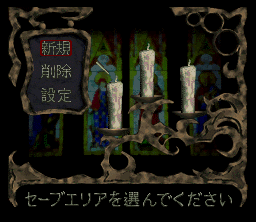
When you first insert the cartridge and turn on the Super Famicom, the title screen appears. Press Start to select a Save Area using the D-pad and choosing a candle. Ensure "New" is selected in the upper left window to start a new game. To resume previous progress, go to the Save Area screen and select the candle containing your saved data. Confirm "Resume" to continue, or select "Delete" to remove unnecessary data.
Saving the Game
You can save your game data at a Save Point by talking to the Save Character, or automatically when clearing each scenario. The Save Point is indicated by where the Save Character is standing.
When you reach the end of Day 1 or clear a scenario, a prompt will ask if you want to save. Select "Yes" to proceed or "No" to decline. Please turn off the power immediately after saving if you wish to quit the game.
Configuring Settings
On the Save Area screen, select "Settings" to access the configuration menu. Here you can adjust three options:
•
Message Speed: Choose between Fast or Slow.
•
Movement Direction: Select one of two control types.
•
Magic Effect: Toggle between ON or OFF.
About Movement Direction
Because this game uses a quarter-view, character movement in the field is diagonal relative to the screen. You must learn to map the actual movement direction to the D-pad buttons on the controller.
Two control methods are available in the settings to help you operate without mistakes.
The Zapping Scenario
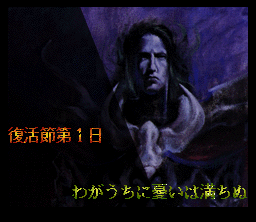
The game features a 'Zapping Scenario' where you play from both the perspective of the Hero (Human) and the Demon King. The scenario is divided into 7 days, played in order of Demon King, then Hero, for each day.
The Demon King and Hero interact while influencing each other's actions, unfolding various mysteries and drama. The timeline spans from the Resurrection Festival (Days 1-6) to an unknown Day 7.
Soul Power
Soul Power is a vital parameter displayed as a gauge at the top of the screen. If this power runs out, it results in a Game Over, so you must monitor it closely.
Demon King Side Mechanics
On the Demon King's side, Soul Power decreases by moving on the field or using magic. It increases by defeating people and monsters.
Hero Side Mechanics
The Hero's Soul Power decreases by moving on the field. It increases by defeating monsters.
Fatio and Soul Shells
Fatio acts as money for the Hero side and can be found in treasure chests or received during events. You can convert Soul Power into Fatio at the 'Sealing Hall' via a Sealer, or Fatio into items at the 'Alchemist Hall'.
Conversely, you can convert items into Fatio, or Fatio back into Soul Power. Items include weapons, armor, and grimoires.
Soul Shell System
This system involves humans spoken to by the Demon King becoming 'soul shells'. When the Hero investigates these shells, they can obtain Fatio or items called 'Light of Hope'.
Some shells have turned into zombies and will attack the Hero. The number of Light of Hope collected changes the ending.
Combat Overview
Combat is turn-based, with enemy and ally sides acting alternately. Both sides explore the same map structure of fields, towns, and dungeons. Encounters with enemies trigger these battles.
Demons' Side Combat
In Demons' Side combat, only Lucius can be controlled directly. Allied monsters act automatically. The Demon Lord does not perform melee attacks or independent movement.
Demon King Combat Commands
Use Soul: Displays available magic and Soul Power costs. Use the D-pad to select magic. After confirmation, choose the target (Ally/Enemy) and effective range using the D-pad and L/R buttons.
Wait and see: The Demon Lord takes no action while party characters fight automatically. Press any button to join the battle midway and gain command usage for the next turn.
Not engage: A command to avoid combat, though this is not always possible.
Reading the Demon King Combat Screen
Hero-side Battle
In Hero-side battles, you can issue command operations to all allies, except for mercenaries. Battles remain turn-based with alternating actions.
Hero Battle Commands
Attack: Select a target to perform an attack with the equipped weapon. The character moves toward the target within their movable range. If the target is beyond range, the character moves as close as possible.
Use Magic: Displays available magic and held spellbooks. Since spellbooks are consumed, use them carefully. Select the target and area of effect; higher spell levels increase the area of effect.
Do Nothing: Takes no action during that turn.
Everyone Flee: Attempts to avoid battle, but this is not always possible.
Reading the Hero Combat Screen
•
3 Party Characters (Names of commandable characters will blink)
Magic Level Up
Heroes level up magic using items called 'Magic Orb'. One spell levels up each time one is obtained.
Demons level up magic through the magic of joined monsters.
On both sides, leveling up magic expands its effective range.
.png)

.png)

.png)
.png)
_1.png)
_1.png)

.png)
 (En).png)
.png)


.png)

.png)