Getting Started
Switch the Nintendo® Game Boy® Advance system OFF. Never insert or remove a Game Pak while the Game Boy Advance is ON.
Insert the *Dragon Ball Z: Taiketsu* Game Pak into the slot on the Game Boy Advance. Press firmly to ensure the Game Pak is correctly inserted.
Switch the Game Boy Advance ON. The title screen should appear. If the title screen fails to appear, return to step 1.
At the title screen, press START to begin the game. Make a selection from the Main Menu by using the +Control Pad to move the cursor up or down and press the A Button to select. Press the B Button to return to the previous menu.
For multiplayer games, link two Game Boy Advance systems (each with a *Dragon Ball Z: Taiketsu* Game Pak) via a Game Boy® Advance Game Link® cable. See the “Two-player Game” section for details.
Combos
Each character has numerous powerful combo moves, but the exact sequence must be memorized and executed precisely. The list of combo moves is unique to each character. You won't find the combo moves listed in the manual; you've got to figure them out for yourself by playing the game.
Sky Battle
A Sky Battle begins when one player uses the Sky Battle move. When a player tries to initiate Sky Battle mode, he will fly up onto the air, off the screen. An arrow appears showing the player's location in the air. The player can then try to align himself above the opponent by pressing the +Control Pad Left or Right.
After a few seconds, the player crashes back down on to the screen. If he hits the opponent, the opponent takes damage.
If the opponent also initiates Sky Battle mode while the player is still in the air, Sky Battle mode begins. Both players must mash all the buttons as fast as possible. The first person to fill their side of the meter wins, knocking the loser back to the ground.
Options
The game options allow you to customize certain settings. You can toggle the sound and music ON or OFF. The game data can be erased, but note that all saved games, high scores, Z Points, and saved options will be erased! The Settings menu, high-score records, and Credits are also accessed from the Options menu.
Settings
You can adjust several gameplay settings in the game's Settings menu. The more difficult settings allow you to earn Z Points more quickly. The Game Settings appear below:
•
Diff: Choose from Easy, Medium, or Hard difficulty levels.
•
Time: Choose a 30-, 60-, 99-second, or infinite match.
•
Health: Choose whether players start with 50 or 100 Health points.
•
Blocks: Turn Block ON/OFF.
•
Rounds: Choose 1, 3, 5, or 7 rounds per match.
•
Default: Sets all settings back to their original presets.
Z-Store
Z Points - the currency of the game - can be gained by playing the game. All game modes will earn you Z Points. In multiplayer mode, the same amount of Z Points is given to both players. The number of Z Points awarded is determined by taking into account how far you progress through the game, how many Super Moves you performed, and the level of difficulty (in Tournament mode).
Z Points can be used at the Z-Store within the game. Use your Z Points to unlock these extras:
Bios
Once you accumulate enough Z Points, you can buy biographies for each of the playable characters. Each bio includes facts and a portrait of the character.
•
Goku Bio: Born a Saiyan named Kakkarot. He was originally sent to Earth to destroy it. As a child, he had an accident and forgot about his...
Image Gallery
Unlock all of the images from the series and access them here in the Image Gallery.
Jukebox
Songs from the game can be played from the Jukebox screen. Available tracks include:
Bonus Settings
The Bonus settings can be unlocked with Z Points at the Z-Store. Bonus settings allow for finer control over game difficulty levels, allowing you to earn Z Points even faster, or allowing for extremely challenging fighting matches. Bonus Modes
Several special Bonus modes can be unlocked with Z Points at the Z-Store. Bonus modes are added into the one-player and two-player menus, and once unlocked, can be accessed like normal game modes.
One-Player Game
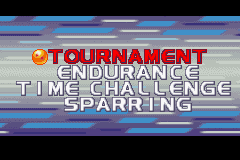
There are four normal one-player fighting modes, and a secret unlockable playing mode. The normal one-player fighting modes are: •
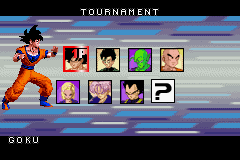
Tournament: Fight through six rounds, the sub-boss, and the final boss to beat the game. Each successive round is more difficult than the last. Completing a tournament can unlock additional characters.
•
Endurance: An extreme challenge, the goal is to make it through as many opponents as possible. Fight a random sequence of characters one after another. In Endurance mode, you don't gain back any health lost during the last battle. At the end of the game, the number of opponents survived will be recorded, along with your initials. A chart will show all previous attempts in a list, ordered with the best attempt at the top.
•
Time Challenge: Fight through six rounds, the sub-boss, and the final boss in an attempt to


 (En,Fr,De,Es,It).png)
.png)
 (En,Fr,De,Es,It).png)


.png)
.png)
_1.png)
_1.png)

_1.jpg)