Choose Number of Players
•
To begin the game, press START BUTTON at the intro screen.
•
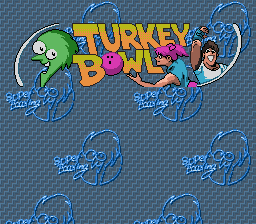
At the Title Screen, press CONTROL PAD UP / DOWN to choose the number of players who will be playing—any number between one and four can play Super Bowling.
•
Press START BUTTON to move to the Game Selection Menu.
Pick a Game
•
Press CONTROL PAD UP / DOWN to highlight one of the three game choices on the Game Selection Menu—the three games are described in detail in the "Games" Section of this manual.
•
Press START BUTTON to move to the Game Options Menu.
Set the Game Options
There are four different characters in Super Bowling, each with his or her own bowling style. All four players and their individual strengths are detailed in the "Cast of Characters" Section of this manual.
To choose your character at the Game Options Screen:
•
Player 1 should press L BUTTON / R BUTTON to cycle through available characters until the desired character is shown on screen.
•
Player 1 should press CONTROL PAD LEFT / RIGHT to make his character left-handed or right handed.
•
Player 1 should then press A BUTTON to select the character and bowling-hand shown.
•
In turn, each player should repeat this process until all the players have chosen a character (Player 1 and Player 3 use Controller 1, Player 2 and Player 4 use Controller 2).
Ball Weight
•
Player 1 should press CONTROL PAD UP / DOWN to choose the weight of the ball he or she wants to play with—ball weights range from 6 pounds to 16 pounds and are detailed in the "Style and Strategy" Section of this manual.
•
Player 1 should press A BUTTON to select the ball shown on screen.
•
In turn, each player should repeat this process until all the players have chosen a character (Player 1 and Player 3 use Controller 1, Player 2 and Player 4 use Controller 2).
•
After the final player has picked a ball, Player 1 will control all remaining selections on the Game Options Screen.
Oil Distance
•
Press CONTROL PAD LEFT / RIGHT to choose among Short, Middle or Long Oil Distance—Oil Distance is described in the "Style and Strategy" Section of this manual.
•
Press A BUTTON to select currently highlighted Oil Distance and move to the Level of Difficulty menu item.
Level of Difficulty
•
Press CONTROL PAD LEFT / RIGHT to choose between Normal and Hard levels of game difficulty.
•
Press A BUTTON to select the highlighted Level of Difficulty.
This completes all selections on the Game Options Screen.
Player Position
•
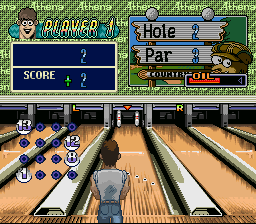
Press CONTROL PAD LEFT / RIGHT to move the player to the position on the lane where you want him or her.
Note: You can move the player's position on the lane right up until the time the ball is released.
Aim Pointer
•
Press L BUTTON / R BUTTON to move the Aim Pointer Left or Right until it is pointing where you want to aim the ball.
•
Press A BUTTON to lock-in the Aim Pointer.
Spin Meter
•
After locking-in your aim, press A BUTTON to bring the Spin Meter on screen.
•
A ball will begin moving left and right across the Spin Meter.
•
Press A BUTTON to stop the ball on the Spin Meter.
•
The closer the ball stops to either edge, the more spin it will have in that direction.
•
The closer the ball is to the middle, the less spin it will have—again, in the direction of the side of the Spin Meter where the ball stops.
•
Stopping the ball directly in the middle of the Spin Meter will deliver a straight shot with no spin at all.
Note: Actual spin of the ball is not only determined by the Spin Meter, but also by the Character chosen, ball used and oil distance.
Power Meter
•
IMMEDIATELY after you choose Spin, the Character will begin his or her approach and the Power Meter will appear on screen.
•
The Power Meter will grow from big to small on the screen.
•
Press A BUTTON to stop the Power Meter and release the ball.
•
The bigger the Power Meter is when the ball is released, the faster the ball will be rolled.
•
The smaller the Power Meter is when the ball is released, the slower the ball will be rolled.
Note: You must press A BUTTON to determine Power before the Character reaches the foul line—otherwise, you will automatically be assessed a penalty gutter ball.
Turkey Bowling
Turkey Bowling is a traditional 10-frame game of bowling, with up to two shots per frame and normal frame-by-frame scoring. In Turkey Bowling, a score is assigned to each of the 10 frames based on one of three possibilities:
•
Open Frame: An open frame means that after the player has taken his or her two rolls for that frame, there are still pins left standing. In the case of an open frame, only the pins that were knocked down during that frame are added to the player's score in that frame. The highest score you can get in an open frame is 9.
•
Spare Frame: A Spare is recorded when the player takes two rolls in a frame and knocks down all 10 pins. A spare is indicated on the score sheet by a diagonal line across the frame score box. Spares are scored as 10 pins plus the total pins from that player's next shot. The total of 10 + one shot is added to the player's score in the frame of the Spare. The highest score you can record in a Spare Frame is 20 (10 +
.png)

.png)

.png)
_1.png)

_1.png)
.png)
.png)

.png)
.png)

-Back-cover.png)


-Back-cover.png)



.png)
.png)




.png)


