One Player Games
To dive into rib-cracking action as fast as possible:
•
Choose a "Regular Season" or "Pre Season" game. In "Regular Season," you'll begin 13 weeks of grueling turf battle for a chance at the championship Super Monday Night Football game. In "Pre Season," you'll play one exhibition game for gridiron dominance.
•
If you're playing "Regular Season," hit the B Button. Next choose "Team Select" and go on to that screen. A "Pre Season" choice takes you directly to the Team Select screen.
•
Pick out your team from 28 pro clubs in two official conferences. Then the computer will select its team with the alternate play.
Note: If you've already played a Regular Season game, you will need to select "Data Clear" and "Yes" in order to choose a different team.
Two Player Games
Go head-to-head against a buddy for gridiron glory:
•
Choose "1P VS 2P" on the first Options menu. In this game, you and a friend will clash in a single bone-crushing battle. You'll automatically go on to the Team Select screen.
•
Pick out your teams. Both players can make their choices at the same time.
•
The game starts automatically as soon as the teams are chosen.
The Coin Toss
Every game starts with a coin toss to determine the kickoff team. In two player games, Player 1 tosses the quarter. Press the Y-Button or B-Button to make your choices.
•
Call "Heads" or "Tails." Watch that quarter spin!
•
If you win the toss, choose whether to kick off or receive. If you lose the toss, the computer or Player 2 gets to decide the kickoff team.
Scoring
The Kickoff
The kicking team lines up at the top of the screen, with the receiving team back to return the kickoff at the bottom of the screen. These first crucial moments will determine the starting position of the offensive (receiving) team.
If you're kicking, press the B-Button to start the kickoff. Then tap the button rapidly to increase your running speed and the strength of your kick. Watch your Kick Meter to see how much power you're building up. The farther downfield you can launch the ball, the tougher it'll be for the offense!
If you're receiving, move your return man into position to catch the ball as soon as possible. Then use the Control Pad to run him upfield, dodging attackers and tapping the B-Button rapidly to increase his speed. Press the L- or R-Button for spin moves to neutralize or slip away from tackles.
You'll play four 5-minute quarters. Player 1's controlled player is marked with a "P1" medallion. Player 2's has a "P2" medallion, and the computer player is marked with a "CP."
Calling Your Next Play
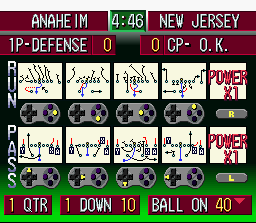
As soon as the runner is downed, you'll go to the Play Board where you can choose your next strategy. All the plays shown are offensive schemes.
If you're on offense:
•
Call your next play by pressing the controller button blinking beneath it.
•
You can also call a running or passing Power Play by pressing the R- or L-Button. Each type of Power Play is available twice per half (four times per game).
If you're on defense:
•
Try to figure out which play the offense will run, and choose it by pressing the correct controller button. During the play, your team will work to stop that particular play. If you choose right, you'll squash the opposition before it can gain any yardage.
You'll return to the field as soon as both teams have made a play choice.
Playing Offense
You're the field general, and you call all the plays. The results are first downs and touchdowns!
Run play:
•
Press the B-Button to snap the ball.
•
Immediately press the Control Pad down to move the quarterback back to avoid a sack or make a handoff. In the case of a handoff, your control will automatically change to the receiver.
•
Start running the ball carrier upfield. Press the B-Button to increase your speed and press the L- or R-Button for spin moves and more yardage!
Pass Play:
•
Press the B-Button to snap the ball.
•
Immediately press the Control Pad down to move the quarterback back to avoid a sack. Glance at the medallions to determine which receiver is open, then press the corresponding button to pass.
•
As soon as the receiver completes the pass, your control passes to him. (If the ball is right over the receiver, you can press the Y-Button to make him jump and try to grab it.) Run him upfield for extra yardage. Tap the B-Button rapidly to increase your speed; press the L- or R-Button for spin moves to avoid tackles.
Note: On screen, three receivers will be designated with medallions A, X and Y, corresponding to the controller buttons. Also watch the matching medallions at the bottom of the screen. When a receiver is blocked, his medallion will flash steadily.
Playing Defense
•
Press the B-Button to increase your speed; press the Y-Button to dive, tackle or jump. (Use these same buttons for Power Plays.)
Time Outs and Strategy Options
.png)

.png)

_1.png)
.png)
_1.png)
.png)
 (En).png)
.png)
.png)
.png)


_1.png)




.png)

