Starting the Game
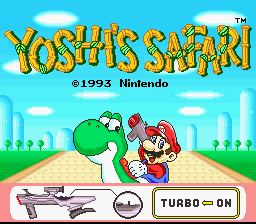
Set up your Super Scope Receiver Module as shown in the Super Scope Instruction Manual. Insert Your Yoshi's Safari Game Pak into the Super NES Control Deck and Turn ON both the Super NES and the Super Scope. When the title screen appeares, shoot at the screen by pressing the Super Scope's FIRE Button. The Adjest Aim screen will appear after the opening story concludes.
Aim Adjustment
•
Adjust Aim Screen: Hold the Super Scope so you can see through the opening in the eyepiece Sight Tube and the Front Sight. Aim at the center of the target and shoot at the center of the screen by pressing the FIRE Button.
•
Test Screen: Press the FIRE Button again to confirm that the aim is correct. A hit mark will flash at the point where you aimed. If the aim was incorrectly set, re-adjust it by pressing the CURSOR Button. This will restart the Adjust Aim procedure.
Re-aiming During Game Play
If at any time your aim seems inaccurate or if you change your position during play, you should re-aim the Super Scope. Press the Super Scope's PAUSE Button to bring up the ADJUST AIM screen and follow the instructions above.
If you do not want to adjust your aim or have finished doing so, you must press the PAUSE Button again to resume play.
Game Play Mode
You can choose to play either the 1-Player Mode or the 2-Player Mode. The object of both is to clear all of the stages.
On the Mode Select Screen, shoot the appropriate panel to select either a 1-Player or a 2-Player game.
Game Play Screen
•
Item Window: This appears only when you are fighting a boss. Press the CURSOR Button to use the item displayed in this window.
•
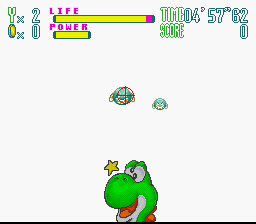
Time: This display shows the time remaining to complete the stage. If you fail to clear the stage before the time is up, you lose one Yoshi. •
Coins: Every time you shoot a Question Block or an enemy, you may get a coin. When you collect 60 coins, you will earn a 1-Up. If you miss a jump, you will be fined three 3 coins. If you have less than 3 coins, you will forfeit one Yoshi. •
Score: When you defeat an enemy or get a bonus, your score will increase.
•
Power Gauge: This gauge measures the power of TURBO Shots. As the gauge decreases, the interval between each bullet shot will be longer.
1-Player Mode
In the 1-Player Mode, you'll use only the Super Scope. Shoot a block on the stage select screen to start the game. You can start the game from any stage. The lower the number on the block, the easier that stage will be to clear.
Your viewpoint is what Mario sees while riding on Yoshi. Yoshi automatically moves forward on the course, but you must shoot down the enemies that are coming at you. You also should shoot the Question Blocks to earn items and coins. If you can defeat the boss that is waiting for you at the end of the course, you will clear the stage.
Rules
•
If your LIFE meter becomes empty, you will lose one Yoshi. When all Yoshis are gone, your game is over. •
If you do not clear the stage within the time limit, you will lose one Yoshi. •
If you cannot defeat the boss before the time limit expires, you will lose one Yoshi. •
If you miss a jump in a jump zone (a gap in the course), you will restart just prior to the jump zone and forfeit three coins. If you have less than three coins when you miss a jump, you will lose one Yoshi. •
For every 60 coins you collect, you will earn an extra Yoshi. Stage Clear
If you defeat the boss at the end of a stage you will be awarded bonus points. After you recover the magic gem held by that boss, the stage will be cleared.
The Map Screen will appear and show a gem on the stages that you have cleared.
Course Tricks
•
Jump: You can jump to avoid a turtle's shell. When you press the CURSOR Button (in the 2-Player Mode, use the A Button on the controller) in the jump zone, you will perform a Super Jump.
•
Junction: There is a barricade at each junction. Repeatedly shoot the barricade to change the path that Yoshi takes. •
Dash Zone: These are marked with a double chevron on the course. When you pass over these marks, Yoshi will move forward with a burst of speed. Score and Stage Clear Screen
When you clear a stage, the Stage Clear Screen will appear. You will earn extra points for any time remaining, and any unused items.
•
Bonus: Bonus points are given for completing each stage.
•
Item: Bonus points are awarded for any unused items.
•
Time: The remaining time is added to your score.
•
Stage: This is the total points earned from attacking enemies during the stage.
•
Total: The points from the Stage Bonus, Time Bonus, and Item Bonus are added to the Stage Points to give you your Total Score.
•
You will get 100 points for every second remaining.
•
The number of points earned per unused item varies. (For more information, see the ITEMS chapter.)
.png)

.png)

.png)
.png)
_1.png)
_1.png)

.png)
 (En).png)
.png)


 (SGB Enhanced).png)

.png)


.png)

_1.png)