Starting the Game
•
Make sure your Super NES is set up correctly.
•
Be sure that Controller 1 is properly plugged in.
•
Make sure the power switch is turned OFF. Place the ESPN's National Hockey Night Game Pak into the slot and press it down firmly.
•
Turn the power switch ON. You should see the Nintendo® Title screen, then the ESPN's National Hockey Night Title screens.
Player Selection Screen
This screen is both the Team Selection screen and the Player selection screen. Select the teams you want to choose, then choose the players.
Press Left or Right on the Control Pad to move a player to Visitors or home. Players left in the middle will be run by the computer.
Press the Start Button to advance to the Bill Clement Screen.
If in the Playoffs: To scroll between Resume Game or New Game, press the Start Button to select and move to team select. You may also choose between "Best of 7" or "Best of 1" to indicate how long you want each series to be.
•
Playoff Tree: Press Left or Right to pan through the playoff tree. Press the Start Button to move to Player Selection.
•
Game: Left or Right moves between Home or Visitors. Up or Down scrolls through the team selection choices. Start button selects the teams and brings you to the Player Selection Screen.
Bill Clement Screen
Use the Start Button to select the highlighted choice.
•
Start Game: Press the Start Button here to begin playing the game.
•
Match Up: Use Up or Down to scroll through the numbers. Any Button returns you to Bill Clement.
•
Edit Lineup: Use Up or Down to scroll through the players. Use Left or Right to see each players stats. Press Button X to switch teams. Press Button A to see reserves at that position. Go left and right to view the different lines in the game.
•
Reserves: Use Up or Down to scroll through reserves. Use Left or Right to see each reserves' stats. Use the A Button to select reserve and return to Edit Screen. Press Start Button to return to Bill Clement Screen.
•
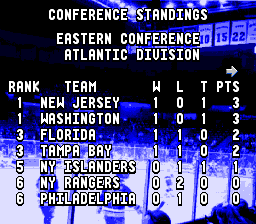
Standings: Use left or right to scroll through the standings. Any button gets you back to the Bill Clement Screen.
Challenge Mode
From the Main Options Screen, to the Player Selection Screen, comes the Challenge Mode. Use Left or Right to move between Home and Visitors. Press Up or Down to scroll through the team selection choices. The Start Button selects the teams and brings you to the Clement Challenge Screen.
There are two forms of challenges: The Fastest Man and the Shootout. These are offered to hone your playing skills and to allow you to get a better feel for the gaming dynamics.
•
Fastest Man: A race around the ice to see who can get the fastest time. Pound on Buttons A and B, and use the Control Pad to move around the ice. Up to four people can play. You may choose two teams to play, and each controlling player gets to play one person.
•
Shootout: A test of your shooting ability. Press the Shoot Button and shoot as quickly and as accurately as you can! Five players from each team compete to see who can get the highest scoring percentage.
Exhibition Mode
This mode allows the players to choose any two teams to play against each other for one game. This is the most common option chosen.
Season Mode
Upon selecting Season Mode on the Options Screen, players get to choose which team they want to play for an entire season! You may choose to play a new season (which erases the battery back-up), or resume if you already have a season in progress.
When the Season Calendar comes up, you may use the Control Pad to move the months around. Press Button B once you have selected the month you want. This brings up a yellow highlight cursor which you use to pick the game day you want.
You can choose any point in the season you want (only moving in a forward direction), and you will go to that game. The computer will simulate how your team did in the games in-between the game you last played and this one. This means that you can potentially play one game out of every month and the computer will play the others for you!
When the Bill Clement Screen comes back up, Season Mode gives you the additional menu option of "Standings." This screen shows you the current NHL standings in both the Eastern and Western conferences. Upon completion of any Season, if you have ranked high enough, you will move on to the Stanley Cup playoffs.
Playoff Mode
You can begin this game already at the playoffs for the Stanley Cup. This mode allows you to select from either the Best of 1 or the Best of 7. Choose your team and the stats for the playoffs will appear. Take your team through this gauntlet of challengers and come out as world champions!
Playing Skills
•
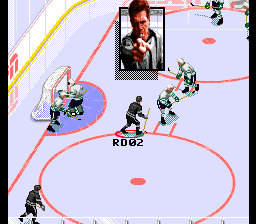
Skating: Use the Control Pad to control the direction of the player.
•
Shooting: Wrist Shots are performed by pressing the "Shoot" button quickly and releasing it. Slap Shots are performed by a long press and release of the Shoot button. Aiming is determined by the direction of the Control Pad when the Shoot button is released.
•
Passing: Press your Pass button to pass the puck to your nearest teammate in the direction you are facing. If you do not have a teammate in a 60° wedge (centered on the Control Pad direction chosen), then the puck sails off to nobody. As soon as the puck is passed, control switches to the player it is passed to.
•
Speed Burst: Perform speed bursts by pressing the appropriate button, provided your player is fairly fresh. Players tire quickly when they do a
.png)

.png)

.png)
.png)




.png)
.png)


_1.png)







.png)


.png)




