Data Screen
•
Hint: The computer will make suggestions for your next move. With experience, you may be able to outmaneuver the Chessmaster and come up with better moves of your own.
•
Captured Pieces Window: Displays all Black and White pieces captured during play.
Rules of the Game
The object of Chess is to attack and corner your opponent's King, leaving him no means of escape. This is called a "checkmate" and must be done without leaving your own King vulnerable to capture.
Your playing pieces are allowed to move as follows:
King
Moves one square at a time in any direction.
Queen
Moves any number of squares in any direction, as long as her path is not blocked.
Rook
Moves any number of squares vertically or horizontally, as long as its path is not blocked.
Knight
Jumps over other pieces and moves in an "L" pattern, one forward or backward and two to the left or right or two forward or backward and one to the left or right.
Bishop
Moves any number of squares diagonally, as long as its path is not blocked.
Pawn
Moves one or two squares on its first move. Thereafter, it moves forward (never backward) one square at a time.
Pawns are the only pieces that do not capture in their path of movement. They move forward, but capture diagonally.
Additional Moves
Castling
A defensive strategy in which you move your King two squares towards your Rook. The Rook will then move automatically one place next to the King towards the center of the board. In order to "Castle," neither the King nor the Rook may have moved previously.
En Passant
An offensive tactic in which a pawn capture is made when your opponent has moved his pawn two squares from the start position to pass your adjacent pawn and avoid capture. In this instance, you may capture the enemy pawn diagonally, as if it had moved one square instead of two.
If you do not exercise this option before making another move, the enemy pawn will be safe from En Passant ("in passing") capture.
Queening
If one of your pawns reaches the eighth row, you may promote it to a queen by pressing SELECT. This is called Queening.
Alternatively, you may use the A or B Button to cycle through all of the available pieces (Queen, Rook, Knight or Bishop). When you see the piece you want to promote your pawn to, press SELECT again.
Playing The New Chessmaster
The Chessmaster's default setting pits you against the computer. In this mode, you can begin play immediately. You will play White; the computer takes Black.
The Chessmaster will notify you if you have attempted an illegal move. For example, you will not be allowed to make a non-defensive move if your King is vulnerable to capture ("in check").
When the Chessmaster is "thinking," the Hand will turn into a Light Bulb.
Beginners may wish to select the Teaching Mode within the Settings Menu. This mode displays all legal moves for any piece you pick up.
If you wish to change any of the default settings before starting a game, press SELECT to get to the Actions and Settings Menus. Use the Control Pad to move the arrow to the desired selection and press the A Button to make your choice. You will automatically be returned to the Chessboard Screen.
For menu options that offer multiple choices, use the A Button to make your selection, then press SELECT to resume play.
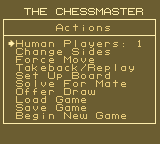
The Actions Menu
Human Players
•
Choose 0 to watch the computer play against itself.
•
Choose 1 to play against the computer.
•
Choose 2 to play against a friend.
Change Sides
Lets you take the Black side instead of White when playing against the computer.
Force Move
Lets you force the Chessmaster to move immediately, while it is thinking.
Takeback/Replay
•
Press the B Button to take back any or all of your previous moves.
•
Press the A Button to replay a move.
•
Press SELECT to terminate this option and return to regular play.
•
Note: While in this mode, the Hand will change to a circled T/R symbol.
Set Up Board
Lets you arrange the pieces on the board. The Chessboard will be displayed with a set of pieces (the "grab bag") along the outer edges of the board.
To remove a piece from the board, use the Control Pad to position the Hand over the piece, press the A button to pick up the piece, move the piece off the board and release it by pressing the A Button again. To add a piece to the board, pick up a piece from the grab bag and drop it over the desired square.
Note: There are restrictions as to how the board can be set up. A pawn may not be placed on rows 1 or 8. Also, the number of Queens, Rooks, Knights or Bishops that may be placed on the board depends on the number of missing pawns.
While in Set Up mode, you can access the Set Up Menu by pressing SELECT. To exit the Set Up Menu, press SELECT again. The following options are available from the Set Up Menu:
•
Clear the Board: Clears the board of all pieces except the Kings.
•
Initial Position: Places the pieces in position for a new game.
•
First Move White/Black: Indicates whose turn it will be when you return to the game. Activate this selection to switch between Black and White.
•
Set Up Complete: Returns you to the game.
.png)

 (Europe).png)
.png)
.png)
